Network Tokenization Overview
What is Network Tokenization?
Network tokenization is a type of payment card tokenization offered by the payment card networks—Visa, Mastercard, American Express, etc. —that replaces primary account numbers (PANs) and other card details with a token issued by the card brand.
Network tokenization ensures that a token is used throughout the payments ecosystem by removing the need for merchants or third-party providers to expose themselves to the risk of handling the raw PAN and other sensitive cardholder data.
A network token is a 16 digit numeric value (a.k.a. a DPAN, Payment token, or EMV token). A network token also contains a lot of other information about the physical card, the issuing bank, and metadata about the PAN.
What are the benefits of Network Tokenization?
Because network tokenization removes the need for sensitive cardholder data to enter the payments ecosystem, it significantly reduces the risk of payment card fraud and data theft. As a result, it can help decrease declines, chargebacks, and interchange fees. In fact, in some instances, it can even shift the liability for chargebacks from the merchant to the issuer.
The financial impact of these benefits is substantial, especially for enterprise organizations with high volumes of transactions. Think about it—even a marginal decrease in interchange fees and declines can have a huge impact when applied across to board to thousands—or even millions—of monthly transactions.
Additionally, because the card networks are issuing the tokens, card details can be updated automatically by the card brands when changes occur. This ensures card data is always up-to-date for all payment cards on file, both improving the user experience and increasing authorization rates by preventing declines due to card expiration, loss, or theft. One Visanet study conducted in 2019 shows that transacting with network tokens provides an average 3.2% authorization lift over using raw PANs for card-not-present transactions and reduce occurrences of fraud by nearly 30%.
Users also can enjoy features such as the ability to view digital card art when selecting a payment type for a given transaction and to use digital wallets and mobile payments where supported. Using network tokens can also enable merchants to implement secure remote commerce (SRC) checkout experiences.
How does TokenEx provide Network Tokenization Services?
TokenEx provides network tokenization services as an On-Behalf-Of Token Requestor (OBOTR) which enables merchants, acquirers, and payment service providers to integrate with global Token Service Providers ("TSPs") using a single, unified API. TokenEx generated tokens will also be used to serve as a reference to the PAN and to a network token if a network token can be provisioned for the PAN. In addition, the TokenEx token acts as a fail-safe PCI token if the Tokenize request is declined by global TSPs. Since not all card issuer and payment gateways support network tokens, using the TokenEx token as a reference to the PAN and network token protects the client from PCI DSS scope in the event a network token cannot be provisioned for a PAN or used in a transaction.
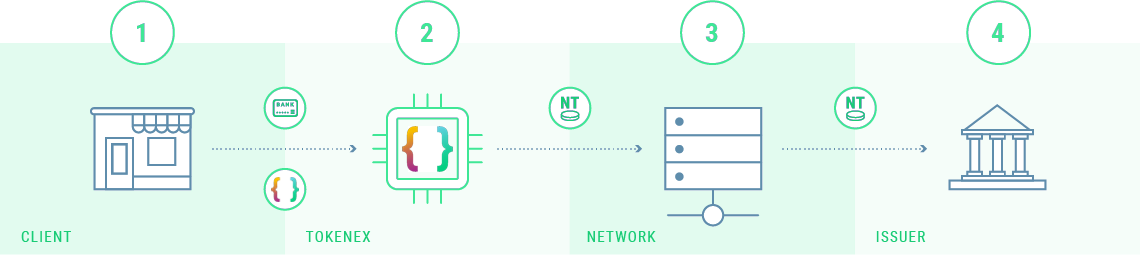
- Client sends TokenEx a PAN or TokenEx token in a request for a network token.
- TokenEx generates the request for a network token and passes it to the card network.
- The card network sends the network token request to the card issuer.
- The card issuer provisions the network token, which is then returned to the client via TokenEx.
Getting enabled for network tokenization
To use network tokenization, contact your Relationship Manager or open a ticket with our Support Team in the IXOPAY Customer Experience Portal. We will provision your account in the TokenEx test environment so you can run the Network Tokenization Test Cases, and then enable production for the card networks you accept (Visa, Mastercard, American Express).
Network Token API
This API supports the provisioning and management of Visa, Mastercard, and American Express issued tokens. This API can also retrieve a cryptogram, an authentication value issuers use for customer-initiated transactions (CIT). Cryptogram generation is supported for Visa only. For Mastercard and American Express, request a token bundle instead. The API can also delete network tokens and fetch card assets such as card images and issuer icons.
Documentation can be found here.
Provisioning a Network Token
The network tokenize method requests a network token to be provisioned for the primary account number (PAN). You will need to provide your TokenEx ID and authorized API key, the PAN or an existing TokenEx token, and the desired TokenEx token scheme if the PAN is used.
If tokenization is approved, the response returns a tokenReferenceId that TokenEx will store.
The paymentBundle.bundleElements array contains the network token value (TOKEN) and its expiration date (TOKEN_EXP)
(TokenEx will store these values in relation to your TokenEx token).
The tokenState in the response is the state reported by the token provider.
If provisioning does not result in an active token, the response returns statusCode 9100, a tokenizationDecision of DECLINED, and an error describing the reason.
The Token State Change Notification webhook or the
GetStatus method can be used to track the latest state.
Notes about the Response Data
The paymentAccountReference (i.e. PAR) is returned in the response. This value is an ID for the PAN and is consistent globally.
Thus, if you have a network token provisioned from Apple Pay (DPAN),
and a network token provisioned by TokenEx’s network token API that both refer to the same PAN,
the network token values will be different.
However, you can expect the PAR to be equivalent for each network token representing the same underlying PAN.
Additionally, metadata about the card, information about the issuing bank, and card assets are returned in the tokenize response. Card assets are MIME types and are represented by a GUID in the response. These GUIDs can be used to retrieve the asset from the Get Asset method.
State of a Network Token
Network tokens are stateful, and the card issuer owns each token.
The issuer sets a token's status, for example by suspending it, and TokenEx reports the state the token provider returns in the tokenState field, passed through unchanged.
Because the issuer controls the status, do not rely on a fixed list of states in your code.
There are three ways to know the state of a token:
- At creation. The Tokenize response returns the token's state. Confirm that it is
ACTIVE, which means the token can be used for transactions. - On demand. Use the GetStatus method to check the current state of a token whenever you need it.
- Automatically. Subscribe to the Token State Change Notification webhook, and TokenEx notifies you whenever the issuer changes the state of a token.
The only status change you can make yourself is to delete a token, using the Lifecycle Management method below. You should delete tokens when your customer churns.
A network token can be in any of the following states.
Note: CONSUMED is not used by default
| Status | Description |
|---|---|
| ACTIVE | The network token has been issued and is not expired. An active token can be used to initiate transactions. |
| INACTIVE | The network token has been issued and is expired. An inactive token cannot be used to initiate transactions. |
| SUSPENDED | The network token has been issued and suspended by the issuer. A suspended token cannot be used to initiate transactions. You cannot suspend a token yourself. |
| DELETED | The network token was issued and has since been deleted. |
| CONSUMED | The network token was issued and has exceeded its allowable uses. |
Network Token Lifecycle Management
The Lifecycle Management method deletes a network token (DELETE_TOKEN).
Delete is the only status change available to you. Suspending and resuming a token are not supported and return an error.
To check the current state of a token, see the GetStatus method.
Card Metadata Updates
Network tokens are automatically kept current by the card brands. Since the issuing bank is involved in the provisioning of a network token, the network token and PAN mapping can be updated without changing the network token value. Thus, when storing a network token on file, you can rely on that token to always be up-to-date. If some data about the card does change, you can use the Card Metadata Update Notification webhook to be notified immediately. To retrieve the latest, up-to-date metadata for the card, you can use the Get Card Metadata method.
How do I use Network Tokens within the Transparent Gateway API?
The Transparent Gateway API v2, is an API proxy that can be used to pass HTTPs requests containing TokenEx tokens to third-party APIs (i.e. payment gateways, loyalty providers, global distribution systems, etc.). The TGAPI can transparently connect to any third-party API to replace the TokenEx token within the request body with the PAN or a network token and network token expiry date.
To process a transaction using a network token, the Use Network Token Function should be invoked within a TGAPI request.
How do I test Network Tokenization?
You can begin testing network tokenization in the TokenEx Test environment once your account is provisioned. Test card numbers are published on the Network Tokenization Test Cases page. Before moving to production, you will need to perform and validate the Network Tokenization Test Cases, then ask your Relationship Manager or Support Team to enable production.