Customer Profiles
If you want to get access to all IXOPAY platform features you need to upgrade your plan. Please contact our Support Team in the IXOPAY Customer Experience Portal for more information.
Customer Profiles allow you to store and organize customer data and related payment instruments to create a smooth shopping experience. You access Customer Profiles through either the platform or using the Customer Profile API directly.
Customer Profile Containers
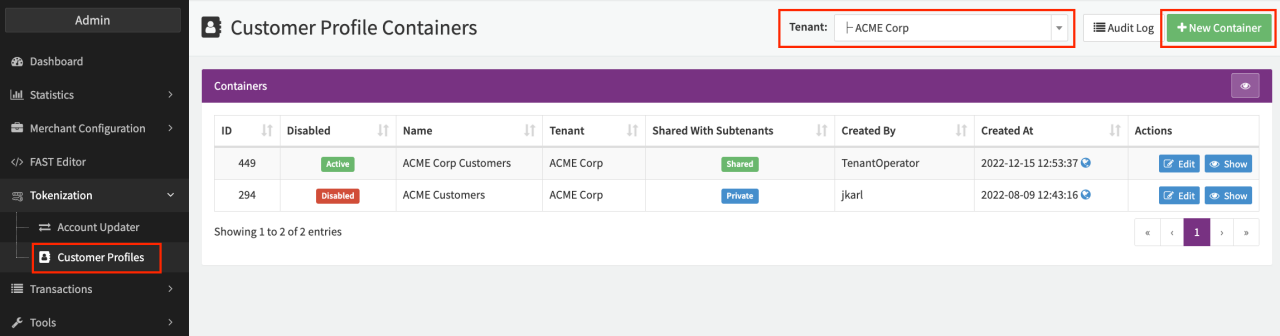
Customer Profiles are organized in so called Customer Profile Containers. Depending on your business model, contractual / legal setup or other requirements, it might make sense to create several containers to separate and categorize your customers. To create and edit Customer Profile Containers:
- Navigate to the Tokenization > Customer Profiles section.
- Select the (Sub-)Tenant you want to create or edit a Customer Profile Container for.
- Click + New Container.
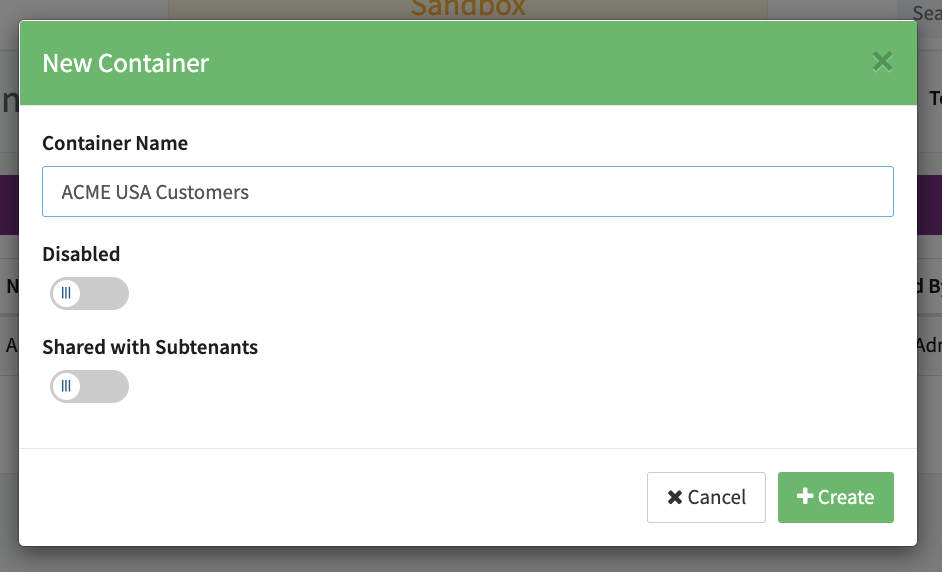
- Enter a Container Name.
- Enable the option Shared with Subtenants if you want to share Customer Profiles among different Sub-Tenants (see New Container).
- By default, Customer Profile Containers are enabled. Enable the option Disabled to disable Customer Profile Containers.
- Click + Create.
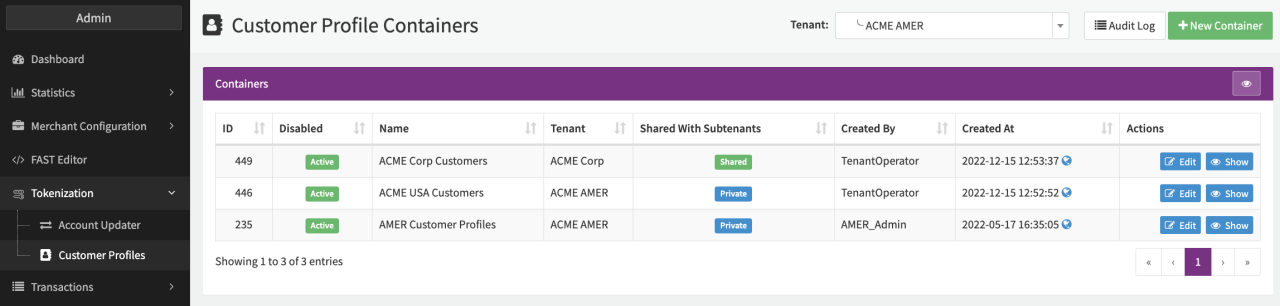
The Container will appear in the Customer Profile Container Overview and can be edited at any time by clicking edit. You can also access the Customer Profiles stored in the Container by clicking show (see Customer Profiles).
Assign Customer Profile Container
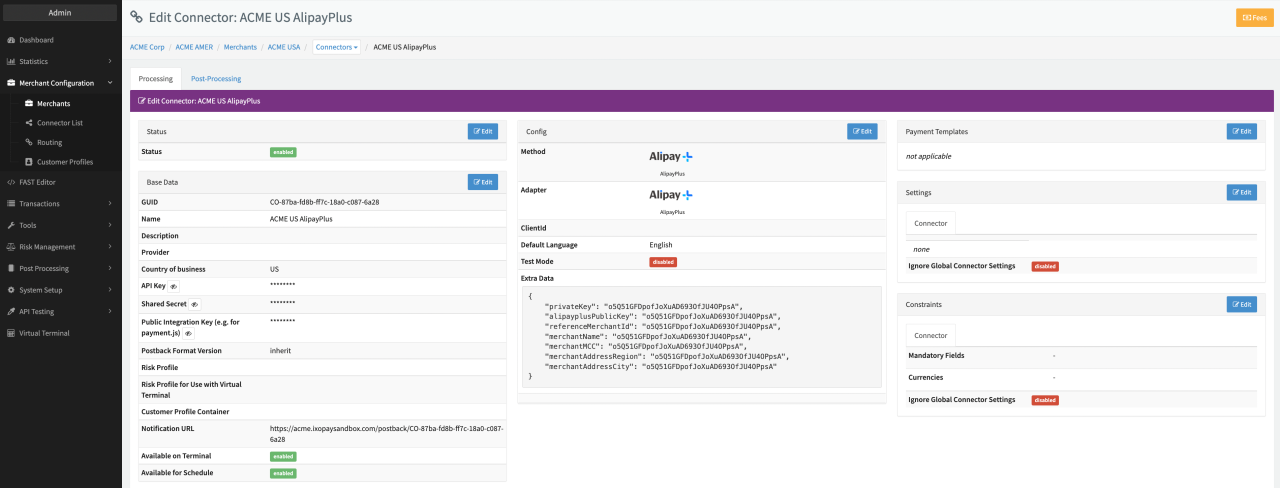
In order to store customer profiles in a container, you need to assign the Customer Profile Container to a Connector.
Any successful Register Transaction or Debit / Preauthorize
Transaction with the withRegister flag set to true processed by this Connector will automatically add the customer data
and used payment instrument for subsequent charges as a Customer Profile in this container if a customerIdentification
is provided (see also Creating a customer profile).
You can assign a Customer Profile Container either in the Connector Base Data (see Connector Details Overview) or using Global Settings.
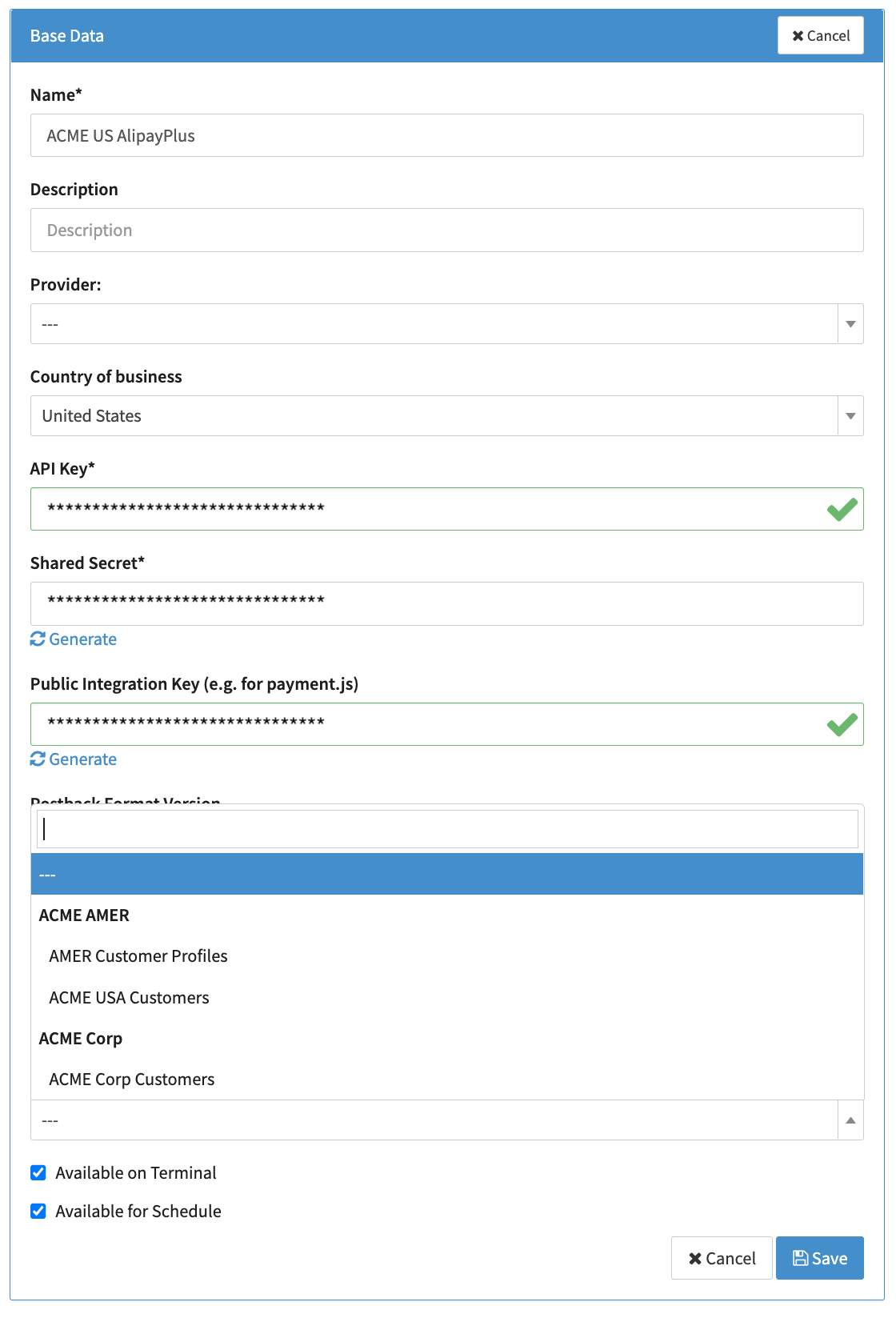
If your setup uses Multi-Method Connectors make sure you also assign the Customer Profile Container there.
Viewing Customer Profiles
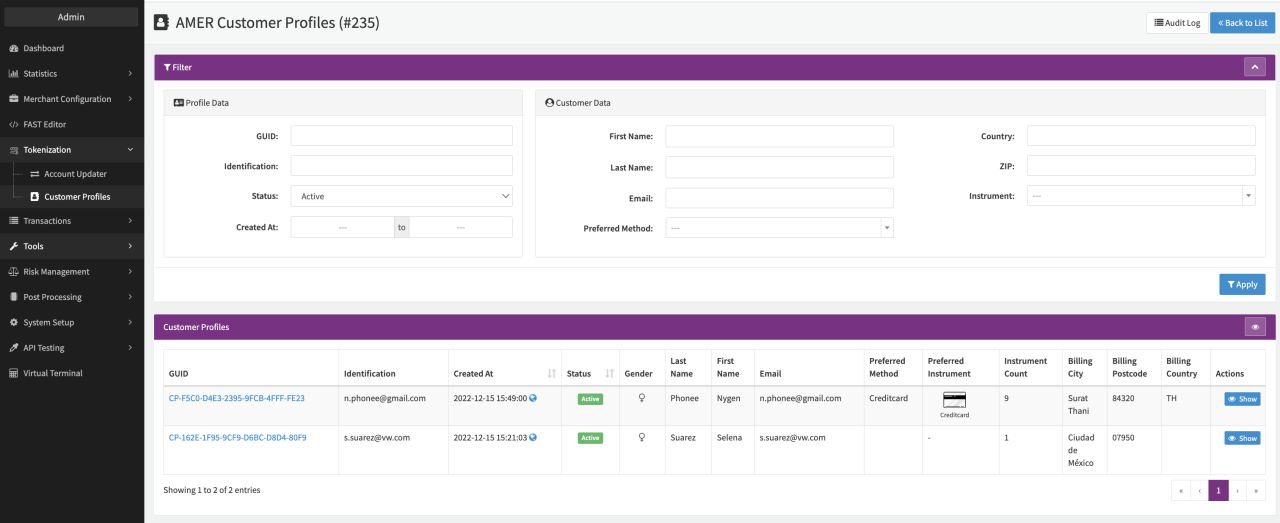
To access the individual profiles stored in a container, navigate to the Customer Profile Container Overview and click Show for the individual container.
You will be presented with an overview of all Customer Profiles (Profile List) in this container including options to filter by Profile Data or Customer Data. Click Show for the individual profile to see more details (stored payment instruments, transaction history, customer data etc.).
Customer Profile Details
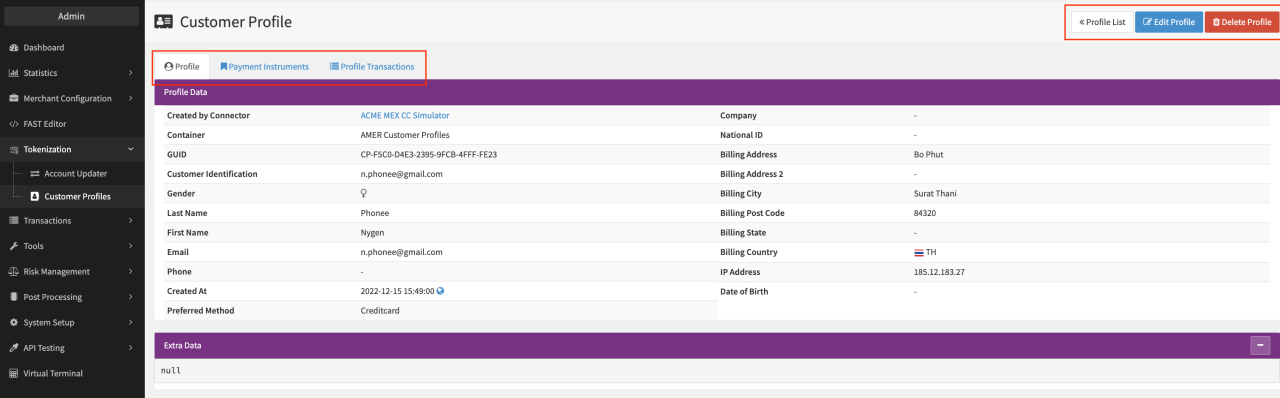
Each Customer Profile contains different tabs containing details about
- Profile Data
- Payment Instruments
- Profile Transactions
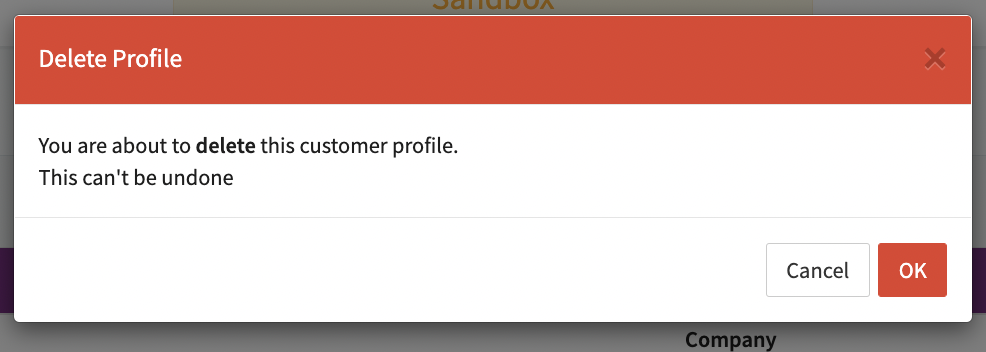
There are also Action Buttons used to navigate back to the Profile List, Edit Profile (Data) or Delete Profile.
Profile Data
This tab contains base data about the Profile such as Customer data (e.g. personal data, billing data), the Connector used to create the Customer Profile, Customer Profile GUID, and Customer Identification, as well as the Preferred method (see also Payment Instruments). The section Extra Data can be used to store any additional data.
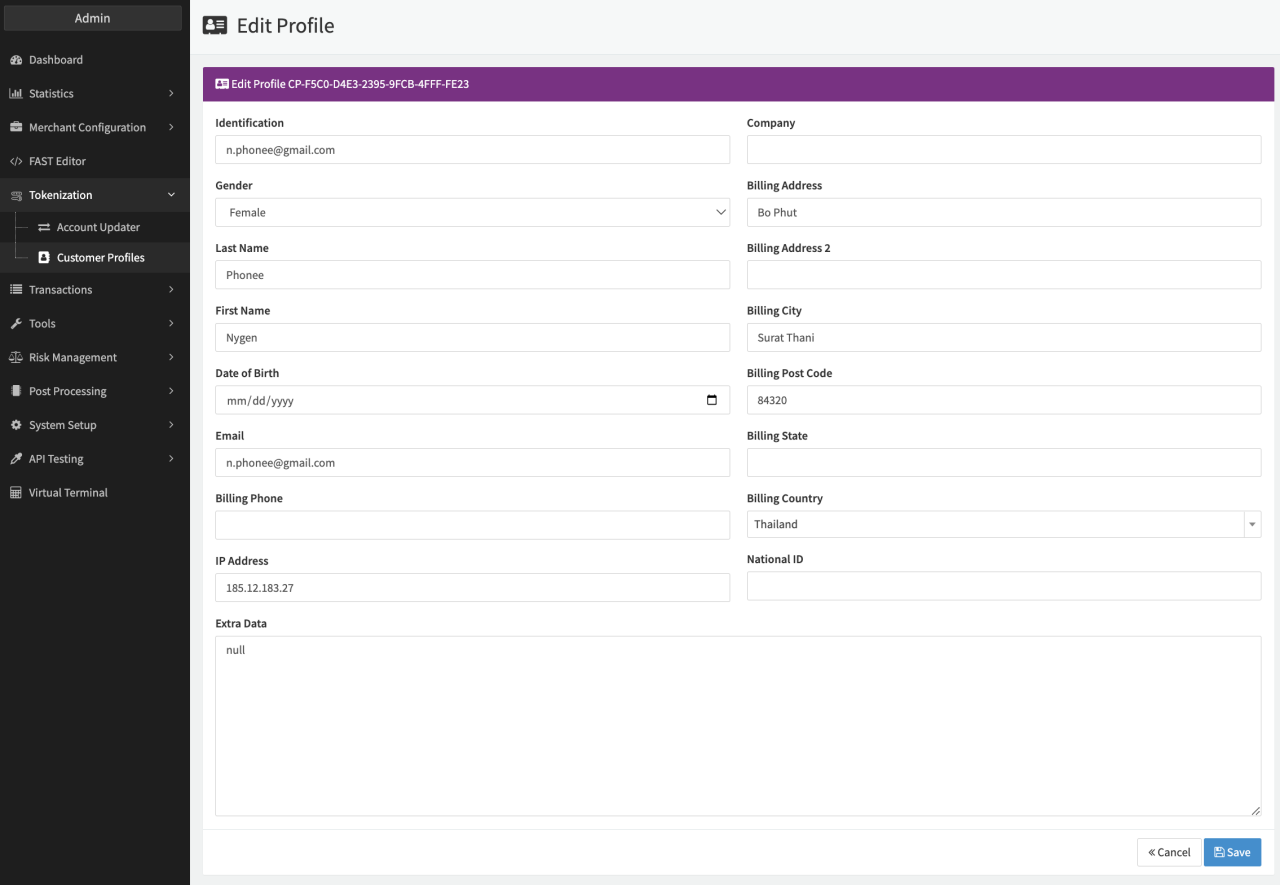
To add additional data to the customer profile, either the Customer Profile GUID or Customer Identification must be provided.
Payment Instruments
This tab contains all payment instruments stored by the customer, categorized into one of the following categories:
- Credit Cards (including ApplePay & GooglePay)
- IBAN
- Others — any payment instrument not falling into a previous category
There are also Action Buttons for each payment instrument (see Customer Payment Instruments):
- Set Preferred — each customer can have one preferred payment instrument which will be marked as preferred for usage later on (e.g. to design hosted payment page for Multi-Method Connectors).
- Detach — to detach the payment instrument from the Customer Profile (payment instrument will still be stored — additional costs may apply).
- Deregister & Detach — to detach the payment instrument form the Customer Profile and deregister the payment instrument all together.
- Transaction — link to the Transaction Details creating the stored payment instrument element in the Customer Profile.
Depending on the category, you will see different information for each payment instrument (e.g. Account Updater Status, IBAN, BIC, Mandate ID, First 6 / Last 4 Digits, Expiry Date). For each payment instrument, the Payment Token is shown and can be used as the transactionToken to initiate subsequent transactions (see Customer Profile API).
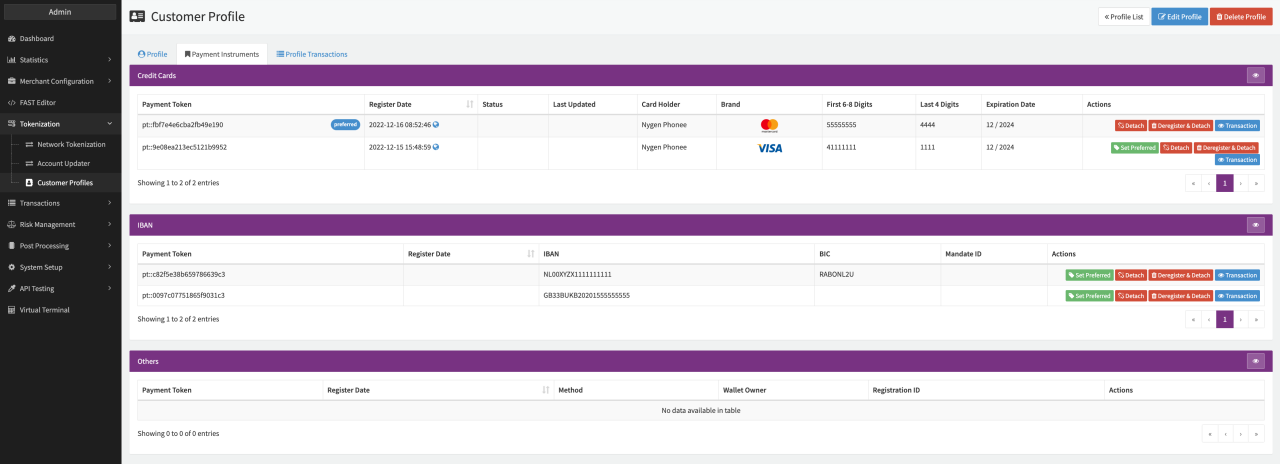
Setting a payment instrument as preferred can be done in the Transaction creating the stored payment instrument element in the Customer Profile (handled using the markAsPreferred flag in the CustomerProfileData object in the transaction request, see Customer Profile API) or using the Action Button Set Preferred in the Customer Profile itself. The current preferred payment instrument is labeled as preferred.
Setting up the Hosted Payment Page with Customer Profiles
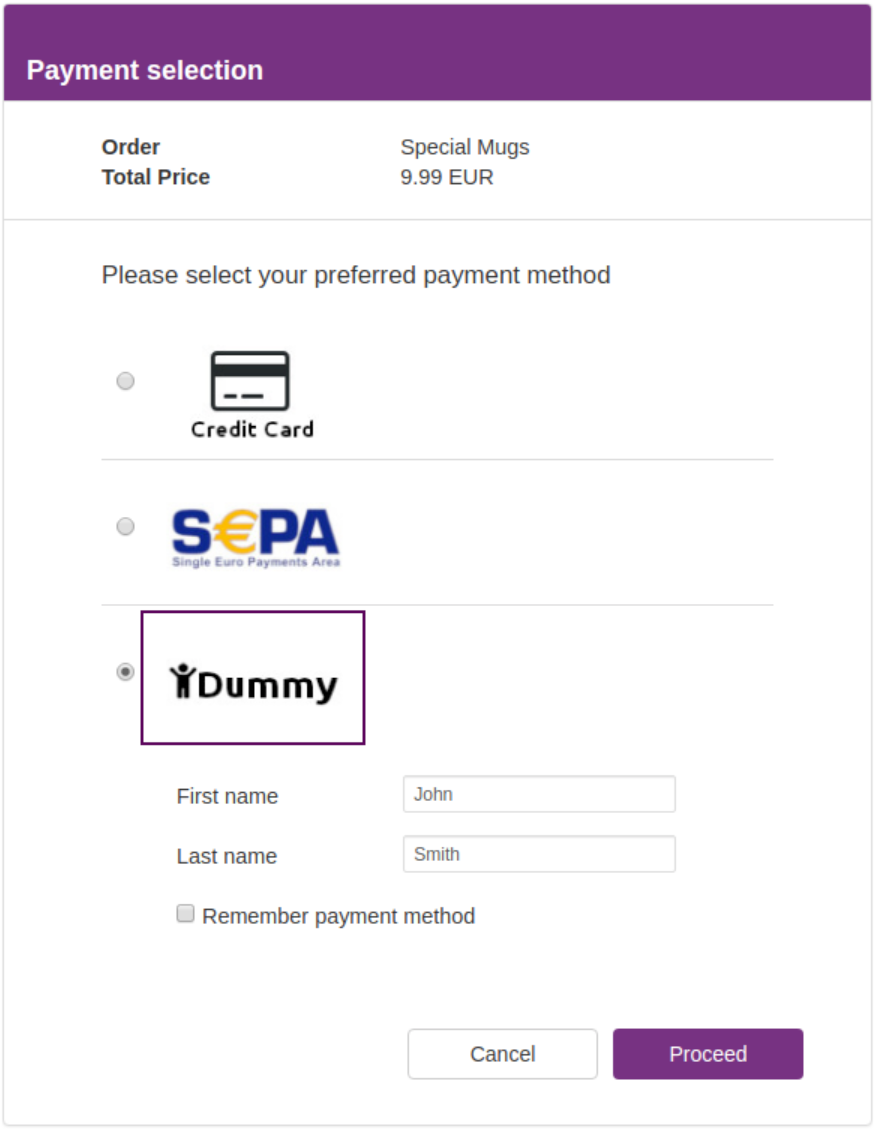
Please refer to the Multi-Method Connector and Payment Selection Template sections for details on how to create a Multi-Method Connector and to set up of Payment Selection (hosted payment) pages.
If the customerIdentification or customerGUID parameter is sent within the request to a Multi-Method Connector, the following parameters are available for use within template (see Fast Editor and Payment Selection Template):
- UserPreferredPaymentInstrument — containing the Payment Token value of the preferred instrument
(e.g.
pt::b639e636df17af782602) - withRegister — true or false
- customerProfileEnabled – true or false
- paymentMethods – associative array containing all stored payment instruments grouped by the payment method starting with the preferred method (if set)
The basic structure of each payment method contains general information about the payment method:
[
  methodIdentifier => [
    identifier => Identifier
    apiIdentifier => API-Identifier
    name => name
    canRegister => true/false
    info => [
      ...
    ]
    publicKey => abcd
    selected => true*
  ]
]
selected => true is only set for the payment method set as Remember.
[
  [
    cardHolder => Alex Smith
    number => xxxxxxxxxxxx1111
    expiryDate => 10/2031
    firstSix => 411111
    lastFour => 1111
    cardType => visa
    ptToken => pt::b639e636df17af782602
  ],
  [
    cardHolder => Jordan Jones
    number => …
    ...
  ]
]
To ensure that sensitive details like credit card numbers and bank account numbers are not handled by merchants directly, the IXOPAY platform's payments.js library renders separate iFrames for details such as the credit card number and CVV. Data entered in these fields is then sent to the IXOPAY platform vault directly, where it is tokenized. (see API documentation)
[
  [
    iban => ATxxxxxxxxxxxx11
    bic => xxxx
    ptToken => pt::b639e636df17af782602
  ],
  [
    iban => ATxxxxxxxxxxxx11
    bic => …
    …
  ]
]
[
  [
    name => dummy
    ptToken => pt::b639e636df17af782602
  ],
  [
    name => dummy
    ptToken => pt::b639e636df17af782602
  ],
  ...
]
Flags
Within the transaction request, you can then set the following flags:
- doRegister — to store the payment instrument
- rememberMethod — to save the selected payment method as "last used payment method"
- setAsPreferredInstrument — to store and set the payment instrument as preferred as well as save the payment method as "last used payment method"
<input type="checkbox" name="rememberMethod" />
<input type="checkbox" name="doRegister" />
<input type="checkbox" name="setAsPreferredInstrument" />
Example template
<script data-main="payment-js" src="https://sandbox.ixopay.com/js/integrated/payment.1.2.min.js"></script>
<details rel="stylesheet" href="https://maxcdn.bootstrapcdn.com/bootstrap/3.3.7/css/bootstrap.min.css" integrity="sha384-BVYiiSIFeK1dGmJRAkycuHAHRg32OmUcww7on3RYdg4Va+PmSTsz/K68vbdEjh4u" crossorigin="anonymous">
<style>
:root {
--primary-color: #5e045e;
--primary-color-rgb: 94,4,94;
--secondary-color: #7E047E;
--tertiary-color: #4C044C;
--error-color: #d00;
}
html{
overflow-y: scroll;
}
body{
font-size: 12px;
}
#Container{
display: block;
width: 600px;
margin: 0 auto;
background-color: white;
padding: 10px;
height: 100%;
min-height: 100%;
}
h1{
font-size: 1.2em;
margin: 0;
padding-top: 25px;
color: white;
font-weight: bold;
}
h2{
font-size: 1.4em;
font-weight: normal;
margin: 0px 0px 0px 15px;
padding-top: 10px;
padding-bottom: 20px;
}
h2.pt{
padding-top: 20px;
}
h3{
font-size: 1.1em;
font-weight: bold;
}
.payment-form{
padding-left: 0px;
}
.payment-form h2{
margin: 0px;
}
.th{
font-weight: bold;
}
.payment-method {
cursor: pointer;
}
.payment-method img{
/* set size of images */
/*max-width: 100%;*/
width: 150px;
height: 90px;
border: transparent solid 2px;
}
.payment-method.method-selected img{
border: var(--primary-color) solid 2px;
}
.payment-method:hover img{
border: var(--secondary-color) solid 2px;
}
.payment-method-trigger{
margin-left: 10px;
}
.stored-payment-container .payment-method-trigger{
margin-left: 20px;
clear: both;
}
.stored-payment-container .payment-method-data{
margin-left: 20px;
display: table;
opacity: 0.6;
cursor: pointer;
}
.stored-payment-container .payment-method-trigger:hover .payment-method-data,
.stored-payment-container .payment-method-data.selected {
opacity: 1 !important;
}
.stored-payment-container .payment-method-data img,
.stored-payment-container .payment-method-data input[type=radio],
.stored-payment-container .payment-method-data div
{
display: table-cell;
vertical-align: middle;
}
.stored-payment-container .payment-method-data img{
width: 50px;
height: auto;
}
.stored-payment-container .payment-method-data input[type=radio]{
margin-top: 10px;
margin-right: 8px;
padding-right: 15px;
}
.stored-payment-container .payment-method-data div{
padding: 3px 2px;
}
.stored-payment-container .payment-method-data.selected .p-data{
border: 2px solid rgba(var(--primary-color-rgb), 0.5);
padding: 2px;
}
.stored-payment-container .payment-method-data .p-data{
padding: 4px;
}
.stored-payment-container .payment-method-data span{
display: block;
color: dimgrey;
font-size: 15px;
line-height: 15px;
padding: 2px 6px;
}
.setNewPreferredInstrumentContainer{
margin-left: 65px;
margin-top: 10px;
display: none;
}
label{
font-size: 1em;
font-weight: normal;
margin-top: 4px;
margin-bottom: 0px;
}
div.info{
color: var(--error-color);
display: none;
margin-left: 17px;
}
hr{
margin-top: 3px;
margin-bottom: 3px;
border-top-color: #dddddd;
}
.btn{
margin: 5px 10px 10px 0px;
}
#proceed-btn,
#togglePaymentMethods {
background-color: var(--secondary-color);
color: white;
}
#togglePaymentMethods{
width: 264px;
}
/* bootstrap overwrite */
.panel-heading{
font-size: 15px;
font-weight: bold;
}
.panel-body{
font-size: 1.2em;
}
.panel-default>.panel-heading{
/* INSERT OPTIONAL LOGO HERE */
background: var(--primary-color) url("<?= getStaticLink('/img/logo.svg'); ?>") no-repeat top right;
background-size: 100px auto;
}
.form-control{
height: 25px;
padding: 5px 6px;
border-radius: 2px;
font-size: 12px;
border-color: #dddddd;
}
.container-fluid{
padding: 5px 50px 20px 50px;
}
.container-fluid:first-child{
padding-top: 5px;
padding-bottom: 0px;
}
/* errors */
.error-block{
display: none;
font-size: 0.9em;
color: #a94442;
}
.has-error .error-block{
display: block;
}
.has-error [id^='number_div_']{
border: #a94442 solid 1px;
}
</style>
<!-- set which fields you want to appear for ALL payment methods (aside from mandatory fields which should be defined on each connector -->
{% set forceFields = ["firstName", "lastName"] %}
<body>
<div id="Container">
<div class="panel panel-default">
<div class="panel-heading main">
<h1>Payment selection</h1>
</div>
<!-- TRANSACTION INFORMATION -->
<div class="panel-body">
<div class="Container-fluid">
<div class="row">
<div class="col-md-5 th">Order</div>
<div class="col-md-7">{{ data.transaction.description }}</div>
</div>
<div class="row">
<div class="col-md-5 th">Total Price</div>
<div class="col-md-7">{{ data.transaction.amount }} {{ data.transaction.currency }}</div>
</div>
{% if data.transaction.testMode %}
<div class="row">
<div class="col-md-12" style="color: red;">Test mode ENABLED</div>
</div>
{% endif %}
</div>
</div>
<hr/>
{% if userPaymentInstruments|length > 0 %}
<!-- STORED PAYMENT METHODS -->
<div class="Container-fluid stored-payment-Container {% if not userPaymentInstruments|length > 0 %}hidden{% endif %}">
<h2 class="pt">Your stored payment instruments</h2>
<!-- loops through enabled payment methods -->
{% for type, paymentInstrumentsOfType in userPaymentInstruments %}
{% for paymentInstrument in paymentInstrumentsOfType %}
<div class="payment-method-trigger">
<div class="payment-method-data {% if paymentInstrument.ptToken == UserPreferredPaymentInstrument %}selected{% endif %}">
<div>
<input type="radio" {% if paymentInstrument.ptToken == UserPreferredPaymentInstrument %}class="preferredInstrument" checked{% endif %}/>
</div>
<div class="p-data">
{% if type == 'Creditcard' %}
<div>
<img src="<?= getStaticLink('/img/generic/card.png'); ?>" />
</div>
<div>
<span>{{ paymentInstrument.cardHolder }}</span>
<span>{{ paymentInstrument.number }}</span>
</div>
<div>
<span>{{ paymentInstrument.expiryDate }}</span>
</div>
{% elseif type == 'DirectDebit' %}
<div>
<img src="<?= getStaticLink('/img/generic/bank.png'); ?>" />
</div>
<div>
<span>{{ paymentInstrument.iban }}</span>
<span>{{ paymentInstrument.bic }}</span>
</div>
{% else %}
<div>
{# insert information regarding the stored payment instrument here #}
<span>{{ type }}</span>
</div>
{% endif %}
<input type="hidden" class="ptToken" name="ptToken" value="{{ paymentInstrument.ptToken }}" />
<input type="hidden" name="paymentMethod" value="{{ type }}" />
</div>
</div>
</div>
{% endfor %}
{% endfor %}
<div class="setNewPreferredInstrumentContainer">
<input type="checkbox" name="setAsPreferredInstrument" id="setNewPreferredInstrument" /> <label for="setNewPreferredInstrument">Set as preferred payment instrument</label>
</div>
</div><!-- stored payments end -->
<div class="Container-fluid" style="padding-bottom: 0px;">
<div class="row">
<button type="button" id="togglePaymentMethods" class="btn pull-right">
Choose a different payment method
</button>
</div>
</div>
{% endif %}{# paymentinstruments > 0 #}
<!-- PAYMENT SELECTION -->
<div class="'Container-fluid payment-selection-Container" {% if userPaymentInstruments|length > 0 %}style="display: none;"{% endif %}>
<h2 class="pt">Please select your preferred payment method</h2>
<!-- loops through enabled payment methods set on the metaconnector -->
{% for m in paymentMethods %}
<div class="payment-method col-md-12 {% if m.selected %}method-selected{% endif %}" data-method="{{ m.identifier }}">
<div class="payment-method-trigger">
<input type="radio" name="method-select" {% if m.selected %}checked{% endif %}/>
{% set method = m.name|lower %}
<!--
for each method add an appropriate image (CDE static folder)
to set the image size, see css: .payment-method img
-->
{% if method == "bitcoin" %}
<img src="<?= getStaticLink('/img/paymentmethods/bitcoin.jpg'); ?>" alt="{{ m.name }}"/>
{% elseif method == "creditcard" %}
<img src="<?= getStaticLink('/img/paymentmethods/creditcard.jpg'); ?>" alt="{{ m.name }}"/>
{% elseif method == "DirectDebit" %}
<img src="<?= getStaticLink('/img/paymentmethods/directdebit.jpg'); ?>" alt="{{ m.name }}"/>
{% elseif method == "dummy" %}
<img src="<?= getStaticLink('/img/paymentmethods/dummy.jpg'); ?>" alt="{{ m.name }}"/>
{% elseif method == "eps" %}
<img src="<?= getStaticLink('/img/paymentmethods/eps.jpg'); ?>" alt="{{ m.name }}"/>
{% elseif method == "paysafecard" %}
<img src="<?= getStaticLink('/img/paymentmethods/paysafecard.jpg'); ?>" alt="{{ m.name }}"/>
{% else %}
<h3>{{ m.name }}</h3>
{% endif %}
</div>
<!-- payment form -->
<div class="panel-body payment-form" id="payment-form-{{ m.identifier }}" style="display: {% if m.selected %}block{% else %}none{% endif %};" data-method="{{ m.identifier}}" data-apimethod="{{ m.apiIdentifier }}">
<input type="hidden" name="paymentMethod" value="{{ m.identifier }}" />
<div class="Container-fluid">
<!-- fields which were set as mandatory on the connector, or are defined in variable "forceFields" will be displayed here -->
{% for f in fields %}
{% set mandatory = (f.name in m.fields ? 1 : 0) %}
{% if f.name in forceFields or mandatory %}
{% if f.type == "text" %}
<div class="form-group row">
<label for="{{ f.id }}" class="col-md-5 col-form-label">{{ f.label }}{{ mandatory ? "*" : ""}}</label>
<div class="col-md-7">
<input type="text" name="{{ f.name }}" id="{{ f.id }}" value="{{ f.value }}" class="form-control {{ mandatory ? "mandatory" : ""}}"/>
</div>
<span class="col-md-7 col-md-offset-5 error-block"></span>
</div>
{% elseif f.type == "select" %}
<div class="form-group row">
<label for="{{ f.id }}" class="col-md-5 col-form-label">{{ f.label }}{{ mandatory ? "*" : ""}}</label>
<div class="col-md-7">
<select name="{{ f.name }}" id="{{ f.id }}">
{% if not mandatory %}
<option value="">---</option>
{% endif %}
{% for k,v in f.options %}
<option value="{{ k }}" {{ f.value == k ? "selected='selected'" : '' }}>{{ v }}</option>
{% endfor %}
</select>
</div>
</div>
{% endif %}
{% endif %}
{% endfor %}
{% if m.apiIdentifier == 'Creditcard' %}
<h3>
Creditcard information
</h3>
<input type="hidden" name="publicKey" value="{{ m.publicKey }}" />
<input type="hidden" name="{{ fields.cardToken.name }}" id="{{ fields.cardToken.id }}" value="" />
<div class="form-group row">
<label for="{{ fields.cardHolder.id }}" class="col-md-5 col-form-label">Cardholder</label>
<div class="col-md-7">
<input type="text" name="{{ fields.cardHolder.name }}" id="{{ fields.cardHolder.id }}" value="{{ fields.cardHolder.value }}" class="form-control"/>
</div>
<span class="col-md-7 col-md-offset-5 error-block"></span>
</div>
<div class="form-group row">
<label class="col-md-5 col-form-label">Card number</label>
<div class="col-md-7">
<div id="number_div_{{ m.identifier }}" style="height: 23px; width: 100%;"></div>
</div>
<span class="col-md-7 col-md-offset-5 error-block"></span>
</div>
<div class="form-group row">
<label for="{{ fields.expiry.id }}" class="col-md-5 col-form-label">Expiry date</label>
<div class="col-md-4">
<select name="{{ fields.expiry.name }}" id="{{ fields.expiry.id }}" class="form-control">
{% for k,v in fields.expiry.options %}
<option value="{{ k }}">{{ v }}</option>
{% endfor %}
</select>
</div>
</div>
<div class="form-group row">
<label class="col-md-5 col-form-label">CVV/CVC</label>
<div class="col-md-4">
<div id="cvv_div_{{ m.identifier }}" style="height: 25px; width: 100%;"></div>
</div>
</div>
{% elseif m.apiIdentifier == 'DirectDebit' %}
<h3>
Bank information
</h3>
<div class="form-group row">
<label for="{{ fields.iban.id }}" class="col-md-5 col-form-label">IBAN</label>
<div class="col-md-7">
<input type="text" name="{{ fields.iban.name }}" id="{{ fields.iban.id }}" class="form-control"/>
</div>
<span class="col-md-7 col-md-offset-5 error-block"></span>
</div>
<div class="form-group row">
<label for="{{ fields.bic.id }}" class="col-md-5 col-form-label">BIC</label>
<div class="col-md-7">
<input type="text" name="{{ fields.bic.name }}" id="{{ fields.bic.id }}" class="form-control"/>
</div>
<span class="col-md-7 col-md-offset-5 error-block"></span>
</div>
{% endif %}{# DirectDebit #}
{% if withRegister %}{# if withRegister flag is set, the payment instrument MUST be stored (for Recurring) #}
<div>
<input type="checkbox" name="setAsPreferredInstrument" class="setAsPreferredInstrument" id="setAsPreferredInstrument-{{ m.identifier }}" />
<label for="setAsPreferredInstrument-{{ m.identifier }}">Set as preferred payment instrument</label>
</div>
{% elseif m.canRegister is defined %}{# if method can do register #}
{% if m.canRegister %}{# can save the instrument? #}
<div>
<input type="checkbox" name="doRegister" class="doRegister" id="doRegister-{{ m.identifier }}" />
<label for="doRegister-{{ m.identifier }}">Save payment instrument</label>
</div>
<div class="info">Required if you want to set it as preferred</div>
{% if userPaymentInstruments|length > 0 %}{# if there are stored instruments, add option to set this as preferred #}
{# set instrument as preferred (and replace existing one) #}
<div>
<input type="checkbox" name="setAsPreferredInstrument" class="setAsPreferredInstrument" id="setAsPreferredInstrument-{{ m.identifier }}" /> <label for="setAsPreferredInstrument-{{ m.identifier }}">Set as preferred payment instrument</label>
</div>
{% endif %}
{% endif %}
{% endif %}
{% if not m.selected %}{# option to save payment method if not already default #}
<div>
<input type="checkbox" name="rememberMethod" class="rememberMethod" id="rememberMethod-{{ m.identifier }}" />
<label for="rememberMethod-{{ m.identifier }}">Remember payment method</label>
</div>
{% endif %}
</div><!-- Container fluid end -->
</div><!-- payment form end -->
{% if not loop.last %}
<hr/>
{% endif %}
</div>
{% endfor %}
</div><!-- payment selection end -->
<!-- FINISH BUTTONS -->
<div class="Container-fluid">
<div class="row">
</div>
<div class="row">
<button type="submit" name="pay" id="proceed-btn" value="submit" class="btn col-md-3 pull-right">
Proceed
</button>
<button type="button" name="{{ fields.cancel_btn.name }}" id="{{ fields.cancel_btn.id }}" value="cancel" class="btn btn-default col-md-3 pull-right" onclick="{{ fields.cancel_btn.onclick }}">
Cancel
</button>
</div>
</div>
</div>
</div>
</body>
<script type="text/javascript">
$(function() {
/**
* display form of corresponding payment method
*/
$('.payment-selection-Container .payment-method-trigger').on('click', function(evt) {
let selected = $(evt.target).parents('.payment-method');
let paymentMethod = selected.data('method');
$('.payment-form').slideUp();
if( $('#payment-form-'+paymentMethod+':hidden').length > 0 ){
$('#payment-form-'+paymentMethod).slideDown();
}
//mark selected img + radio
$('.method-selected').removeClass('method-selected');
selected.addClass('method-selected');
$('.method-selected').find('input[name="method-select"]').prop('checked', 'on');
});
/**
* mark selected (stored) payment instrument as active/selected
*/
$('.stored-payment-Container .payment-method-trigger').on('click', function(evt) {
let selected = $(evt.target).parents('.payment-method-trigger');
$('.payment-method-data.selected').removeClass('selected');
$('.payment-method-data input[type=radio]').removeAttr('checked');
selected.find('.payment-method-data').addClass('selected');
selected.find('input[type=radio]').prop('checked', 'on');
// show "set as preferred instrument"-checkbox IF selected is not the already preferred one
if( selected.find('input[type=radio].preferredInstrument').length ){
$('.setNewPreferredInstrumentContainer').slideUp();
} else{
$('.setNewPreferredInstrumentContainer').slideDown();
}
});
// initialize creditcard fields
let ccForm = $('.payment-form[data-apimethod="Creditcard"]');
if( ccForm.length ){
var publicKey = ccForm.find('input[name="publicKey"]').val();
var numberDivId = 'number_div_' + ccForm.data('method');
var cvvDivId = 'cvv_div_' + ccForm.data('method');
var paymentJs = new PaymentJs("1.2");
// style cc number and cvv field
paymentJs.init(publicKey, numberDivId, cvvDivId, function(payment) {
payment.setNumberStyle({ 'border': '#dddddd solid 1px', 'height': '100%', 'padding-left':'5px' });
payment.setCvvStyle({ 'border': '#dddddd solid 1px', 'height': '100%', 'padding-left':'5px'});
});
}
/**
* validate and tokenize creditcard
*
* @param callback
*/
function tokenized(callback) {
let expiry = ccForm.find('select[name="expiry"]').val();
let expiryParts = expiry.split('/');
let data = {
"cardHolder": ccForm.find('input[name="cardHolder"]').val()
};
data.month = expiryParts[0];
data.year = expiryParts[1];
paymentJs.tokenize(
data,
function (token, cardData) {
ccForm.find('input[name="cardToken"]').val(token);
callback(true);
},
function (errors) {
let visibleForm = $('.payment-form:visible');
$('.has-error').removeClass('has-error');
$.each(errors, function (index, ele) {
//map js error to actual form element
if (ele.attribute === "card_holder") {
visibleForm.find('#{{ fields.cardHolder.id }}').parents('.form-group').addClass('has-error');
visibleForm.find('#{{ fields.cardHolder.id }}').parents('.form-group').find('.error-block').text(ele.message);
} else if (ele.attribute === "number") {
visibleForm.find('[id^="number_div_"]').parents('.form-group').addClass('has-error');
visibleForm.find('[id^="number_div_"]').parents('.form-group').find('.error-block').text(ele.message);
}
});
callback(false);
}
);
}
/**
* callback
*/
function tokenizeFinished(success) {
if( success ){
// remove stored cardform
$('#storedCardForm').remove();
// remove other payment forms
$('.payment-form:hidden').remove();
// remove stored payment instruments form
$('.stored-payment-Container').remove();
$('#payment-form').get(0).submit();
} else {
return false;
}
}
/**
* submit
*/
$('#proceed-btn').on('click', function(ev) {
ev.preventDefault();
$('.has-error').removeClass('has-error');
// use stored payment instrument
if( $('.stored-payment-Container:visible').length ){
// remove irrelevant data and submit
let irrelevantData = $('.payment-method-data:not(.selected)');
irrelevantData.find('.ptToken').remove();
irrelevantData.find('input[name="paymentMethod"]').remove();
$('.payment-selection-Container').remove();
$('#payment-form').get(0).submit();
} else{
// use new payment instrument
//validate mandatory fields
let validMandatory = true;
$.each( $('.payment-form:visible .mandatory'), function(index, ele){
if( $(ele).val() === "" ){
$(ele).parents('.form-group').addClass('has-error');
$(ele).parents('.form-group').find('.error-block').text('This field is required');
validMandatory = false;
}
});
if( validMandatory ){
//for creditcards
if( $('.payment-form[data-apimethod="Creditcard"]:visible').length ){
// tokenize
tokenized( tokenizeFinished );
} else {
//submit for non-creditcards
$('.payment-form:hidden').remove();
$('.stored-payment-Container').remove();
$('#payment-form').get(0).submit();
}
}
}
});
/**
* toggle between stored payment instruments and new
*/
$('#togglePaymentMethods').on('click', function(ev) {
ev.preventDefault();
if( $('.stored-payment-Container:visible').length ){
$('.stored-payment-Container').slideUp();
$('.payment-selection-Container').slideDown();
$('#togglePaymentMethods').text('Select stored payment instrument');
} else{
$('.payment-selection-Container').slideUp();
$('.stored-payment-Container').slideDown();
$('#togglePaymentMethods').text('Choose a different payment method');
}
});
/**
* only payment instruments which are registered can be set as preferred
*/
$('.setAsPreferredInstrument').on('change', function(evt){
let setAsPreferredInstrumentCheckbox = $(evt.target);
let parent = setAsPreferredInstrumentCheckbox.closest('.payment-form');
// in order to set a preferred instrument, the instrument must be stored
if( setAsPreferredInstrumentCheckbox.prop('checked') ){
parent.find('.doRegister').prop('checked', 'on');
} else{
parent.find('.info').slideUp();
}
});
/**
* enforce "save payment instrument"-button when set as preferred is selected
*/
$('.doRegister').on('click', function(evt){
let savePaymentInstrumentCheckbox = $(evt.target);
let parent = savePaymentInstrumentCheckbox.closest('.payment-form');
if( parent.find('.setAsPreferredInstrument').prop('checked') && !savePaymentInstrumentCheckbox.prop('checked') ){
evt.preventDefault();
parent.find('.info').slideDown();
}
});
});
</script>
For the template rendering of payment methods you can either loop through paymentMethods or create an appropriate
handling for each paymentMethod.
Customer Profile data can be requested before transaction processing using the Get profile request against the Customer Profile API (e.g. to be included in the checkout page for customer confirmation). Merchants then must include this customer data in the actual transaction processing using the Payment Token, since profile data is not copied to subsequent transactions.