Roles
Video: How to Configure Roles and Add New Users

Here administrators have the possibility to define and set up a multitude of role permission schemes in order to assign them later to specific Users. (See System Set Up User)
This feature allow you to control the areas and permissions (edit, add, create, read only, etc.) each User has access to. In most of the cases, you will have one Admin role with full permissions and then other Users with less permissions (eg. for Users who will do only reporting and invoicing, for your Risk Management team, for technical Users...)
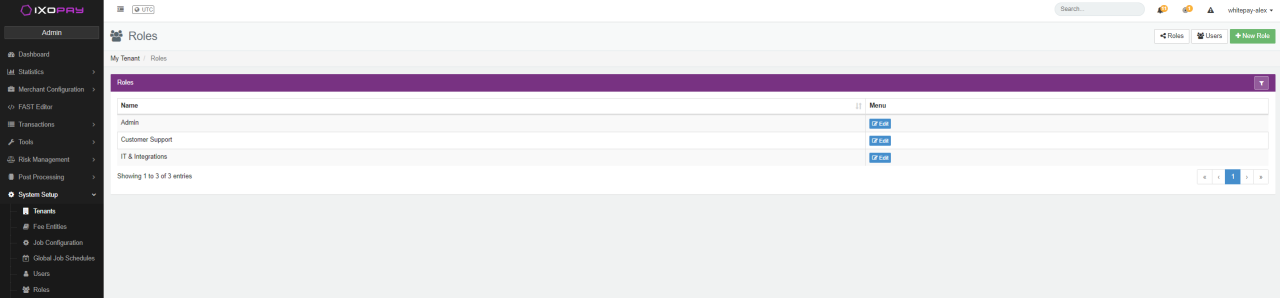
- Click "Roles" in the "System Setup" menu
- Click on the button "+ New Role"
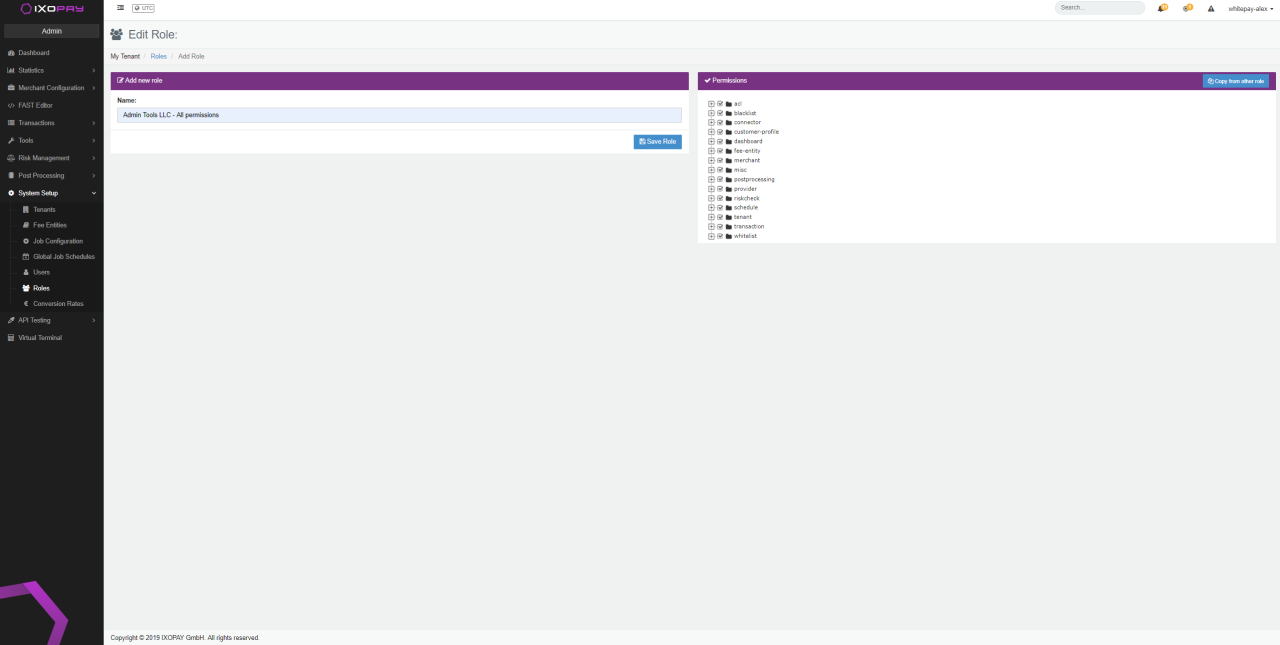
- Give your new "Role" rule a significant name
- In the role list overview select the button "Edit"
- Select the permissions needed for this User role
- Click "Save Roles"
4 Eyes Principle
To ensure compliance to Access, Roles and Right Guidelines and changes on the IXOPAY platform setup are sufficiently reviewed, 4 eyes confirmation of status changes can be configured.
Therefore the editing of a Connector, Merchants and Admin / Merchant Users (.edit Permissions) and the actual enabling, disabling for usage and archiving (.enable, .disable, archive Permissions) are split up among different Admin User Roles.
By splitting up responsibilities you can be ensured that at least 2 sets of eyes look over configuration changes before they get applied to the production system.
| User role category | Description |
|---|---|
| Acl: roles and Users | Access control list |
| Blocklists | Enable to manage (create, edit and list) Blocklists globally, on Merchant or on Tenant level |
| Connectors | Enable the activation of multiple Connectors |
| Customer profiles | Enable to manage and use customer profile functionalities |
| Dashboard | Enable Pivot Table and reports |
| Fee entity | Enable the permission to create, edit, list and mapping |
| Merchant | Enable Merchants to get access to various features offered in the IXOPAY platform (Connector, Fee, Transaction types, User) |
| Misc | Alert, BitPay-pairing, FAST Editor. Data export, audit-logs, Virtual Terminal |
| Post-Processing | Data fetcher, job-config, job, line-item, Provider settlement, reconciliation |
| Provider | Assign Connectors, create, edit, list, show |
| Risk check | Risk Rules and Risk-Rule-Set management |
| Schedule | Enable a User to create, edit and manage Schedules |
| Tenant | Access, add, edit, show |
| Transaction | Transaction management, Post-Processing, review |
| Allowlist | Enable to manage (create, edit and list) Allowlists globally, on Merchant or on Tenant level |
| acl.roles.add | Add new User Roles & their permissions |
| acl.roles.edit | Edit user roles & their permissions |
| acl.roles.show | Show user roles |
| acl.users.add | Add new Users |
| acl.users.edit | Edit existing users |
| acl.users.removeTwoFactor | Reset Two-Factor configuration for a user |
| acl.users.resetAdminPassword | Reset Password for a user |
| acl.users.show | Show all users |
| blacklist.merchant.create | Add Blacklist entries on merchant blacklist |
| blacklist.merchant.edit | Edit entries on merchant blacklist |
| blacklist.merchant.list | Show blacklist entries from merchant blacklist |
| blacklist.tenant.create | Add blacklist entries on tenant blacklist |
| blacklist.tenant.edit | Edit entries on tenant blacklist |
| blacklist.tenant.list | Show blacklist entries from tenant blacklist |
| dashboard.edit-shared-dashboards | Edit shared dashboards for user's tenant |
| dashboard.pivot-table | Use Pivot table to create online reports |
| merchant.connector-list.show | Show the connector list |
| merchant.connector.show | Show an individual connector |
| merchant.connector.terminal.list | Show terminals on a connector |
| merchant.fee.list | Show configured fees of a connector |
| merchant.list | Show list of all merchants |
| merchant.show | Show details a merchant |
| merchant.user.show | Show details of a merchant user |
| misc.alert.dismissForAll | Dismiss Alert notifications |
| misc.alert.resolve | Resolve Alert notifications |
| misc.data-export | Use Data-Export to export transactions to an XLSX/CSV |
| misc.virtual-terminal.register | Use Virtual-Terminal for Register transactions |
| misc.virtual-terminal.use | Use Virtual-Terminal for Sale transactions |
| schedule.show | Show all transaction recurring schedules from the merchants |
| tenant.access | See data of sub-tenants |
| tenant.show | See list of sub-tenants |
| transaction.capture | Capture a transaction |
| transaction.comment.read | Read comments on a transaction |
| transaction.comment.write | Write a comment on a transaction |
| transaction.list | List all transactions |
| transaction.postprocessing.show | See post-processing information for transactions |
| transaction.refund | Refund a transaction |
| transaction.resend-postback | Re-trigger postback sending for transactions |
| transaction.settlement-state | See settlement-state of transactions |
| transaction.show | See details (base-data, payment data) of a transaction |
| transaction.test | Use the API-Testing feature of the platform |
| transaction.void | Void an authorization |
| whitelist.merchant.create | Add Whitelist entries on merchant blacklist |
| whitelist.merchant.edit | Edit entries on merchant whitelist |
| whitelist.merchant.list | Show whitelist entries from merchant whitelist |
| whitelist.tenant.create | Add whitelist entries on tenant whitelist |
| whitelist.tenant.edit | Edit entries on tenant whitelist |
| whitelist.tenant.list | Show whitelist entries from tenant whitelist |