Hosted Payment Page Content-Security Policy Configuration
Use HPP CSP Configuration to control which scripts your Hosted Payment Page (HPP) is allowed to load and execute.
This helps you:
- manage payment page script integrity (PCI DSS 4.0.1 Requirement 6.4.3), and
- detect and respond to unauthorized changes by collecting CSP violation reports (PCI DSS 4.0.1 Requirement 11.6.1).
You can review violations in the Reports tab (see Find and fix violations) and optionally forward them to your own reporting service.
You are responsible for meeting PCI DSS requirements for your payment pages (e.g., as an SAQ D merchant/service provider). The IXOPAY platform provides configuration and reporting tooling, but does not guarantee compliance with PCI DSS 6.4.3 or 11.6.1.
What happens automatically
To keep HPP secure and functional, the IXOPAY platform automatically:
- injects the required CSP directives for our payment script (payment.js),
- provides a valid nonce for authorized inline scripts, and
- injects default script sources for the payment and risk providers used by your connector.
Default provider sources are detected via the connector's payment provider, enabled connector settings (e.g. Google Pay, Apple Pay, Kount), and active external risk checks (e.g. Forter, Fraud.net). For meta-connectors, the connectors of the configured payment methods are evaluated as well. This way you do not have to allowlist the script dependencies of features you enabled through the IXOPAY platform yourself.
CSP headers are only sent when your account has at least one enabled HPP CSP Configuration and the payment template has been published with the FAST Editor. Without an enabled configuration, no CSP or reporting headers are sent and no violation reports are generated.
You can use the nonce placeholder {{ head.nonce }} in your HPP templates to allow required inline scripts
without enabling insecure directives like unsafe-inline.
CSP in a nutshell
Content Security Policy (CSP) is an HTTP response header that tells the browser which sources are allowed for content like scripts, styles, images, fonts, and more. For HPP, the most important part is controlling where scripts are allowed to load from.
This feature configures the script-src directive for HPP responses at the connector level.
Recommended rollout
- Start in Report-Only mode
Deploy with
Content-Security-Policy-Report-Onlyto collect violations without breaking the page. - Fix violations Update your HPP templates (scripts, sources, inline code) until reports are clean (see Fix violations in your Payment Templates).
- Enforce
Switch to
Content-Security-Policyonly after you’re confident the payment page works with no critical violations.
Do not disable Report-Only until you have reviewed and resolved violations. Enforcing too early can block essential scripts and break your payment page.
Best practices for HPP scripts
Checklist
- Prefer external scripts over inline scripts.
- For third-party scripts:
- Pin exact versions (never
latest). - Use Subresource Integrity (SRI).
- Pin exact versions (never
- Avoid enabling insecure CSP directives (e.g.,
unsafe-inline,unsafe-eval). - If inline scripts are unavoidable, use a nonce (
{{ head.nonce }}). - Maintain an inventory of scripts and their business purpose (helps with PCI DSS 6.4.3).
Use Subresource Integrity (SRI) for external scripts
SRI lets the browser verify that an external script matches an expected hash. If the file changes (tampering or unexpected update), the browser blocks it.
Generate a hash for the exact file you load and set it in the integrity attribute (update it whenever you change the script version).
For cross-origin CDNs, also include crossorigin="anonymous".
<script
  src="https://cdn.example.org/libs/moment/2.30.1/moment.min.js"
  integrity="sha512-ZXhhbXBsZV9pbnRlZ3JpdHlfaGFzaF9fZG9fbm9fY29weV9fZ2VuZXJhdGVfcmVhbF9zcmlfaGFzaF9fX19fCg=="
  crossorigin="anonymous"
></script>
Pin specific package versions from CDNs
Avoid versionless or moving targets such as latest.
Always reference a specific, tested version.
Pinning prevents unexpected upstream updates from changing your payment page behavior (or introducing new vulnerabilities) without you noticing. When you update the version, update the SRI hash too.
- Good (pinned version)
- Bad (latest)
<script
  src="https://cdn.example.org/libs/moment/2.30.1/moment.min.js"
  integrity="sha512-ZXhhbXBsZV9pbnRlZ3JpdHlfaGFzaF9fZG9fbm9fY29weV9fZ2VuZXJhdGVfcmVhbF9zcmlfaGFzaF9fX19fCg=="
  crossorigin="anonymous"
></script>
<script
  src="https://cdn.example.org/libs/moment/latest/moment.min.js"
></script>
Use nonces for inline scripts
Inline scripts are blocked by CSP unless explicitly allowed.
Use a nonce (a unique value per page load) to allow a specific inline script without enabling unsafe-inline.
On IXOPAY-hosted payment pages, use the placeholder {{ head.nonce }} in the script tag.
The IXOPAY platform will provide a matching nonce in the response header.
<script type="text/javascript" nonce="{{ head.nonce }}">
  // Your inline script content here...
</script>
Setup
Create a HPP CSP Configuration
Use HPP CSP Configuration to define the script-src directive for your Hosted Payment Page responses per connector.
Depending on Report Only, the IXOPAY platform will send either Content-Security-Policy (enforced) or
Content-Security-Policy-Report-Only (monitoring).
New configurations default to Report Only so you can review violations before enforcing. After saving, verify the configuration.
script-src lets you allowlist approved JavaScript sources
(see the official script-src directive documentation).
Optionally, configure Reporting Endpoint to forward CSP violation reports to your own reporting service
(see the official Reporting-Endpoints header documentation).
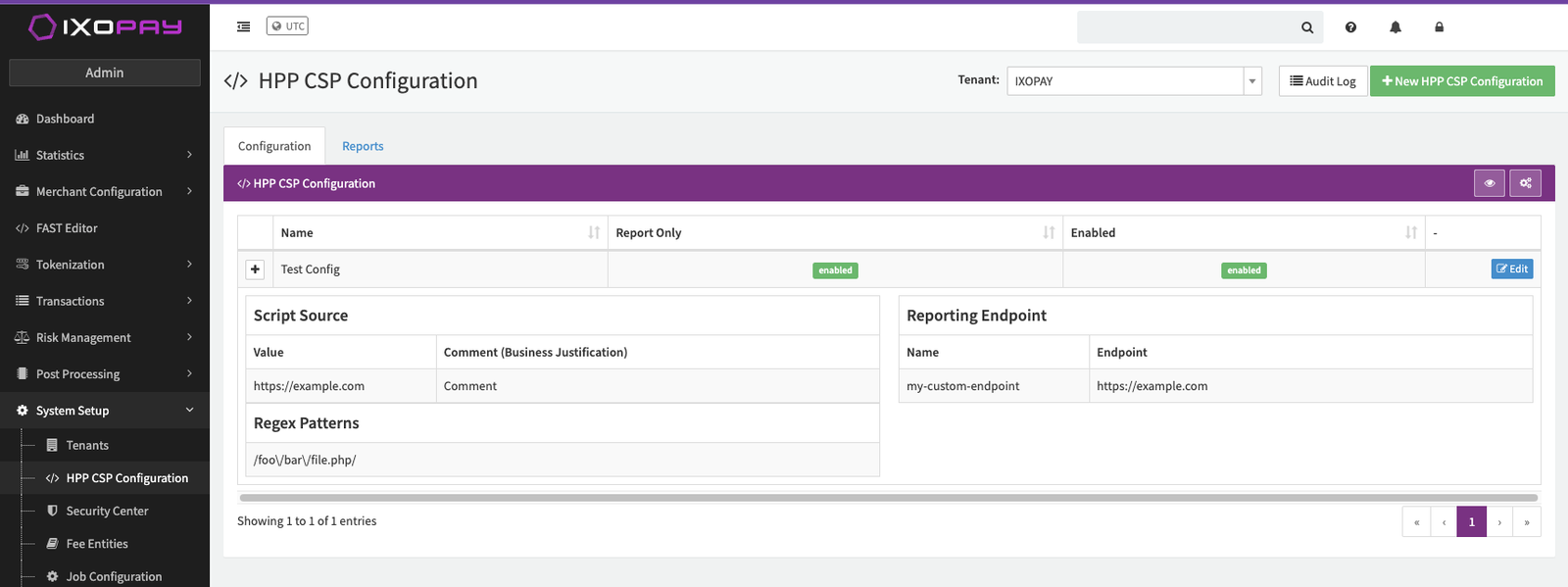
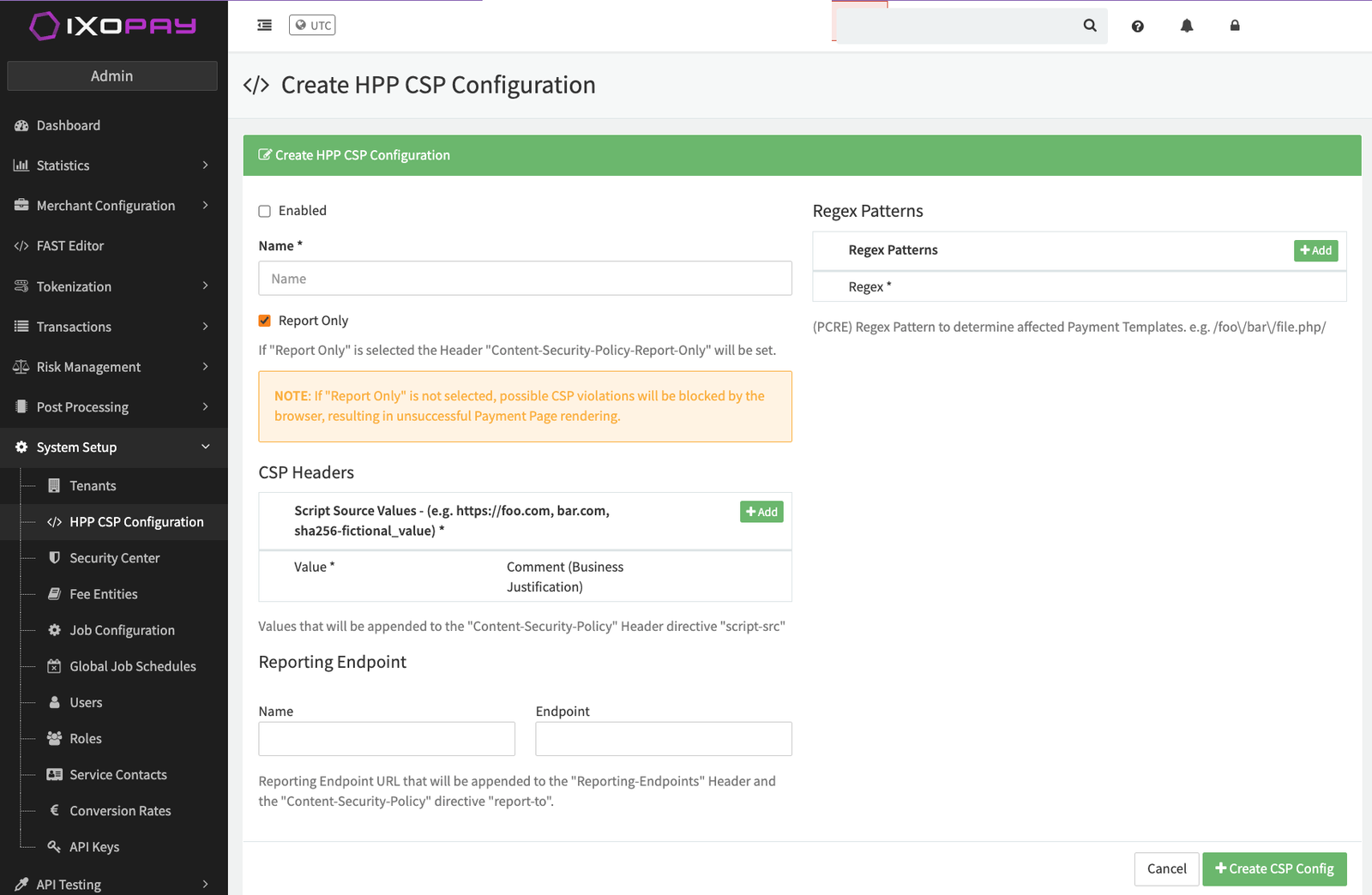
To create a new HPP CSP Configuration:
- Go to System Setup → HPP CSP Configuration.
- Click + HPP CSP Configuration.
- Fill in:
- Enabled: Turns the configuration on or off.
- Name: A descriptive name.
- Report Only: Sends
Content-Security-Policy-Report-Only. Disable this to enforceContent-Security-Policy. - CSP Headers:
- Script Source Values: Allowed script sources.
- Value: Host or hash to allow.
- Comment: Business reason for allowing it.
- Reporting Endpoint (optional): Where violation reports should be sent.
- Name: Unique endpoint name (used as
<endpoint-name>). - Endpoint: URL of the reporting server.
- Name: Unique endpoint name (used as
- Script Source Values: Allowed script sources.
- Regex Patterns:
- Regex: A PCRE valid Regex pattern to determine affected Payment Templates e.g. /foo/bar/file.php/. Patterns must compile as valid PCRE and may be at most 512 characters long, otherwise the configuration cannot be saved.
Regex Pattern and Payment Templates
You can define multiple regex patterns in an HPP CSP Configuration to apply your configuration to specific payment templates.
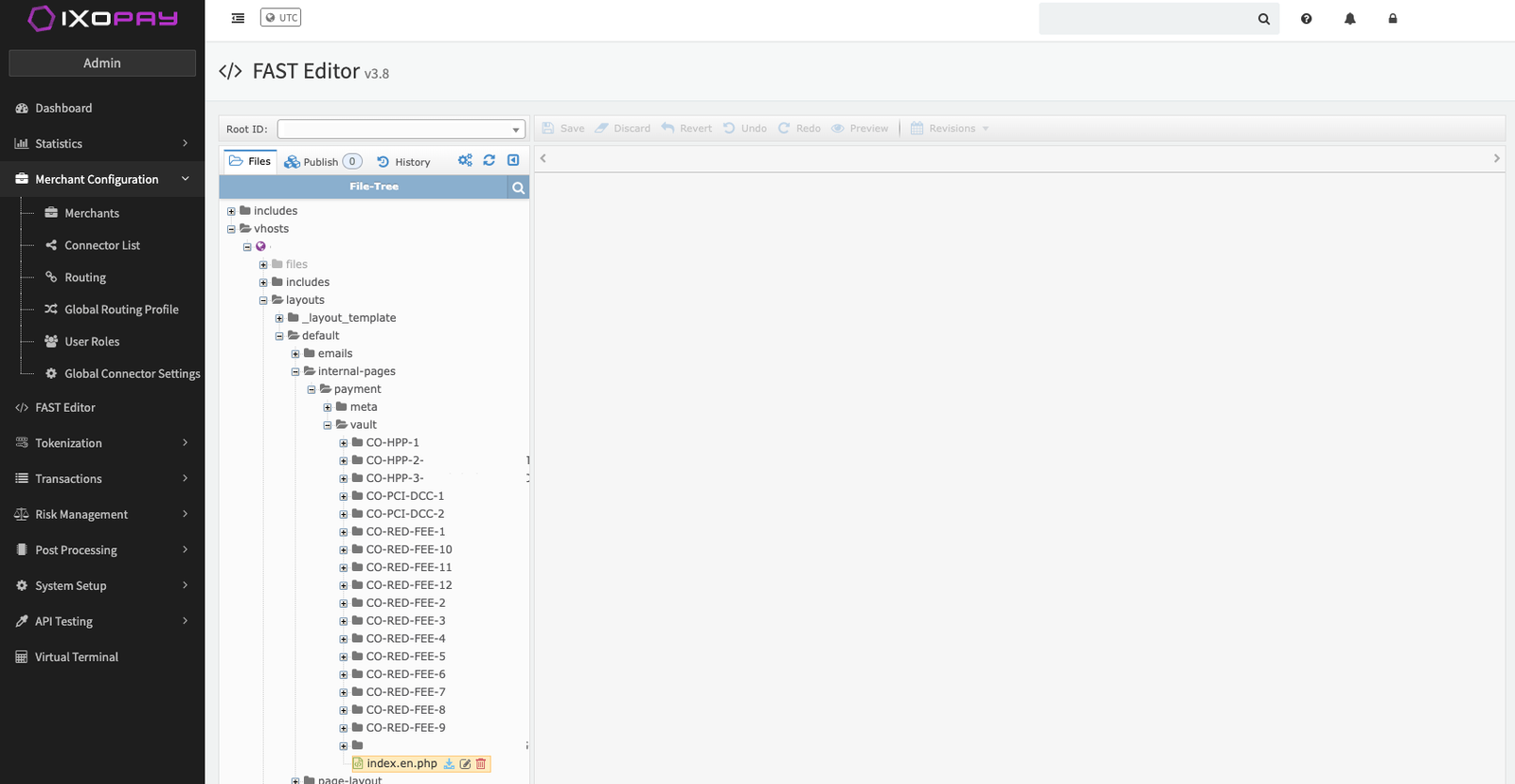
Each Hosted Payment Page enabled in a connector resolves to a specific file path. For example, a default payment template for English might be stored at:
/vhosts/my-host.com/layouts/default/internal-pages/payment/vault/index.en.php
You can view these paths in the FAST Editor File Tree.
Pattern matching examples
To apply your HPP CSP Configuration to a template, define a regex pattern that matches its file path:
-
Match a specific template Use
/.*\/internal-pages\/payment\/vault\/index\.en\.php$/to target only this exact payment template. -
Match templates by filename Use
/index\.en\.php$/to apply the configuration to any template namedindex.en.php. -
Match all templates Use
/.*/to apply the configuration to all payment templates.
If you have an enabled HPP CSP Configuration but none of its regex patterns match the rendered payment template,
the IXOPAY platform still sends a default Content-Security-Policy-Report-Only header (containing only the
automatically injected sources) for a small, sampled percentage of requests.
This keeps baseline violation reporting available for templates you have not covered with a pattern yet.
A pattern that fails to evaluate is treated as non-matching — the configuration will not apply to that page.
Verify the configuration
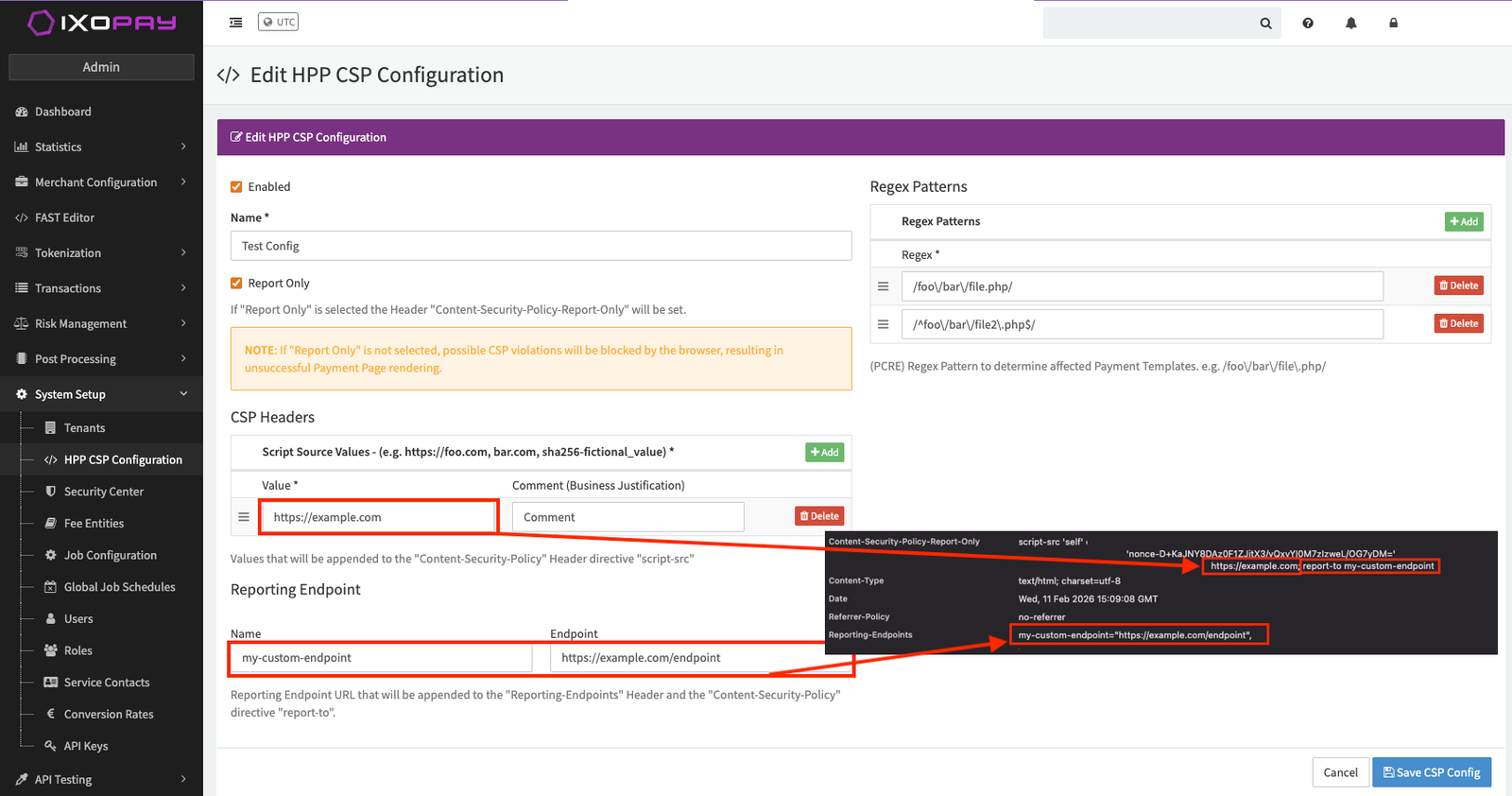
After you create a configuration , verify the response header on page load:
- Open your payment page in the browser.
- Open DevTools → Network.
- Select the document request (the main page).
- Check Response Headers for:
Content-Security-Policy-Report-Only(Report-Only enabled), orContent-Security-Policy(Report-Only disabled)
Confirm that script-src includes your configured values.
Find and fix violations
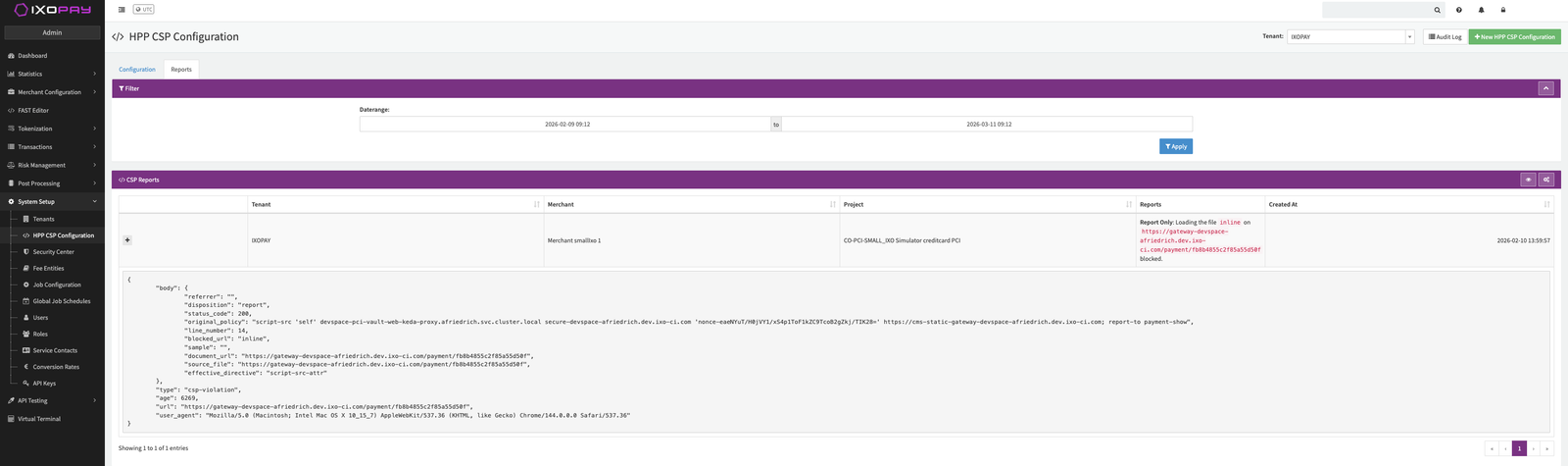
You can review CSP violation reports in two ways:
- Open the Reports tab from the HPP CSP Configuration list view.
- Configure a custom Reporting Endpoint to send reports to your own system.
Fix violations in your Payment Templates
- Open your Connector → Edit.
- Go to your configured Payment Templates.
- Click the yellow edit button for a language to open the HTML editor.
- Review all
<script>tags and decide for each script:- Keep as external (preferred)
- Pin an exact version.
- Add SRI.
- Ensure the source is allowed by
script-src.
- Remove
- If redundant or unused.
- Keep inline (only if necessary)
- Add a nonce using
nonce="{{ head.nonce }}". - Avoid using
unsafe-inline.
- Add a nonce using
- Keep as external (preferred)
Common report patterns and what to do
- Blocked external domain
Add the required domain toscript-src(and pin + SRI the script). - Inline script blocked
Move inline code into an external file or addnonce="{{ head.nonce }}". unsafe-evalrequired
Refactor to removeeval()usage (do not “fix” this by allowingunsafe-evalunless you fully accept the risk).