Reconciliation
If you want to get access to all IXOPAY platform features you need to upgrade your plan. Please contact our Support Team in the IXOPAY Customer Experience Portal for more information.
The reconciliation of transactions with the processing providers presents a number of challenges to eCommerce enterprises. Different providers handle this process in different ways. For example, one service provider may provide reconciliation data within seconds to be collected via an API, whereas it may take several hours for another service provider to provide the data as a file. The format (JSON, XML, CSV, fixed-width file), semantics and granularity of the data often differ, generally as a result of the underlying payment method.
The IXOPAY Post-Processing Engine standardizes the reconciliation process across all PSPs and payment methods. Any resulting conflicts, such as incorrectly calculated fees, missing reconciliation data and unknown transactions are handled in the same manner for all providers. All identified conflicts can easily be resolved within the IXOPAY platform, thereby drastically simplifying this task for your employees.
Before you can manage reconciliation conflicts, reconciliation needs to be enabled for your connectors, see Provider and Post Processing - Reconciliation / Settlement on the Connector Level. You may need to configure reconciliation data fetchers and reconciliation settings; refer to the adapter-specific documentation for more information.
Files are retained for 12 months and permanently deleted thereafter.
To view and manage reconciliation conflicts:
- Navigate to the Post Processing section, sub-section Reconciliation.
- The Reconciliation section contains three tabs (see Reconciliation screenshot):
- Conflicts: A conflict occurs when the records for a transaction differ in the IXOPAY platform and the PSP's system. In the screenshot, the IXOPAY platform recorded a transaction amount of € 9.99 and the provider recorded an amount of only € 8.99.
- Unknown Transactions: These are transactions present in the reconciliation file, but not stored in the IXOPAY platform. This usually occurs if the IXOPAY platform is bypassed when processing the transaction, or with refunds initiated directly with the PSP.
- Missing Reconciliations: These are transactions that are present in the IXOPAY platform but missing from the provider's reconciliation data.
Various options for dealing with these conflicts are available in each tab.
Conflicts
You have the following options for dealing with conflicts, i.e. transactions with mismatched data in the IXOPAY platform and at the provider (see Reconciliation screenshot):
- Mark as solved: Dismisses the conflict without any action.
- Accept & Change Status: Updates the outlined changes in the transaction.
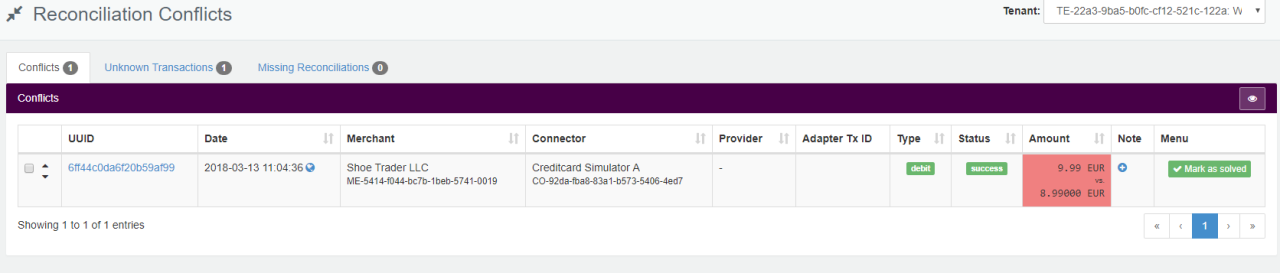
If this leads to a status change, the merchant's system is automatically notified with a new status notification using the defined Callback URL.
Unknown Transactions
You have the following options for dealing with unknown, i.e transactions recorded on the payment provider side, but missing in the IXOPAY platform (see Unknown Transactions screenshot):
- Dismiss: Dismiss the conflicts without any action.
- Create: A new transaction is created in the IXOPAY platform using the data received from the provider.
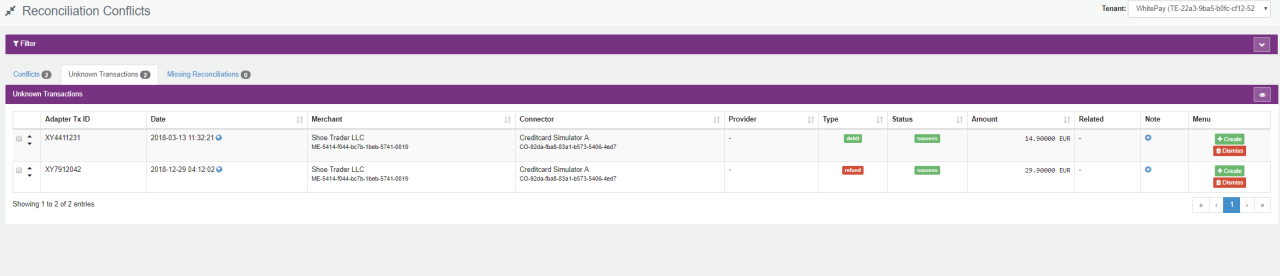
A notification is only sent to the merchant if the merchant’s notification URL has been configured in the Connector's Post-Processing Tab.
Missing Reconciliations
All transactions that are not present in any reconciliation files (after the configured time period has expired) have to be reconciled manually:
- Mark as reconciled: The transaction is marked as reconciled without any action.
Missing Reconciliations view is loaded in Mode: BI-Data, using the BI Data Source technology also available to clients.
Manual Reconciliation
To upload a reconciliation file:
- Navigate to the Post Processing section, sub-section Reconciliation.
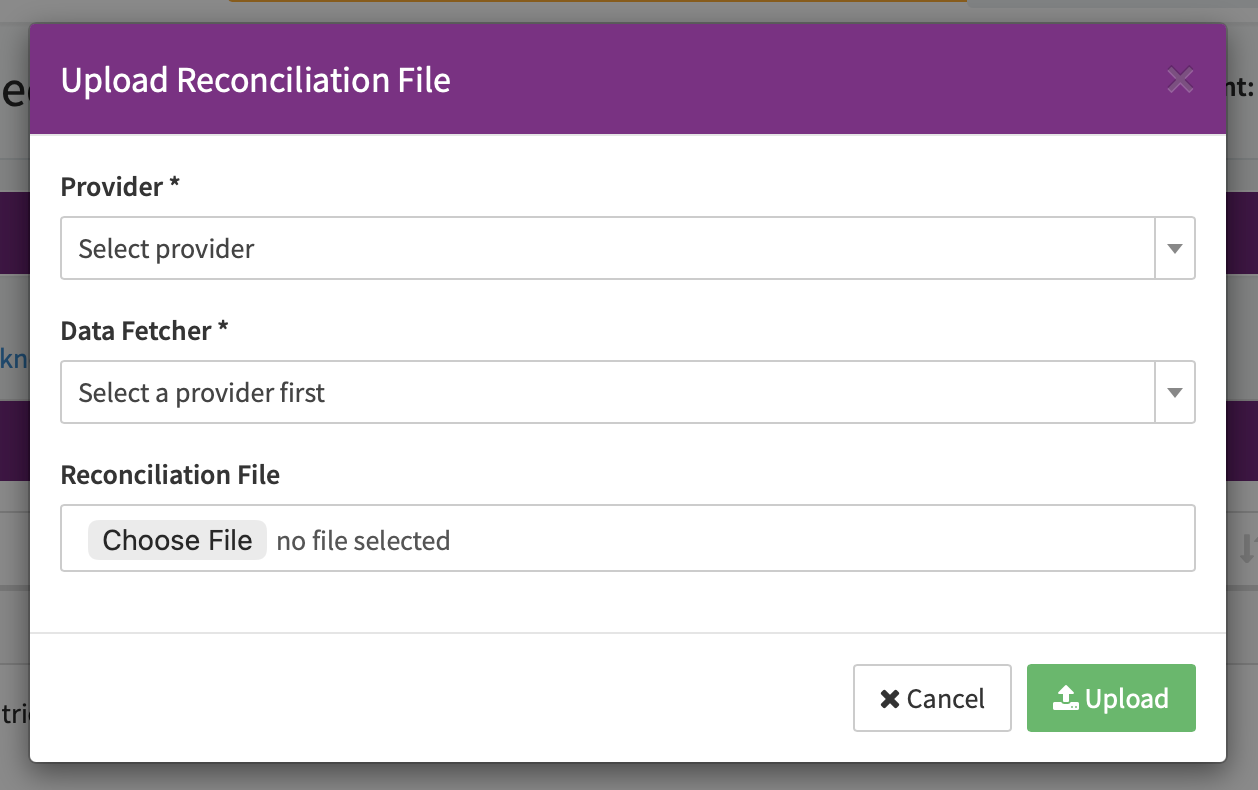
- Select + New and choose Upload Reconciliation from the dropdown.
- In the Upload Reconciliation File modal:
- Select the Provider.
- Select the Data Fetcher you want to upload the reconciliation file for.
- Select Choose File to select the Reconciliation File.
- Select Upload.
The file format and size depends on the provider. The reconciliation file is processed in the same way as reconciliation files received via the data fetcher.

The file format and size depends on the provider. Files are retained for 12 months and permanently deleted thereafter.
This feature requires the postProcessing.reconciliations.create permission.