Network Tokenization Setting
Network Tokenization Settings allow you to configure the network tokenization behavior when processing transactions.
info
This setting can only be used if network tokenization is setup and ready for use. For more information, reach out to your Customer Success Team or contact our Support Team in the IXOPAY Customer Experience Portal.
Setup
To configure the Network Tokenization Setting:
- Go to the Connector Detail Overview of the desired Connector
- Click Edit on the Settings section
- Select the Connector Setting Network Tokenization Setting and click Add
- Configure the settings as desired and click Save
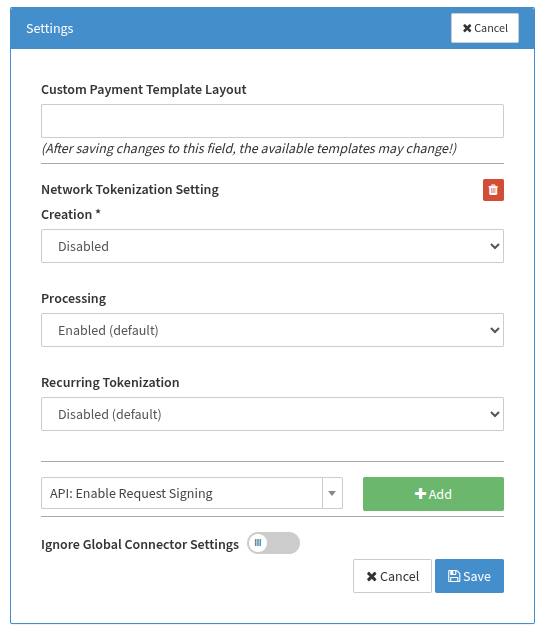
Configuration
Creation
This setting specifies how the network token should be created.
- Disabled — Disables the creation of network tokens.
- Tokenize after transaction — The network token will be created after the transaction has finished processing (asynchronous). Recommended to keep processing time down. The initial transaction will use the FPAN; subsequent transactions will use the DPAN (if network tokenization was successful).
- Tokenize before transaction (default) — Will attempt to create the network token before processing with 3DS / PSP. May add additional processing time. Failing to create the network token will automatically queue it for asynchronous network tokenization while the current transaction will be processed using the FPAN.
Processing
This setting specifies whether the transaction will be processed using network tokens.
- Enabled (default) — If the adapter is network token compatible, it will process the transaction using the network token (if available).
- Disabled — Disables processing transactions using network tokens.
Recurring Tokenization
This setting specifies whether network tokens should be created during subsequent transactions if no network token exists yet.
- Disabled (default) — Disables creating network tokens for subsequent transactions if no network token exists yet.
- Tokenize after transaction — The network token will be created after the transaction has finished processing (asynchronous). Recommended to keep processing time down.
- Tokenize before transaction — Will attempt to create the network token before processing with 3DS / PSP. Failing to create the network token will process the transaction using the FPAN. May add additional processing time.