Field Expression Operation
The feature allows manipulation of data before both sending to the upstream PSP API and storing in the database. The setting can be configured on a connector via the Manipulation: Field Operation Expression Language setting on a connector.
The setting is currently in beta and can be enabled upon request via [email protected]. When enabled, the permission
for this setting appears under beta.field-manipulation-expression-language.
Configuration
The connector setting consists of:
- Fail handling: A general configuration to specify the behaviour for unexpected error scenarios.
- Rule Configuration: One or more manipulation rules.
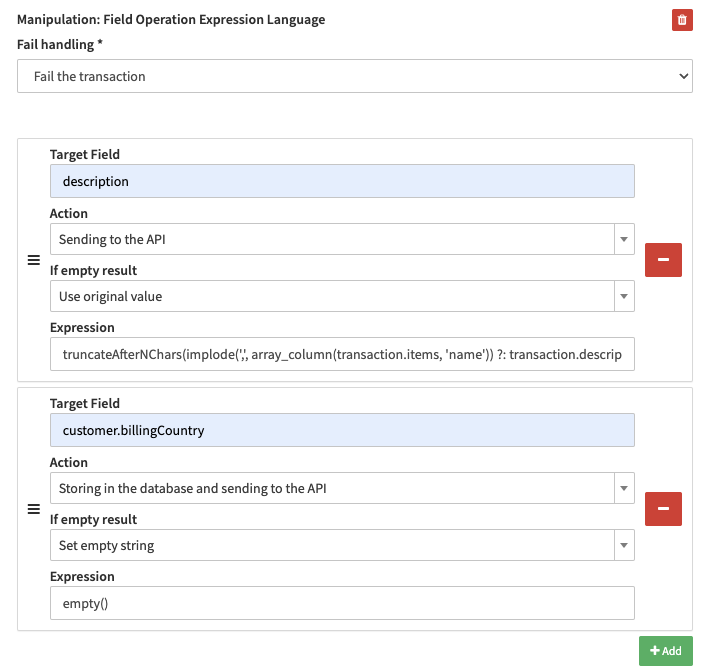
Fail Handling
In addition, there is 1 general setting which applies to all rules and defines the action in case one of the manipulation rules returns an unexpected error during the evaluation:
Fail the transaction
The request will fail and the transaction will be set to error.
Skip single failed expression
The failed expression will be skipped and the error will be logged. The rest of the expression manipulations will continue to execute as usual.
Skip all expressions
All expression manipulations will be skipped and an error will be logged.
Rule Configuration
Each rule has 4 properties which define the behaviour of the rule and the manipulation.
- Target Field
- Action
- If empty result
- Expression
1. Target Field
Which field will be used to insert the resulting string:
- merchantTransactionId
- additionalId1
- additionalId2
- merchantMetaData
- description
- extraData
- extraData.foo
- extraData.bar
- customer.identification
- customer.firstName
- customer.lastName
- customer.billingAddress1
- customer.billingAddress2
- customer.billingCity
- customer.billingPostcode
- customer.billingState
- customer.billingCountry
- customer.billingPhone
- customer.shippingFirstName
- customer.shippingLastName
- customer.shippingCompany
- customer.shippingAddress1
- customer.shippingAddress2
- customer.shippingCity
- customer.shippingPostcode
- customer.shippingState
- customer.shippingCountry
- customer.shippingPhone
- customer.company
- customer.email
- customer.nationalId
2. Action
Which action should be done for the manipulated field:
| Action | Description |
|---|---|
| Send to PSP | - The manipulated value will be sent to the PSP. - The original value will be stored in the database. |
| Store in Database | - The manipulated value will be stored in the database. - The original value will be sent to the PSP. |
| Send to PSP and Store in Database | - The manipulated value will be sent to the PSP and also stored in the database. |
3. Action if result is empty
What to do if the resulting value is empty:
- Use original value
- Use empty value
4. Expression
The expression describes the manipulation to be done.
Following functions are available - using any expression other than in this list will fail the validation:
| Expression | Description | Example | Input | Output |
|---|---|---|---|---|
lower(string) | Change the string to all lowercase | lower(transaction.description) | SomeText | sometext |
upper(string) | Change the string to all uppercase | upper(transaction.description) | SomeText | SOMETEXT |
trim(string) | Strip white spaces from the beginning and end of the string | trim(transaction.description) | spaceSomeTextspace | SomeText |
substr(string, start, length) | Return part of the string | substr(transaction.description, 1, 4) | SomeText | omeT |
truncateAfterNChars(string, length) | Truncate the string after a number of characters | truncateAfterNChars(transaction.description, 4) | SomeText | Some |
| uuid() | Returns a random UUID v4 string | uuid() | N/A | e644978c-98a8-4215-a404-474951d8314c |
random(min, max) | Returns a random number between provided min and max value | random(1, 9) | N/A | 8 |
base62_encode(decimal) | Base62 encode a decimal value | base62_encode(transaction.description) | 100 | 1c |
| empty() | Returns an empty string Note: Action if result empty must be set to "Use empty value" | empty() | N/A | (nothing) |
implode(string, array) | Joins array elements using the provided string Note: - an array can be denoted via [] - this expression can be used in combination with array_column | implode('+', [transaction.description, transaction.customer.firstName]) | description = test customer.firstName = John | test+John |
array_column(array, string) | Return the values from a single column in the array Note: Must be combined with implode | implode('+', array_column(transaction.items, 'name')) | items.0.name = Salt items.1.name = Sugar | Salt+Sugar |
Fallback Operators
Two operators are available to define a fallback value when a field is absent or empty:
?? — Null coalesce: fallback only when the value is null. An empty string "" is used as-is and does not trigger the fallback.
transaction.description ?? transaction.merchantTransactionId
?: — Elvis operator: fallback when the value is falsy (null, "", 0, false).
transaction.description ?: transaction.merchantTransactionId
Concatenating Values
Use ~ to concatenate multiple values:
transaction.description ~ transaction.merchantTransactionId
Custom strings can also be concatenated:
"something" ~ transaction.description
Combining Expressions
You may combine multiple expressions.
Example
truncateAfterNChars(implode(',', array_column(transaction.items, 'name')) ?: transaction.description, 100)
The example does following:
- Collect all item names and concatenate them with a
, - If no items exist, use the description instead
- Truncate the value to 100 characters
If the expression is valid and evaluates to null or an empty result:
- The field will change to empty if Action if result is empty is set to Use empty value
- The field will NOT change if Action if result is empty is set to Use original value
Whether the original field has been modified in any way will be explicitly stated in the Field Manipulation log
- […] has been modified […]
- […] has NOT been modified […]
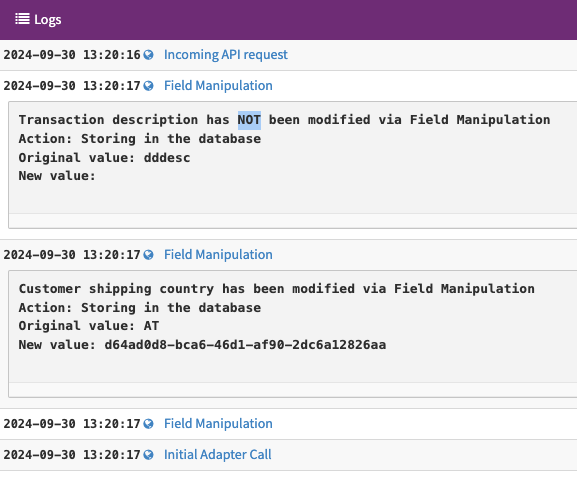
Available fields for Expression
-
Any field referenced inside an expression must be prefixed with
transaction., for exampletransaction.descriptiontransaction.merchantTransactionId
-
Any field that can be used as Target Field can be used for Expressions
- For the
extraDatafield, use the bracket notation to access the datatransaction.extraData["foo"]transaction.extraData["foo-bar"]
- For the
-
In addition to target fields, following fields are also available for Expressions
transaction.amounttransaction.currencytransaction.uuidtransaction.items- Customer data must also be prefixed with
transaction.customer, for exampletransaction.customer.firstNametransaction.customer.lastName- etc.
Excluded fields for Register transactions
The following fields are not compatible with Register transactions and will be ignored when used in expressions for that transaction type:
transaction.amounttransaction.currencytransaction.items
Example Configurations
Replace a billing country value before sending to the PSP
Send a mapped country code to the PSP while keeping the original value stored in the database.
The following configuration replaces customer.billingCountry value UK with GB:
- Target Field:
customer.billingCountry - Action: Send to PSP
- Expression:
transaction.customer.billingCountry == 'UK' ? 'GB' : transaction.customer.billingCountry
The PSP receives GB, while the original value UK is retained in the database.