Allowed Card Schemes
If you want to use this setting, please contact your the Customer Success Manager directly, or contact our Support Team in the IXOPAY Customer Experience Portal.
The Allowed Card Schemes setting restricts which credit card schemes a Connector accepts. Transactions with a card that does not match one of the configured schemes are declined during processing. Optionally, the configured schemes can also be used on the IXOPAY platform Hosted Payment Pages to give customers immediate feedback while they type their card number.
Allowed Card Schemes Configuration
To configure the setting:
- Navigate to the Connector Details Overview - Settings
- Select Allowed Card Schemes from the dropdown and click + Add
- Configure the setting as desired and click Save
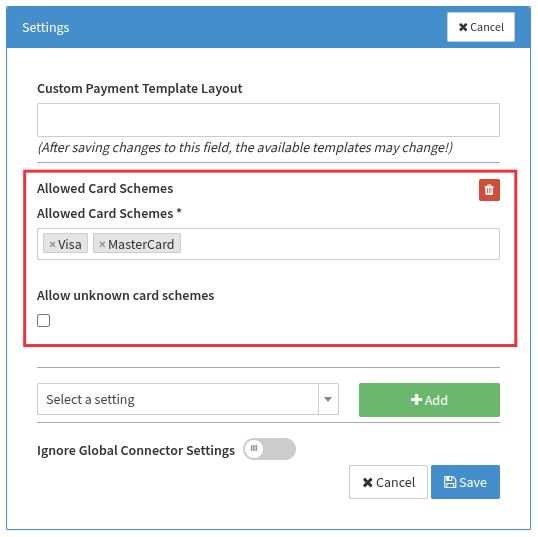
The setting provides the following options:
- Allowed Card Schemes — the list of card schemes the Connector accepts (e.g. Visa, Mastercard, American Express). Cards of any scheme not in this list are declined.
- Allow unknown card schemes — controls what happens to cards whose scheme cannot be determined from the card number. If disabled (default), such cards are declined; if enabled, they are allowed.
How to Use the Setting
Where to configure the setting depends on your setup:
- Individual Connector — if you process transactions directly on a single Connector, configure the setting on that Connector. It applies to the transaction validation and, if the Connector uses Hosted Payment Pages, to the frontend check.
- Multi-Method Connector — if the transactions are processed via a Multi-Method Connector, configure the setting only on the Multi-Method Connector and keep the routing rules consistent with it: do not route cards of an allowed scheme to a Connector that cannot process them. If the setting is configured on the individual Connectors instead, the frontend check on the Hosted Payment Page may reflect a different Connector's setting than the one that ultimately processes the transaction (see Pre-Routing on Multi-Method Connectors).
If the setting is configured on both a Multi-Method Connector and an individual Connector it routes to, only the setting of the individual Connector applies during transaction validation. The settings are not merged, and the Multi-Method Connector's setting is not evaluated in this case: If the Multi-Method Connector allows Visa and Mastercard, a Connector that only allows Mastercard declines Visa cards routed to it. Likewise, a Connector that additionally allows American Express accepts American Express cards, even though the Multi-Method Connector does not allow them.
Transaction Validation
The allowed card schemes are always validated during transaction processing, even if a frontend check (see the HPP configuration below) is bypassed. The setting of the Connector that processes the transaction applies. If the transaction is routed through a Multi-Method Connector and the processing Connector has no setting of its own, the Multi-Method Connector's setting applies. The validation applies to initial transaction types (Debit, Preauthorize, Register, Payout). If the card scheme is not allowed, the transaction is declined with
error code 3002 (Not Allowed) and an
error message like:
Card scheme "visa" is not available for this connector
The validation applies to every transaction — including recurring charges on cards that were stored before the setting was enabled — and always against the setting as configured at the time of the transaction. Enabling the setting, or removing a scheme from the list, also declines follow-up transactions of existing agreements on the affected schemes. Review your stored card portfolio before enabling or tightening the restriction.
Hosted Payment Page (HPP) Configuration
In addition to the validation during transaction processing, the configured schemes can be used in your payment templates to give customers immediate feedback, e.g. by disabling the submit button for cards that would be declined anyway.
The following template variables are available in your payment templates via the FAST Editor when the Allowed Card Schemes setting is configured:
{{ allowedCardSchemes }}— the configured schemes as a comma-separated list of scheme identifiers (e.g.visa,mastercard,amex){{ allowUnknownScheme }}—trueorfalse, depending on the Allow unknown card schemes option
The variables are only available when the Allowed Card Schemes setting is configured for the Connector;
otherwise they are empty. If the same template is used for Connectors with and without the setting,
make sure it also works with empty variables (e.g. by using the default filter — {{ allowedCardSchemes|default('') }}
and {{ allowUnknownScheme|default('true') }} — and skipping the check when the scheme list is empty).
Combined with the payment.js numberOn method
and its getBinData option, the card scheme entered by the customer can be checked while typing:
once the first six digits of the card number are entered, a BIN lookup is performed
and the result is passed to the handler as data.binData.
Its normalizedCardBrand field contains the scheme identifier of the card,
determined the same way as during transaction validation.
normalizedCardBrand is null if the BIN lookup cannot determine the scheme:
let allowedCardSchemes = "{{ allowedCardSchemes }}".split(",");
let allowUnknownScheme = {{ allowUnknownScheme }};

var paymentJs = new PaymentJs("1.2");
paymentJs.init(publicKey, numberDivId, cvvDivId, function (payment) {
  payment.numberOn(
    "input",
    function (data) {
      var scheme = (data.binData && data.binData.normalizedCardBrand) || data.cardType;
      var schemeAllowed = scheme ? allowedCardSchemes.includes(scheme) : allowUnknownScheme;
      $("#proceed-btn").prop("disabled", !schemeAllowed);
    },
    { getBinData: true },
  );
});
The example falls back to the cardType detected from the card number pattern
when the BIN lookup does not determine a scheme — data.binData is null
while fewer than six digits have been entered and when the BIN is not found in the lookup.
The transaction validation applies the same fallback.
If no scheme can be determined either way, the Allow unknown card schemes option decides.
The frontend check improves the user experience but does not replace the validation during transaction processing described above — the schemes are always validated when the transaction is submitted.
Pre-Routing on Multi-Method Connectors
This section is only relevant if the setting is configured on the individual Connectors. If it is configured on the Multi-Method Connector only — as recommended — the template variables always reflect that setting, and you can skip this section.
When the Hosted Payment Page is rendered, it is not yet known which individual Connector will process the transaction. To fill the template variables anyway, a pre-routing of the credit card method is performed:
- the setting of the pre-routed Connector is used,
- or, if that Connector has no setting of its own, the setting of the Multi-Method Connector.
The pre-routing runs before the customer has entered a card number, so routing rules that need the card data cannot be evaluated at this point. If such a rule is part of the routing decision, the pre-routing falls back to the default Connector of the credit card method and uses its setting (or, if not configured there, the Multi-Method Connector's setting). Rules that only need data already known when the page is rendered — such as amount, currency, transaction type, or customer country — work as usual. Load Balance by Random rules may likewise pick a different Connector than the one used when the transaction is submitted.
The routing rules are evaluated again when the transaction is submitted, so the transaction may end up on a different Connector than the pre-routed one. In that case, the frontend check may have used a different configuration than the one applied during transaction validation.