Interface Overview
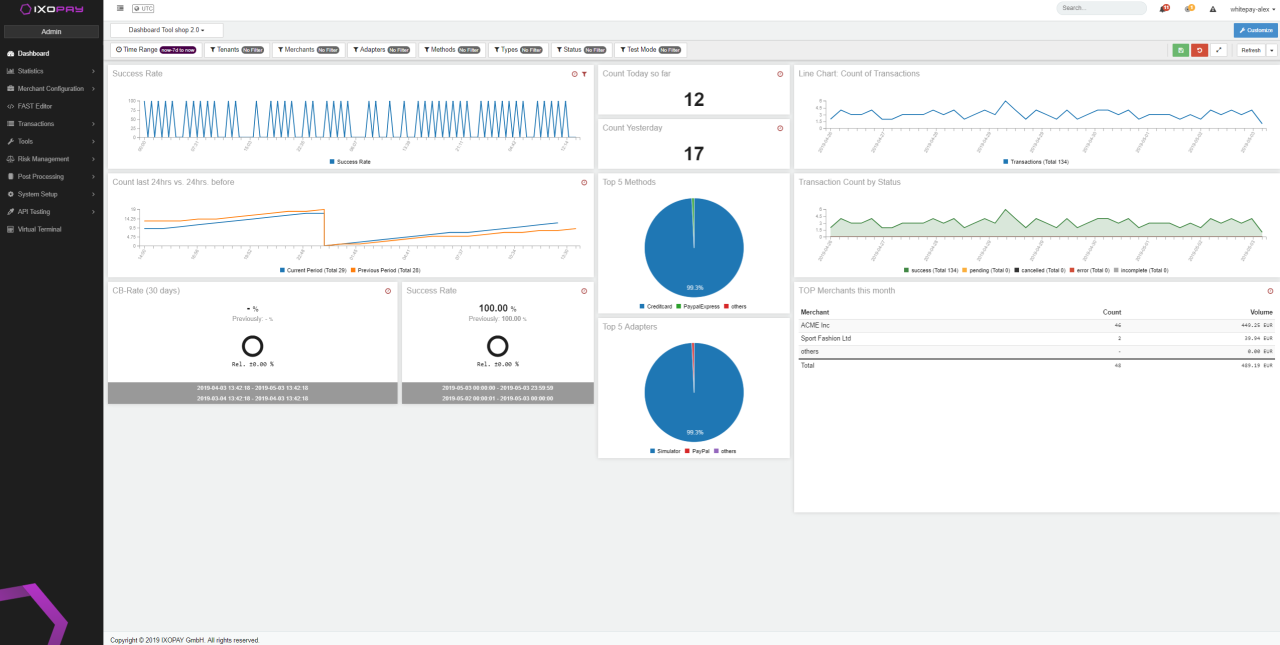
After logging in, the Dashboard is displayed. This is a customizable view of all relevant transactions, providing insights about today’s, yesterday’s and monthly counts and volumes of your merchants or connectors, and informs you of any existing conflicts.
The IXOPAY platform interface is structured into 3 areas:
- Top Bar: Provides access to Quick Searches within the IXOPAY platform tenant and displays important Alerts. There are also direct links to the Review list and Conflicts overview. Account Settings (2FA setup, change password, log out) can be accessed from the drop-down menu at the top right, which also provides access to the Dashboard.
- Main Menu: Used to navigate between areas in IXOPAY, e.g. to manage platform tenants or merchants.
- Main Frame: Displays the details for the current area.
Depending on your user permissions (Admin, Default, Merchant) the content of the individual areas may differ.
Quick Search
When using the quick search, directly navigate to the Transaction list of the desired entry (connector or merchant) using Enter. Use Shift + Enter to edit the entity.