Volt
Bank Transfer - PIX
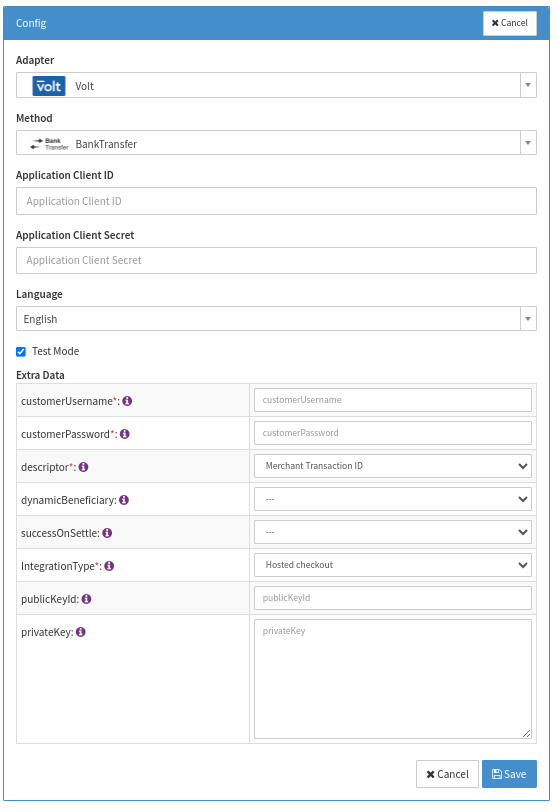
Configure the following parameters for the Connector (see Connector Config - PIX):
- Fill in the mandatory Application Client ID
- Fill in the mandatory Application Client Secret
- Fill in the mandatory Extra Data: customerUsername
- Fill in the mandatory Extra Data: customerPassword
- Select the mandatory Extra Data: Descriptor (Merchant Transaction ID, Generated ID)
- Select the optional Extra Data: dynamicBeneficiary (True, False)
- Select the optional Extra Data: successOnSettle (True, False)
- Select the mandatory Extra Data: IntegrationType (Hosted checkout, Embedded checkout, PayByLink)
- Hosted checkout: redirect to Volt's checkout page
- Embedded checkout: redirect toIXOPAY platform hosted payment page
- PayByLink: returns a redirectUrl in the response for PayByLink
- Fill in the optional Extra Data: publicKeyId
- Optional: If both key configuration fields are filled in, a JWT header will be sent for refunds for SCA compliance
- Fill in the optional Extra Data: privateKey
- Optional: If both key configuration fields are filled in, a JWT header will be sent for refunds for SCA compliance
Reconciliation for this Adapter can be handled via notifications, you can therefore create the settlement file via the Post Processing Jobs, collecting all successful transactions for this adapter in your desired Job Period. Just make sure to configure the adapter with Extra Data: successOnSettle equals True.
Data Fetcher Configuration
You have the option to configure Data Fetchers (see section Enable and Set Up Reconciliation on the Provider Level) either on Provider or on Connector Level, depending on which setup works better for your provider.
Provider Settlement
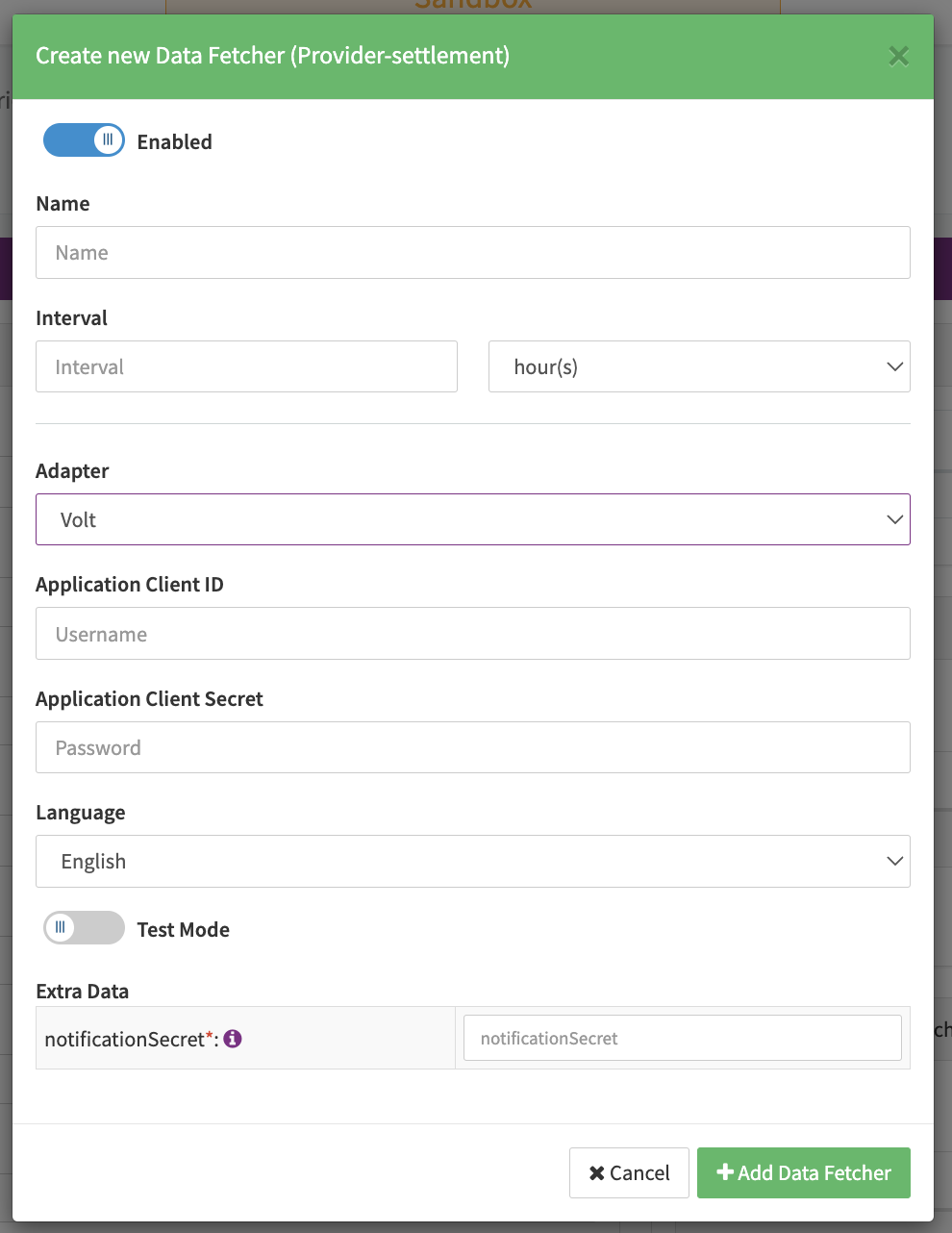
Configure the following Parameters for the Settlements Provider Data Fetcher to fetch Settlement (json format) via Notifications (see Edit Provider Settlement Data Fetcher Provider Level):
- Fill in the optional Name
- Fill in any Interval - days, hours — This setting is irrelevant for the Data Fetcher, since the Data Fetcher will listen for notifications.
- Select the Adapter Volt
- The Setting Testmode is irrelevant for this adapter
- Fill in the mandatory Extra Data: notificationSecret used to receive Settlement Notifications from Volt. Should the value not be available before the notification URL (see Hint) must be given to Volt please enter a dummy value until it is available. Please be aware that the real notification secret is required to successfully receive settlements.
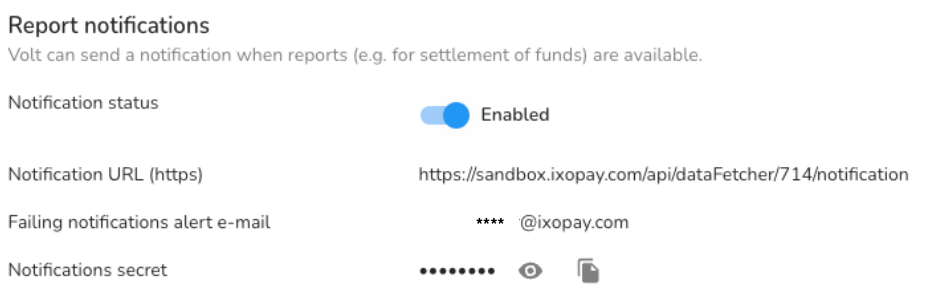
The notification URL has to be configured on Volt side (see Volt configuration) in the "Connect" tab (July 2023):
The URL looks like this: {host}/api/dataFetcher/{dataFetcherId}/notification whereas the host is
e.g. sandbox.ixopay.com and the dataFetcherId should be replaced with the
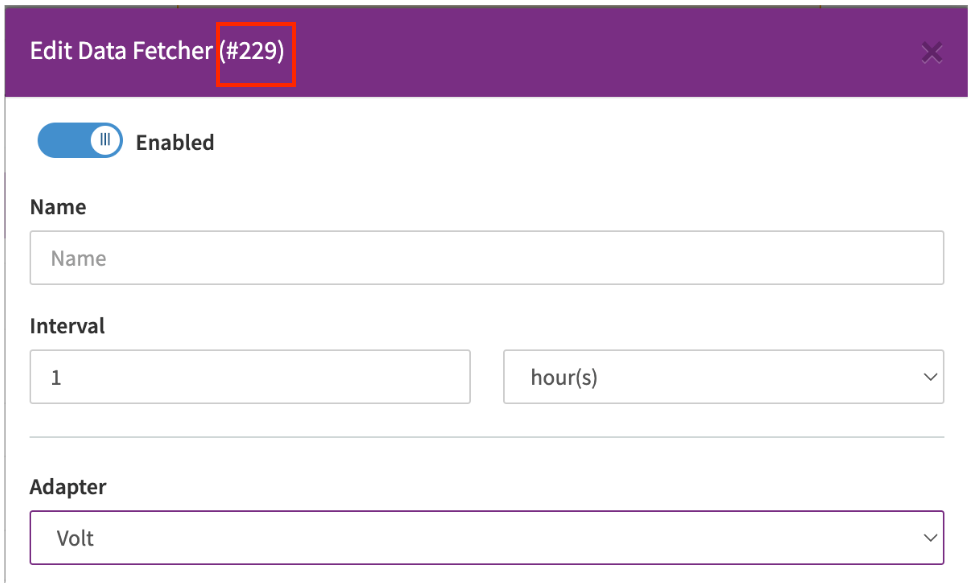
settlement data fetcher id which is created when saving the configured data fetcher (see Datafetcher Edit).
Settlement fields
Batch Number
The batch number is taken from the report notification itself and contains the batchId found under "details".
Payment Reference
The payment reference is taken from the report notification itself and contains the paymentReference found under "details".
Mapped Fields
We are mapping the following fields from the Volt settlement reports (Volt → IXOPAY platform):
| Volt | IXOPAY platform | default (if not set by Volt) |
|---|---|---|
confirmationDate | transaction settlement date | date time of processing |
transactionCurrency | transaction settlement currency | none - required |
transactionGrossDebit / transactionGrossCredit | transaction settlement amount, credit is for refunds | none - required |
paymentId / refundId | transaction adapter tx id (Volt reference id) | none |
uniqueReference | IXOPAY platform UUID | none - required |
exchangeRate | transaction settlement exchange rate | none |