ValitorPay
ValitorPay Creditcard
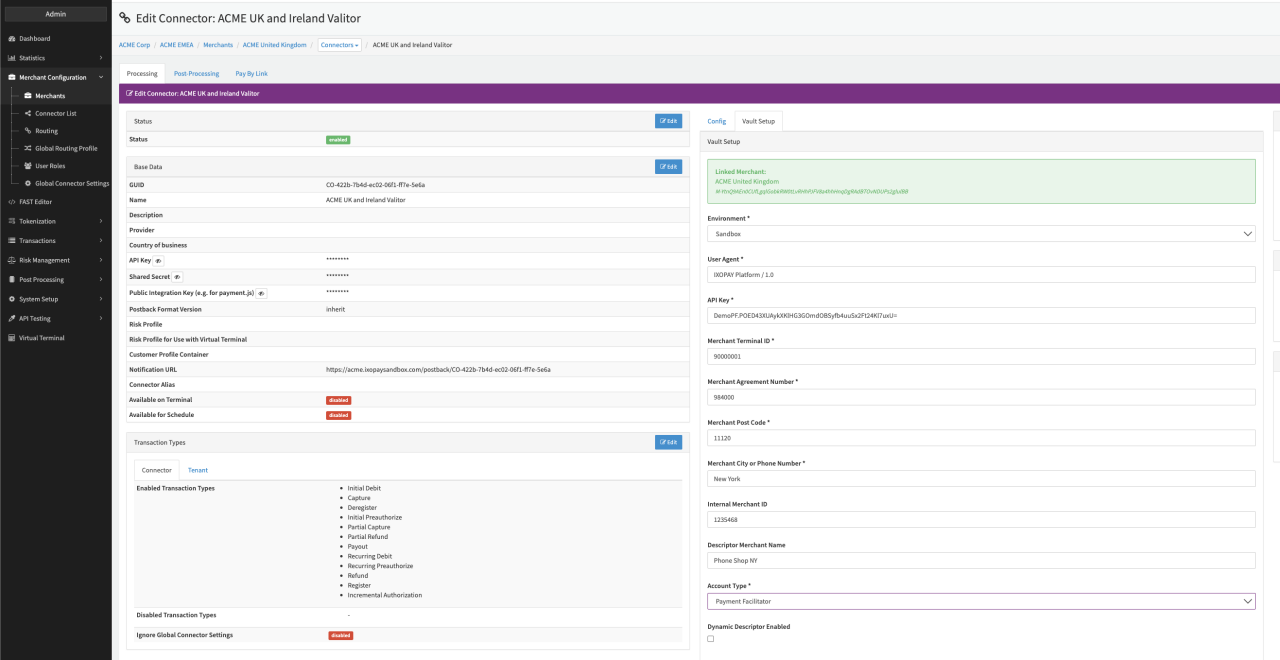
Configure the following parameters for the Connector (see Connector Detail Overview - ValitorPay Creditcard - Vault Configuration):
- Select the mandatory Environment: Sandbox, Production
- Fill in the mandatory User Agent
- Fill in the mandatory API Key
- Fill in the mandatory Merchant Terminal ID
- Fill in the mandatory Merchant Agreement Number
- Fill in the mandatory Merchant Post Code
- Fill in the mandatory Merchant City or Phone Number
- Fill in the optional Internal Merchant ID
- Select the mandatory Account Type - Merchant - Multi, Payment Facilitator
- Fill in the optional Descriptor Merchant Name
- Enable the Checkbox Dynamic Descriptor Enabled to enable Dynamic Descriptor
- Check Disable Automatic scaExemption to map the provided SCA exemption value
For the ValitorPay-specific Parameters see also https://api.saga.valitor.com/HttpServices/
Settings for Delayed Clearing
- Specify the When to clear (enter minutes, hours or days - max. 7 days) setting
- Select the Action to be done when the transaction expires: Reversal, Clearing
Settings for Sponsored Merchant Data
Enable Use sponsored MerchantData mapping1 to send the configured sponsored merchant data. These data will only be sent if this setting is enabled.
For credit card payments the sponsored merchant data will be mapped to sponsoredMerchantData field.
For wallet payments the sponsored merchant data will be mapped to sellerData.sponsoredMerchantData field.
- Fill in the merchantId
- Fill in the name
- Fill in the streetAddress
- Fill in the cityName
- Fill in the cityOrPhoneNumber
- Fill in the countrySubdivisionCode
- Fill in the countryCode
- Fill in the postCode
- Fill in the urlAddress
- Fill in the customerServicePhoneNumber
- Fill in the acceptorLocationGeographicCoordinates
- Fill in the merchantCountryOfOrigin
- Fill in the merchantCategoryCode
IXOPAY platform does not validate the configured values nor check for mandatory requirements as this may be customer specific.
Refer to Valitor's documentation for Credit Card and Wallet.
Other Settings
Fill in the serviceLocationGeographicCoordinates field to send the service location geographic coordinates.
- The value will be sent if it has been configured.
- For credit card payments the value will be sent as
serviceLocationGeographicCoordinates. - For wallet payments the value will be sent as
sellerData.serviceLocationGeographicCoordinates.
Data Fetcher Configuration
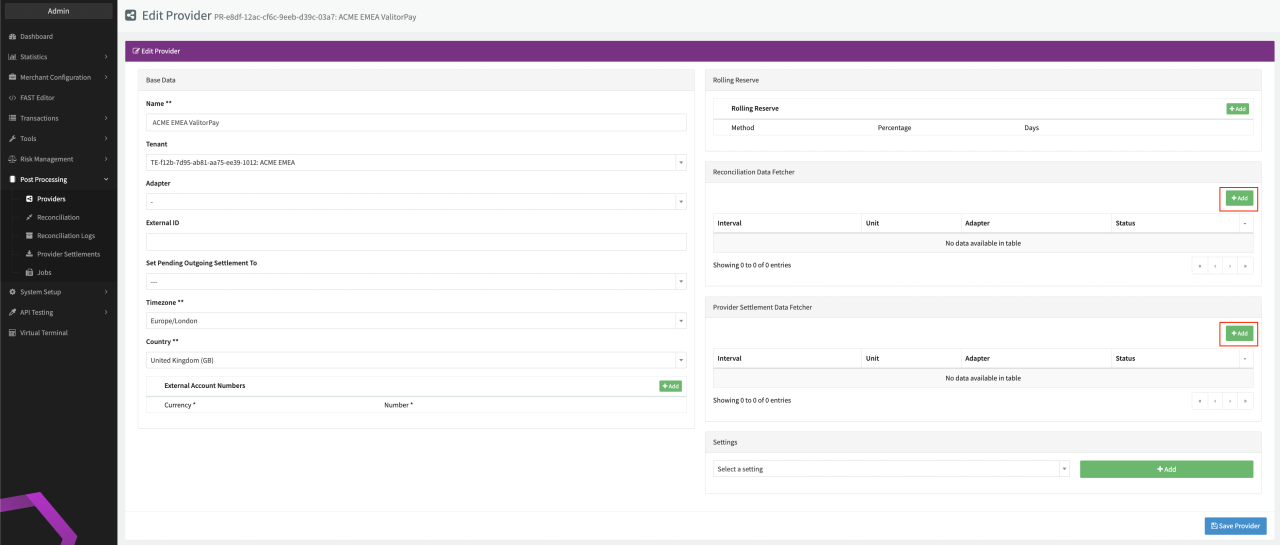
You have the option to configure Data Fetchers (see section Enable and Set Up Reconciliation on the Provider Level) either on Provider or on Connector Level, depending on which setup works better for your provider (see Edit Provider).
Provider Settlement
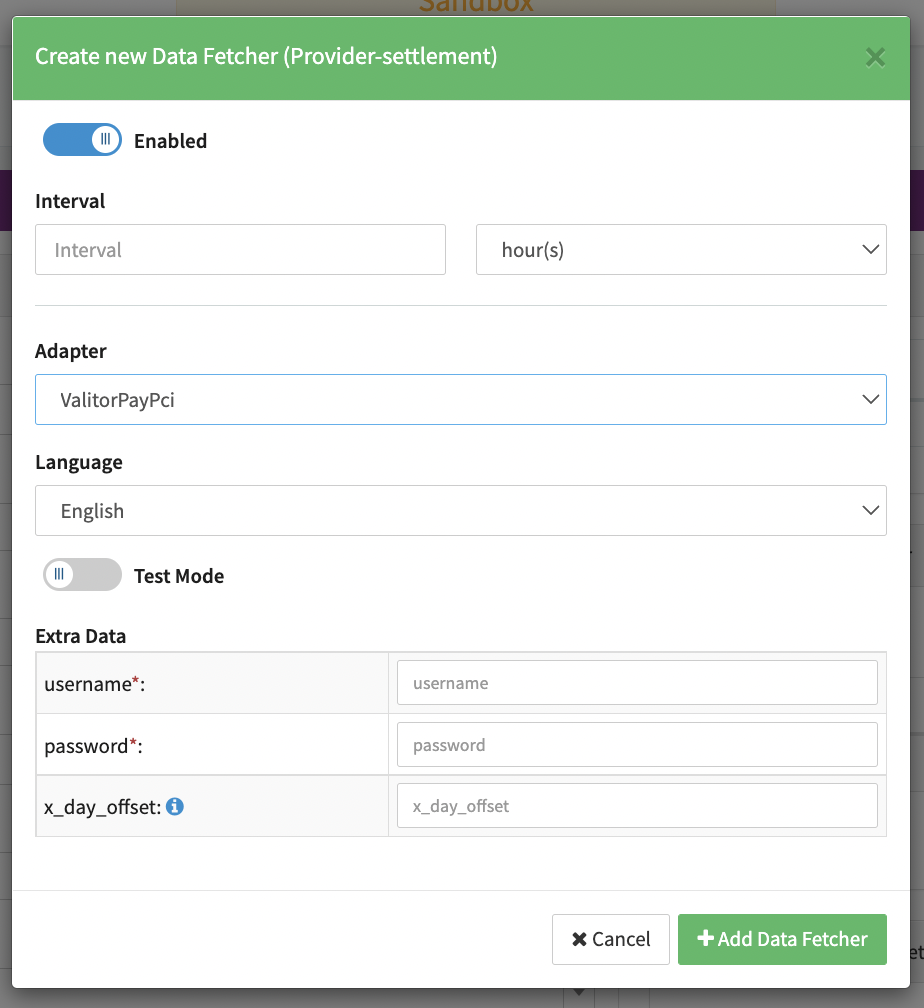
Configure the following Parameters for the Settlements Provider Data Fetcher to fetch Settlement
(settlementreport_[Ymd]_[settlementnumber]_[random].json format) via an API https://api-saga.valitor.com/HttpServices/api
(see Edit Provider Settlement Data Fetcher Provider Level).
The retrieval consists of 2 different API requests.
First we are fetching all necessary settlement numbers from the settlement endpoint with a from-to date filter.
After that we are fetching the settlement file itself with the provided settlement number using the reconciliation endpoint:
- Fill in the expected Interval in which the Provider Settlement File should be fetched - days, hours
- Select the Adapter ValitorPayPci
- Enable Testmode to test fetching of Provider Settlements from the ValitorPay Sandbox
- if enabled, it will use the sandbox endpoint https://api-saga.uat.valitor.com/HttpServices/api
- if disabled, it will use the production endpoint https://api-saga.valitor.com/HttpServices/api
- Fill in the mandatory Extra Data: Username used for authentication
- Fill in the mandatory Extra Data: Password: used for authentication
- Fill in the optional Extra Data: x_day_offset
Used to set an offset to the settlement date.
Reconciliation
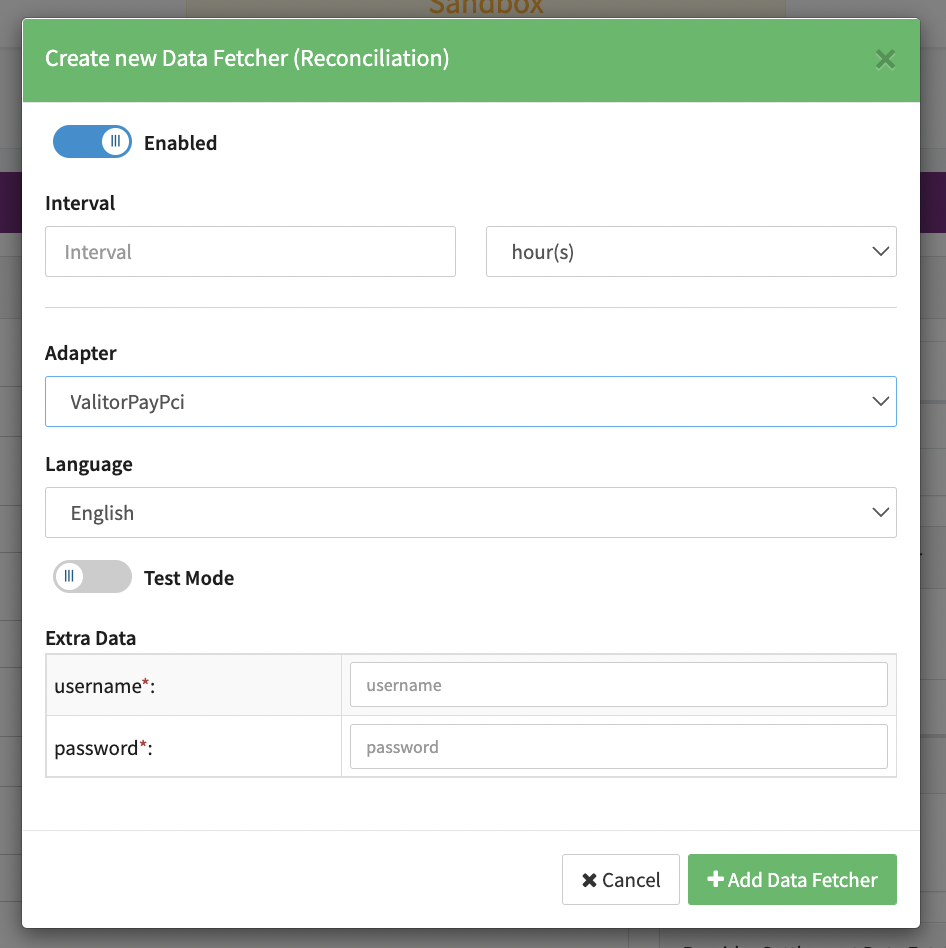
Configure the following Parameters for the Reconciliation Data Fetcher to fetch Reconciliation (json format) via an API (see Reconciliation Data Fetcher Provider Level):
- Fill in the expected Interval in which the Reconciliation File should be fetched - days, hours
- Select the Adapter ValitorPayPci
- Enable Testmode to test fetching of Reconciliation files from the ValitorPay Sandbox
- if enabled, it will use the sandbox endpoint https://api-saga.uat.valitor.com/HttpServices/api
- if disabled, it will use the production endpoint https://api-saga.valitor.com/HttpServices/api
- Fill in the mandatory Extra Data: Username used for authentication
- Fill in the mandatory Extra Data: Password: used for authentication
Settlement fields
Batch Number
If the filename of the settlement is following the defined standard:
settlementreport_[Ymd]_[settlementnumber]_[random].json then [settlementnumber] will be used as settlement date.
If not then the datetime of the parsing of the settlement will be used.
Payment Reference
No payment reference is saved.
Settlement Date
If the filename of the settlement is following the defined standard:
settlementreport_[Ymd]_[settlementnumber][random].json then the date in the second part [Ymd] will be used.
Furthermore there is an extra parameter x_day_offset in the data fetcher.
If that field is filled out then it is used to modify the provided date accordingly.
Mapped Fields
We are mapping the following fields from the Provider settlement reports (Provider → IXOPAY platform).
Any other fees (Interchange, Scheme) are deducted from the value which is set in the markup field. This value is then used to map the transaction fee of type markup.
| Provider | IXOPAY platform | default (if not set by Provider) |
|---|---|---|
TransactionID | Settlement reference id Transaction adapter tx id | None |
ReferenceData | Settlement transaction id Transaction uuid | None |
GrossAmount | Settlement amount Transaction amount | 0 |
Currency | Settlement currency Transaction currency | None |
TransactionLifeCycleID | Settlement scheme reference id Settlement second adapter tx id Transaction Scheme Reference Id Transaction second adapter transaction Id | None |
Interchange | Transaction fee of type interchange | 0 |
SchemeFeeBase | Transaction fee of type scheme | 0 |
Fees | Transaction fee of type markup | 0 |
| Code | IXOPAY platform |
|---|---|
OUTFE20, OUFE20, 2CHABA | Second Chargeback |
CHABAC, RECB16, REJE15 | Chargeback |
CBRV35, REPR05, RCRV36 | Chargeback Reversal |
REFU06 | Refund |
SALE05 | (no specific type - will be handled internally) |
RDR15,RDR16 | Type: Chargeback & Subtype: Chargeback Resolved |
RDR35, RDR36 | Type: Chargeback Reversal & Subtype: Chargeback Reversal Resolved |
Mapping of Transaction Types
The type of the transaction is decided in the column TransactionCode. The RDR codes will also add the value of TransactionCode as original-subtype-code to the extra data of the transaction.
Other Line Items
| Provider | IXOPAY platform | default (if not set by Provider) |
|---|---|---|
NetSettlement | Actual Net Settlement Amount | None |
ChargebackFees, SwiftFees, SchemeFees, TransactionFee, JoiningFee, PosFee, SettlementFee, SetFee, AukakronurFee, OtherFees, GomobileFee, GomobileInitialFee, PreAuthorizedFee, MonthlyFee, AuthorizationFee, MinimumMonthlyServiceFee, CardNotPresentFee, PciFee, MobileAirTimeFee, EcomGatewayMonthlyFee, EcomGatewayTransactionFee | Adjustment | None |
Reconciliation fields
| Provider | IXOPAY platform | default (if not set by Provider) |
|---|---|---|
OriginalAmount / Amount | Transaction amount If OriginalAmount is set then this value will be used for the Transaction amount. Else the field value of Amount will be used. | 0 |
OriginalCurrency / Currency | Transaction currency If Original Currency is set then this value will be used for the Transaction currency. Else the field value of Currency will be used. | None |
AuthorizationNumber | Transaction auth code | None |
Fees | Transaction fee amount Field value of Currency will be used as currency value for fee items | None |
Arn2 | Transaction arn Transaction identifier arn | None |
SchemeFee2 | Transaction extra data schemeFees Transaction callback extra data schemeFees | None |
SchemeFeeCurrency2 | Transaction extra data schemeFeesCurrency Transaction callback extra data schemeFeesCurrency | None |
Interchange2 | Transaction extra data interchange Transaction callback extra data interchange | None |
General Mappings
Mappings (Transaction types other than Chargeback / Chargeback Reversal)
| Provider | IXOPAY platform | default (if not set by Provider) |
|---|---|---|
TransactionID | Transaction adapter tx id | None |
ReferenceData | Transaction uuid | None |
ReasonCode | Transaction status If the value of ReasonCode is equal to "00" then the transaction will have the status "success". Else it will have the status "error". | success |
Scheme | Card Type (Visa or Mastercard) for Transaction return data | None |
CardNumber | Card Type (Visa or Mastercard) for Transaction return data | None |
Chargeback / Chargeback Reversal Mappings
| Provider | IXOPAY platform | default (if not set by Provider) |
|---|---|---|
ReasonCode | Chargeback reason | Chargeback Reversal reversal reason Transaction description | None |
ReferenceData | Original transaction uuid | None |
TransactionID | Original reference id Transaction adapter tx id | None |
PurchaseDate | Chargeback datetime | Chargeback reversal date time Transaction created at | None |
Mapping of Transaction Types - The type of the transaction is decided in the field TransactionCode
| Code | IXOPAY platform |
|---|---|
CHABAC, RECB16 | Chargeback |
CBRV35, REPR05, RCRV36 | Chargeback Reversal |
REFU06 | Refund |
SALE05 | (no specific type - will be handled internally) |
REJE15 | (no specific type - will be handled internally) & status: error_adapter |
SARV25 | (no specific type - will be handled internally) & status: cancelled |
REJE16 | Refund & status: error_adapter |
OUTFE20, OUFE20, 2CHABA | 2nd Chargeback |