USIO
USIO ACH
The USIO ACH connector (adapter USIO, payment method ACHDirectDebit) processes US domestic ACH debits, refunds and payouts via the USIO Payments API. Only USD is supported.
For transaction types, request fields, response data, error codes and examples see the adapter-specific API documentation.
Connector Configuration
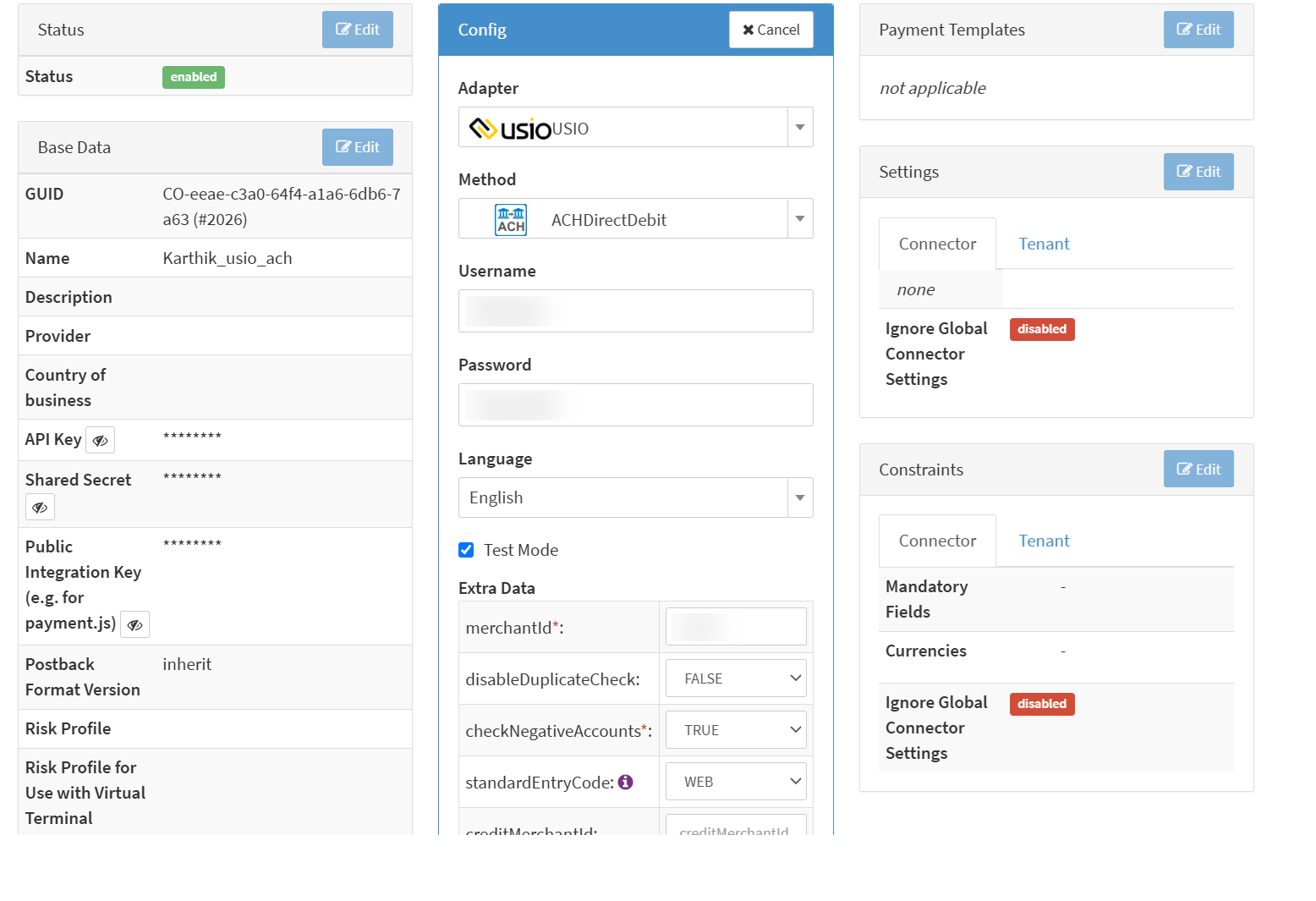
Configure the following parameters for the Connector (see Connector Config - USIO ACH):
- Fill in the mandatory Username: the USIO
Login - Fill in the mandatory Password: the USIO
Password - Fill in the mandatory Extra Data: merchantId: the USIO
MerchantID - Enable Testmode to process transactions against the USIO sandbox (https://devpayments.usiopay.com). If disabled, the USIO production environment (https://payments.usiopay.com) is used.
- Select the optional Extra Data: standardEntryCode: the NACHA Standard Entry Class (SEC) code — WEB, PPD, TEL, CCD. It is the default for every transaction and can be overridden per transaction. A transaction is rejected if neither the connector nor the transaction provides a valid value.
- Set Extra Data: checkNegativeAccounts (True, False): checks the account against USIO's negative accounts list.
USIO requires this flag on every payment. If left empty,
trueis sent. Any other value than True or False is a configuration error and the transaction is rejected. - Set the optional Extra Data: disableDuplicateCheck (True, False): defaults to
false, i.e. USIO's duplicate check stays enabled - Fill in the conditional Extra Data: creditMerchantId, Extra Data: creditUsername and Extra Data: creditPassword: see Payout Credentials
Payout Credentials
USIO can provision a separate merchant account for ACH credits (payouts). Only in that case fill in creditMerchantId, creditUsername and creditPassword with the credentials of the credit account.
- If all three are filled in, payouts are submitted with the credit credentials.
- If any of the three is empty, payouts fall back to the standard Username, Password and merchantId.
The NACHA WEB account validation that runs before a WEB payment always uses the standard credentials, also for payouts.
The USIO PCI connector handles payout credentials differently: Pinless Debit payouts do not fall back to the standard credentials. If you run both connectors, configure each one according to its own rules.
Data Fetcher Configuration
USIO does not send webhooks or status notifications. A debit or payout stays pending until the Reconciliation Data
Fetcher reads its final status from USIO's ACH reports, so the Data Fetcher is required for this connector.
You have the option to configure Data Fetchers (see section Enable and Set Up Reconciliation on the Provider Level) either on Provider or on Connector Level, depending on which setup works better for your provider.
Reconciliation
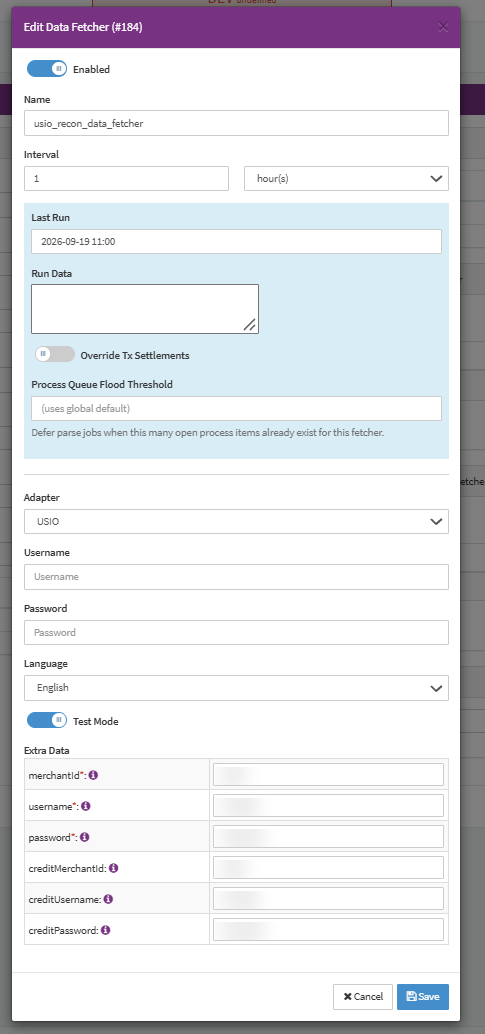
Configure the following parameters for the Reconciliation Data Fetcher, which fetches USIO's ACH batch and ACH return reports via the API (see Reconciliation Data Fetcher - USIO ACH):
- Fill in the expected Interval in which the reconciliation data should be fetched - days, hours. USIO recommends once a day.
- Select the Adapter USIO
- Enable Testmode to fetch from the USIO sandbox (https://devpayments.usiopay.com). If disabled, the USIO production environment (https://payments.usiopay.com) is used.
- Fill in the mandatory Extra Data: merchantId: the USIO
MerchantID - Fill in the mandatory Extra Data: username: the USIO
Login - Fill in the mandatory Extra Data: password: the USIO
Password - Fill in the optional Extra Data: creditMerchantId, Extra Data: creditUsername and Extra Data: creditPassword if payouts use a separate USIO credit account (see Payout Credentials). The credit account's reports are then fetched as well.
With a daily interval, expect the final status of a debit or payout on the business day after USIO has batched it. Settlement data is not fetched by this connector.
Reconciliation Settings
Set the following in the Reconciliation Settings of the connector:
- Allow Success to Error: ACH returns (R-codes) can arrive after a transaction was already reported as
success, for example when a consumer disputes a debit as unauthorized up to 60 calendar days after settlement. Enable this setting to let a return change the transaction toerrorautomatically. If disabled, the return appears in the Conflicts Tab and has to be resolved manually. - Allow Error to Success: if the IXOPAY platform does not receive a clear answer from USIO (e.g. a timeout), the
transaction fails, but USIO may have accepted it. Enable this setting to let reconciliation update such a transaction
to
successautomatically. If disabled, it appears in the Conflicts Tab.