Stripe
Stripe
Depending on the chosen method the a subset of the following parameters for the Connector need to be configured (see Connector Config - Stripe):
- Fill in the mandatory Username
- Fill in the mandatory Password
- Fill in the mandatory API Secret
- Fill in the mandatory Public Key (Bank Transfer)
- Fill in the mandatory Webhook Secret (ACH Credit Transfer)
- Fill in the mandatory Private Key (ACH Credit Transfer)
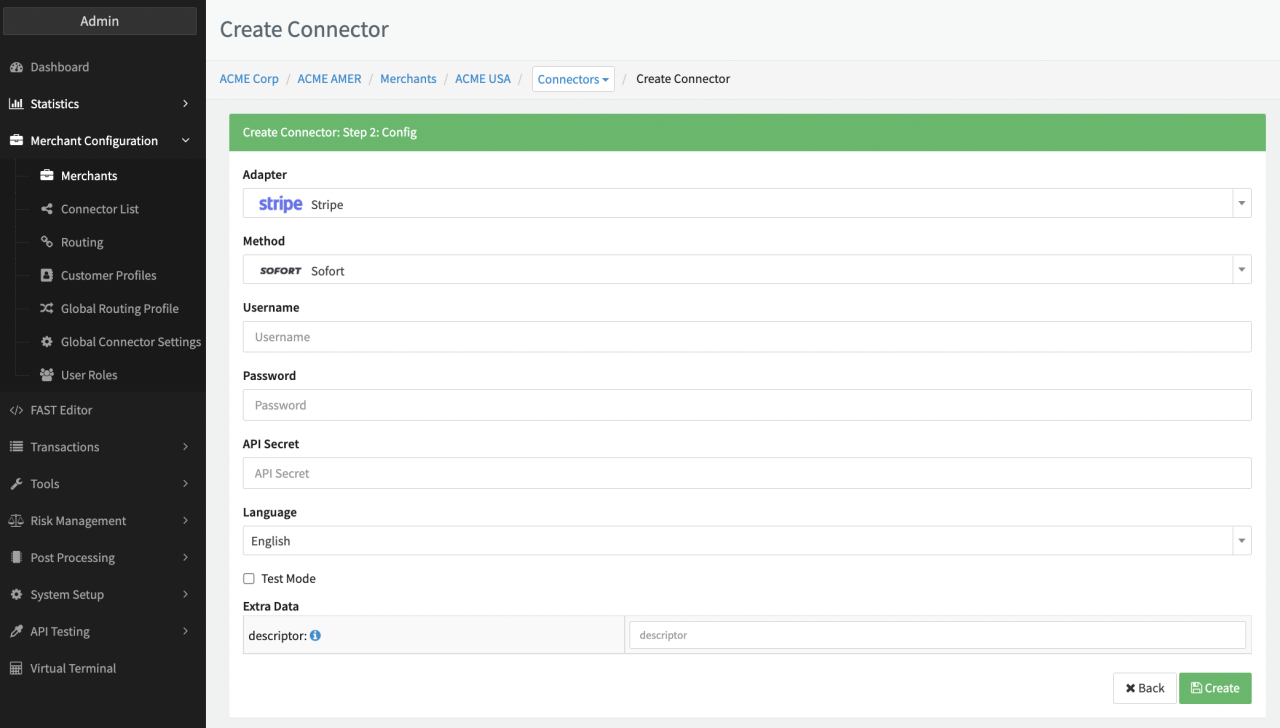
Additional Extra Data is available to be configured:
- Fill in the optional Extra Data: descriptor
- Fill in the mandatory Extra Data: publishableKey (mandatory for Method Creditcard)
- Fill in the mandatory Extra Data: connectAccountId (for Stripe Connect Accounts)
- Fill in the optional Extra Data: currencyForRegister (Method Creditcard - Stripe Elements)
- Fill in the optional Extra Data: registerWithAuthorize: True, False (Method Creditcard - Stripe Elements)
Stripe Creditcard
Configure the following parameters for the Connector (see Connector Detail Overview - Stripe Connect Creditcard - Vault Configuration):
- Fill in the mandatory Stripe Connect Account Key
- Fill in the mandatory API Key
- Select and fill in the optional Descriptor, Static Descriptor, Prefix Descriptor (see Descriptor)
- Enable optional Send final capture field to support partial / final capture
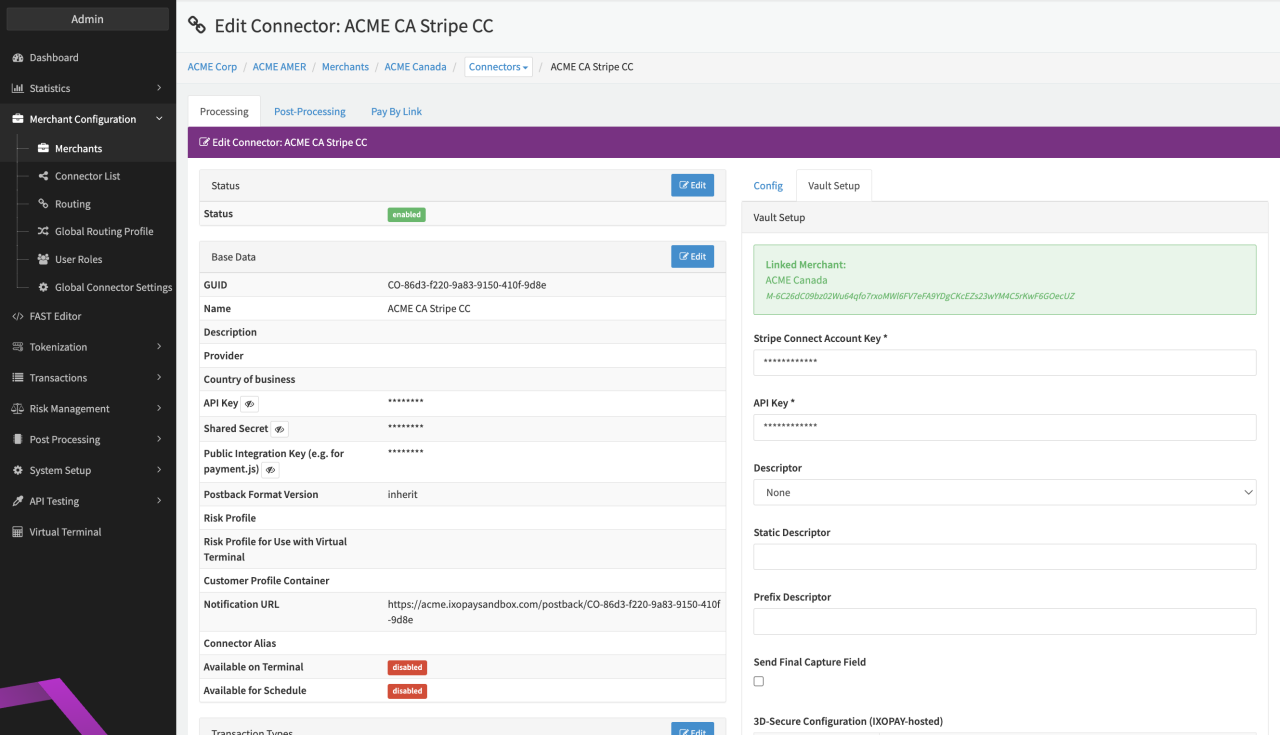
For Transaction types partial capture, make sure the feature is enabled on your Stripe account
(Statement) Descriptor
Keep in mind that statement descriptors need to comply to several requirements:
- Contains only Latin characters.
- Contains between 5 and 22 characters, inclusive.
- Contains at least one letter (if using a prefix and a suffix, both require at least one letter).
- Doesn’t contain any of the following special characters:
<,>,\,',",*. - Reflects your Doing Business As (DBA) name.
- Contains more than a single common term or common website URL. A website URL only is acceptable if it provides a clear and accurate description of a transaction on a customer’s statement.
A static statement descriptor or the shortened descriptor can be configured in Stripe Dashboard "https://dashboard.stripe.com/settings/public" (see Dashboard descriptor and shortened descriptor).
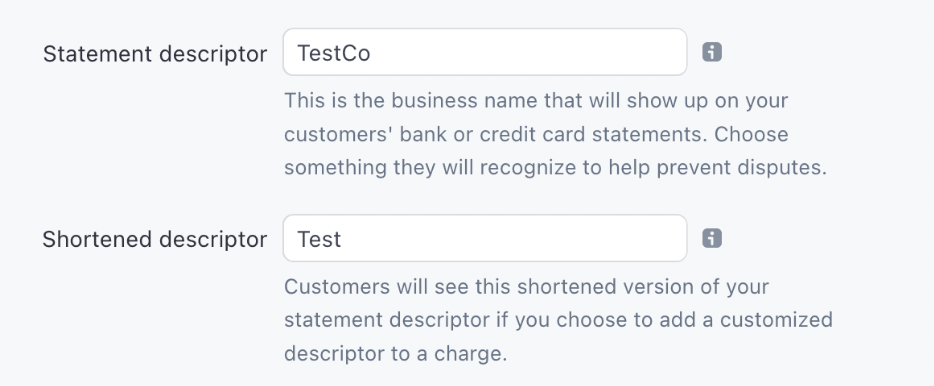
Additionally in the Vault Setup for Stripe you can:
- Select the optional Descriptor - None, Use Transaction Description, Use static Descriptor value (next field), Concatenate Prefix Descriptor with transaction description
- Fill in the conditional Static Descriptor (when Use static Descriptor value is selected)
- Fill in the conditional Prefix Descriptor(when Concatenate Prefix Descriptor is selected)
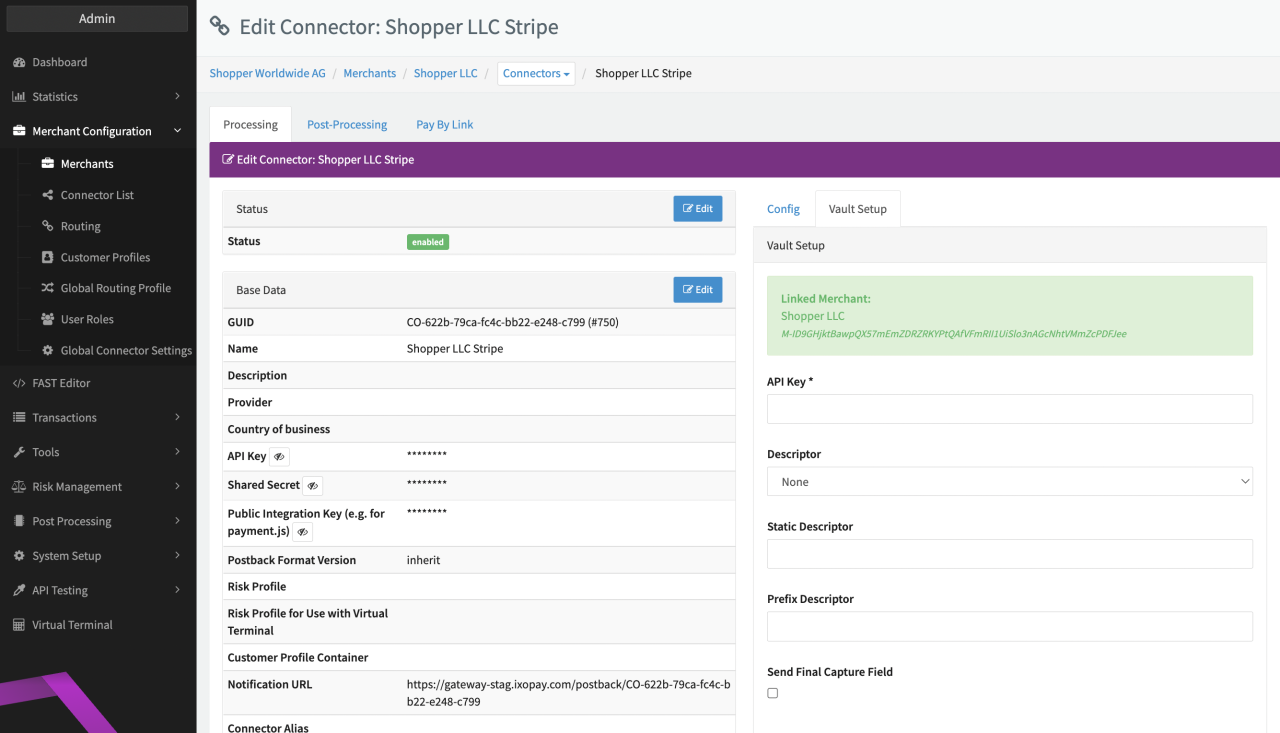
If None is selected the pre-configured Statement Descriptor from the Stripe Dashboard is used.
Set a dynamic statement descriptor by selecting Use Transaction Description. This will use the transaction description (if available) as a statement descriptor.
If you select use static value (next field) the shortened descriptor you have chosen in your Stripe dashboard will be overwritten by the Static Descriptor.
Set a dynamic statement descriptor with prefix by selecting Concatenate Prefix Descriptor with transaction description. This will then concatenate the Prefix Descriptor (provided in the Prefix Descriptor field below) with the transaction description as the statement descriptor.
Keep in mind that the concatenated descriptor must not exceed 22 characters, when composing the Prefix Descriptor otherwise exceeding characters will be cut off.
Furthermore only credit card charges are supported for dynamic suffixes.
Data Fetcher Configuration
You have the option to configure Data Fetchers (see section Enable and Set Up Reconciliation on the Provider Level) either on Provider or on Connector Level, depending on which setup works better for your provider (see Edit Provider).
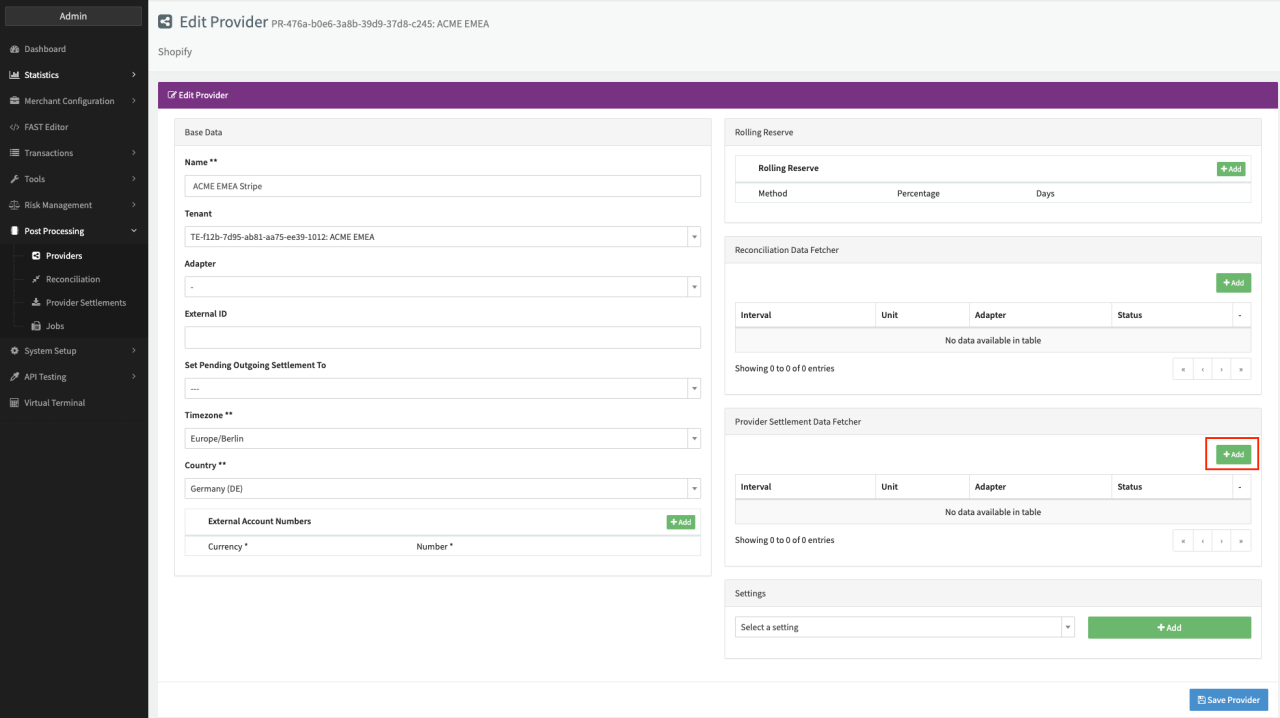
Provider Settlement
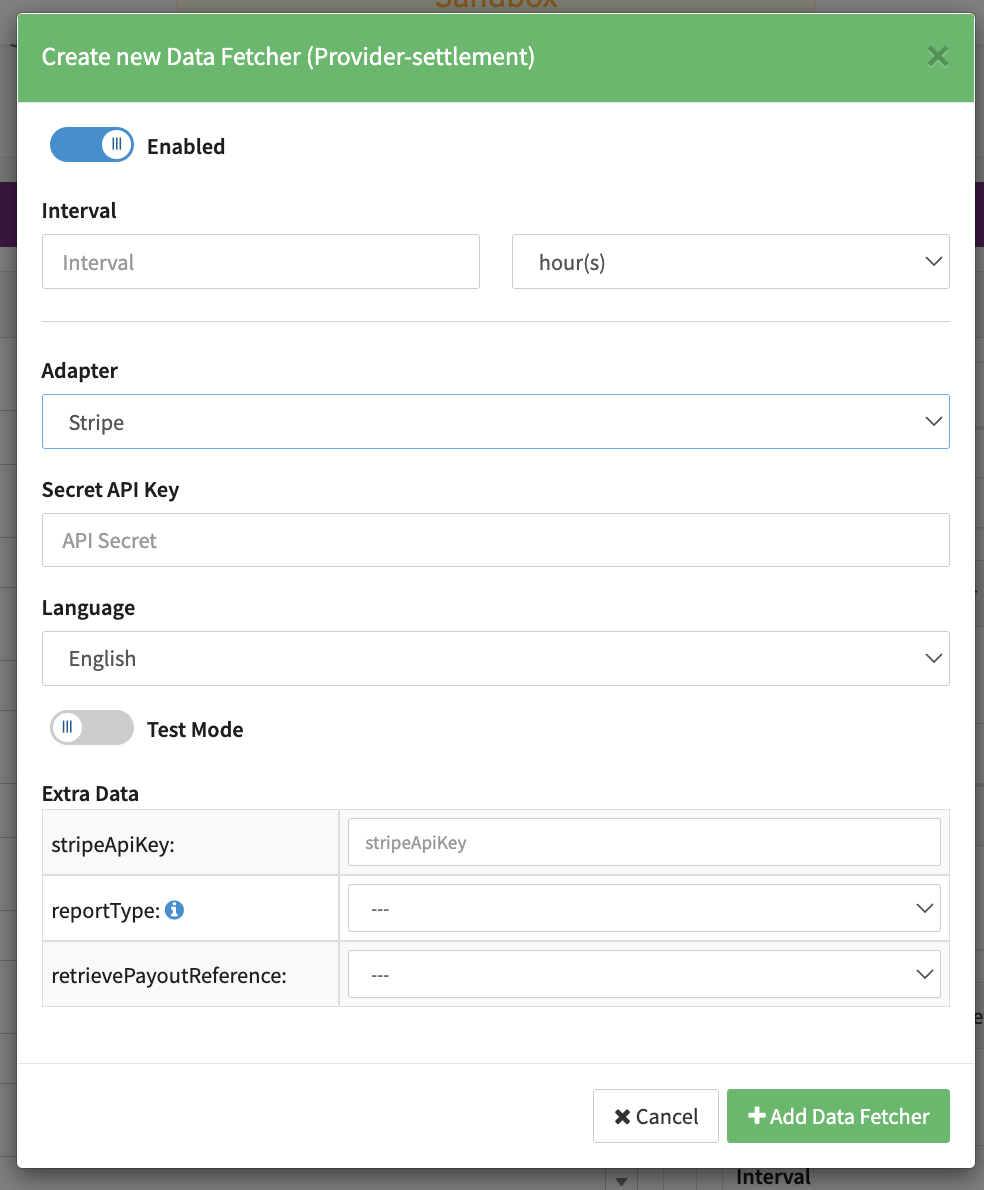
Configure the following Parameters for the Settlements Provider Data Fetcher to fetch Settlement (json format) via an API (see Edit Provider Settlement Data Fetcher Provider Level):
- Fill in the expected Interval in which the Provider Settlement File should be fetched - days, hours
- Select the Adapter Stripe or Stripe Direct
- Enable Testmode to test fetching of Provider Settlements from the Stripe Sandbox (URL used …), disabled the Stripe Production (URL …) environment is used
- Fill in the mandatory Extra Data: stripeApiKey - used for authentication
- Select the optional Extra Data: reportType used to specify the desired settlement report,
if nothing is selected the report type
payout_reconcilication.itemized.5used by default - Select the optional Extra Data: retrievePayoutReference - true, false
Settlement fields
Batch number
In case of payout reconciliation the Stripe's automatic_payout_id as settlement batch number.
In case of fee report fee_report_{date} e.g. fee_report_20240423 as settlement batch number.
Payment reference
With the data fetcher setting "retrievePayoutReference" the payout reference is retrieved and stored the returned value "reference" on the IXOPAY platform side as payment reference.
Fee Report Mapped fields
| Stripe | IXOPAY platform | Default (if not set by Stripe) |
|---|---|---|
incurred_at | Settlement Date | None |
charge_id | Reference ID | None |
refund_id | Reference ID | None |
dispute_id | Reference ID | None |
card_scheme | scheme fee | None |
non_transactional_card_scheme | markup fee | None |
interchange | interchange fee | None |
discount | normal fee | None |
blended_fee | gateway fee | None |
per_auth_fee | gateway fee | None |
per_sale_fee | gateway fee | None |
volume_fee | gateway fee | None |
billing_currency | Transaction Fee Currency | None |
total_amount | Transaction Fee Amount | None |
Settlement Report Mapped fields
| Stripe | IXOPAY platform | Default (if not set by Stripe) |
|---|---|---|
payment_metadata[uuid] | Transaction ID | Null |
automatic_payout_id | Settlement Batch Number | Null |
gross | Settlement Amount | None |
source_id | Reference ID | None |
automatic_payout_effective_at_utc | Settlement Date | None |
currency | Settlement Currency | None |
fee | Settlement Fee Data | No settlement fee data |
description | Line Item Title | None |