Six / PAYONE
Six Elink Creditcard
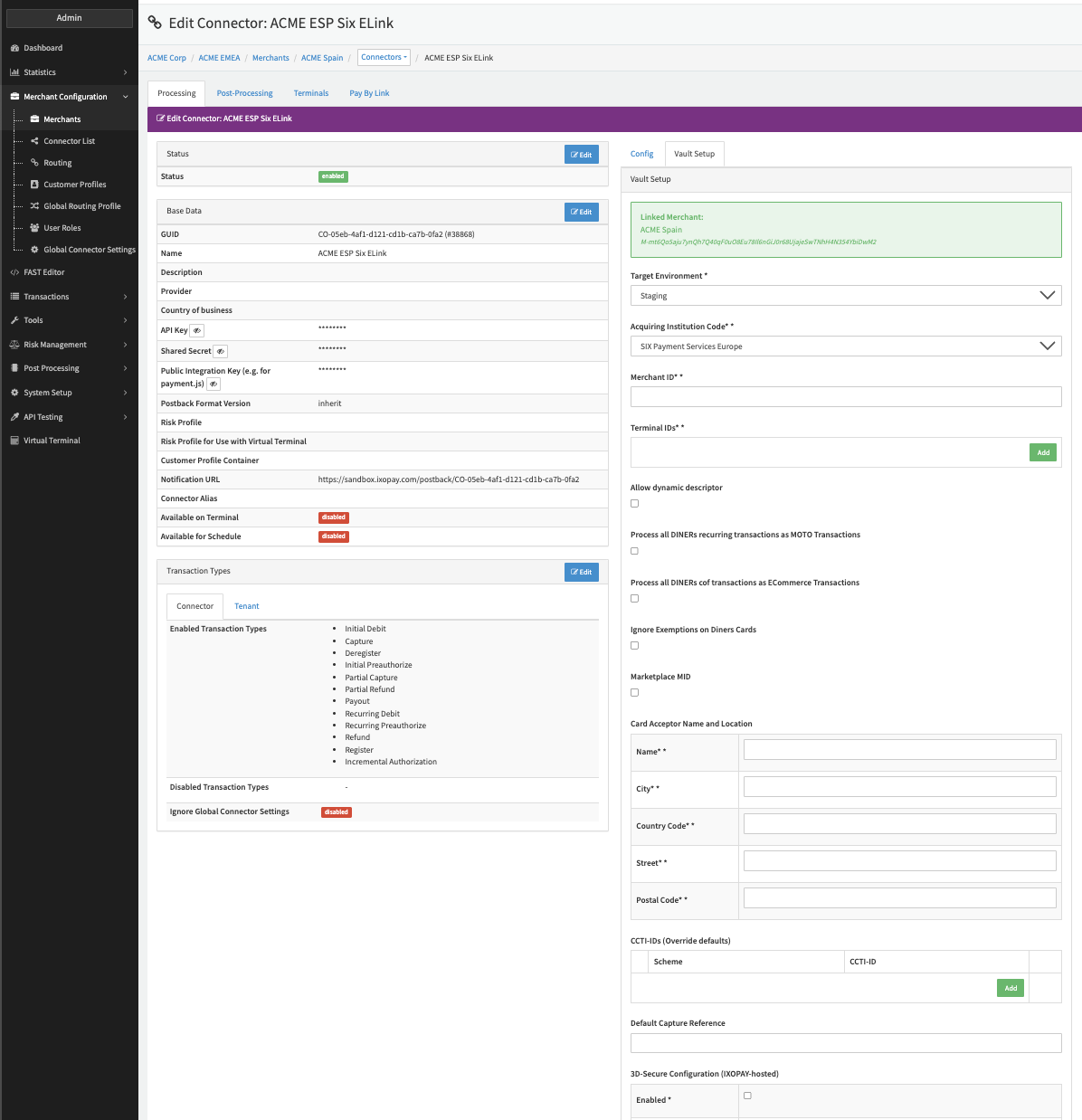
Configure the following parameters for the Connector (see Connector Detail Overview - Six Elink Creditcard - Vault Configuration):
- Select the mandatory Target Environment: Staging, Production
- Fill in the mandatory Acquiring Institution Code: SIX Payment Services Europe, SIX Payment Services Switzerland, SIX Payment Services Austria
- Fill in the mandatory Merchant ID
- Fill in the mandatory Terminal IDs
- Enable the option Allow dynamic descriptor
- Enable the option Process all DINERs recurring transactions as MOTO Transactions
- Enable the option Process all DINERs cof transactions as ECommerce Transactions
- Enable the option Ignore Exemptions on Diners Cards
- Enable the option Marketplace MID
- Fill in the parameters for the Card Acceptor Name and Location
- Fill in the mandatory Name — 1-25 characters
- Fill in the mandatory City — 1-13 characters
- Fill in the mandatory Country Code — two-character, uppercase, alphabetic string (ISO 3166-1 alpha-2 code)
- Fill in the mandatory Street — 1-48 characters
- Fill in the mandatory Postal Code — 1-10 characters
- Add CCTI-IDs (Override defaults) to
- Fill in the Default Capture Reference
Six Push
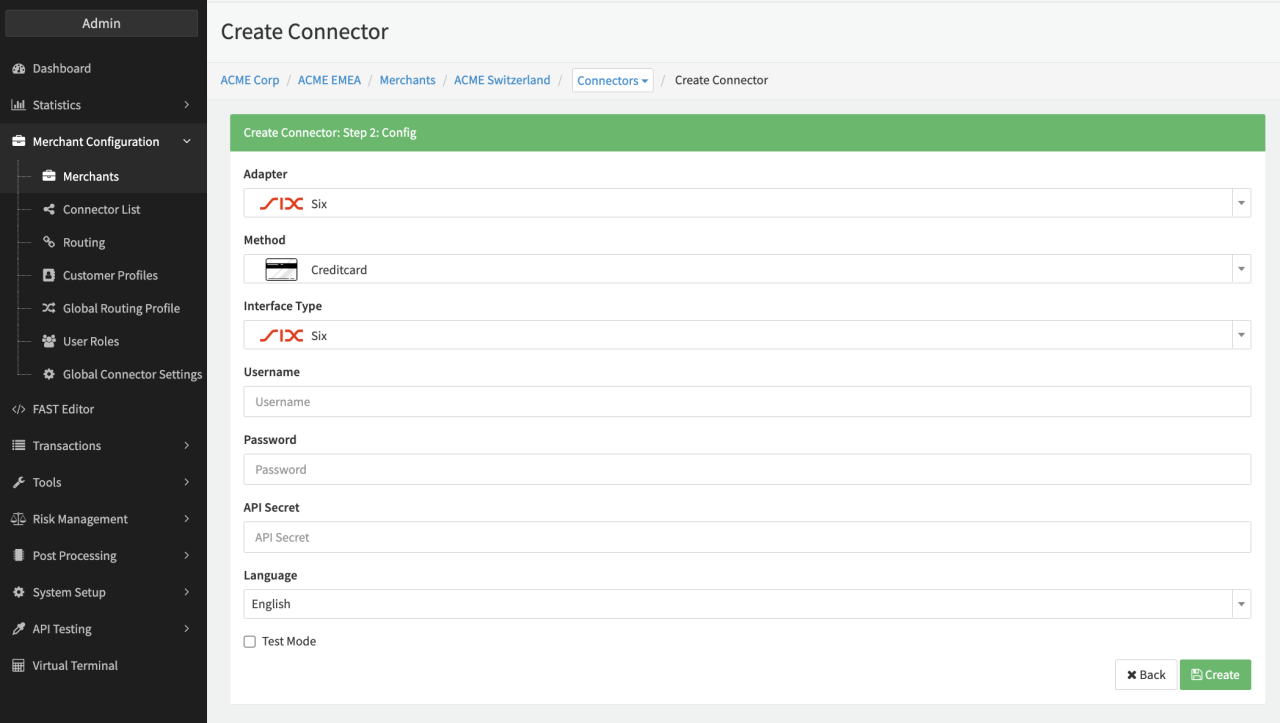
Configure the following parameters for the Connector (see Connector Config - Six Creditcard):
- Fill in the mandatory Username
- Fill in the mandatory Password
- Fill in the mandatory API Secret
Data Fetcher Configuration
You have the option to configure Data Fetchers (see section Enable and Set Up Reconciliation on the Provider Level) either on Provider or on Connector Level, depending on which setup works better for your provider.
Provider Settlement
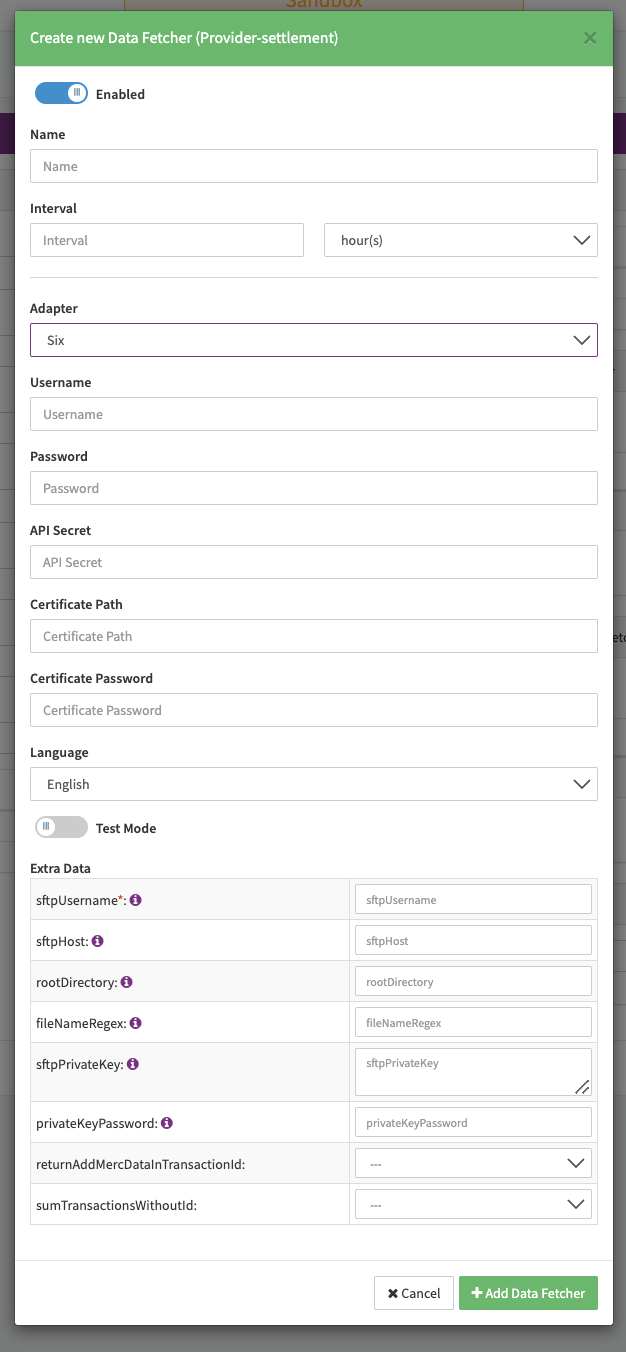
Configure the following Parameters for the Settlements Provider Data Fetcher to fetch Settlement
(xml file with default filename regex is: /\.EVP\.MRXD/) via SFTP (ftservice.six-group.com)
(see Edit Provider Settlement Data Fetcher Provider Level):
- Fill in the optional Name
- Fill in the expected Interval in which the Provider Settlement File should be fetched - days, hours
- Select the Adapter Six
- The Setting Testmode is irrelevant for this adapter
- Fill in the mandatory Extra Data: sftpUsername: used for authentication
- Fill in the mandatory Extra Data: sftpHost: specify the Host used for fetching documents
- Fill in the mandatory Extra Data: rootDirectory: specify the root directory for the files to be fetched
- Fill in the optional Extra Data: fileNameRegex: specify the naming convention of the files to be fetched
- Fill in the optional Extra Data: sftpPrivateKey: used for authentication
- Fill in the Extra Data: privateKeyPassword: used for authentication
- Select the optional Extra Data: returnAddMercDataInTransactionId — True, False
- Select the optional Extra Data: sumTransactionsWithoutId — True, False
Settlement fields
The extSettlingRefNo and the paymentNo are set as settlement number depending on the availability of this field.
Some countries like Austria provide only paymentNo.
The priority is extSettlingRefNo -> paymentNo -> now as Ymd.
Batch Number
The batch number is populated with the filename. It is expected to include a timestamp.
Payment Reference
The payment reference is taken from the parameter paymentNo.
Mapped Fields
We are mapping the following fields from the Provider settlement reports (Provider → IXOPAY platform):
| Provider | IXOPAY platform | default (if not set by Provider) |
|---|---|---|
arn | Settlement ARN | None |
aTrxOC/@c | Settlement currency | None |
aTrxNetSC | Net settlement amount | None |
xRate | Settlement exchange rate | None |
pan | Last 4 digits - Settlement return data | None |
aComEffExclVatSC | Fee amount | None |
aComEffExclVatSC/@c | Fee currency | None |
condCode = 1, 200, 221, 600, 701 | Fee type markup | None |
condCode = 15, 103 | Fee type interchange | None |
condCode = 35, 38 | Fee type scheme | None |
condCode = 55 | Fee type dispute | None |
Payment Date | Settlement date | Now |
paymentNo (see Settlement fields) | Settlement number | None |
extSettlingRefNo (see Settlement fields) | Settlement number | Now as Ymd |
addlMercData | Settlement transaction id | None |
Transaction Types
trxIndicator | Provider | IXOPAY platform | default (if not set by Provider) |
|---|---|---|---|
100 | trxTypeId = 1, 3 | Debit | None |
100 | trxTypeId = 2 | Preauthorize | None |
100 | trxTypeId = 9, 37 | Refund | None |
100 | trxTypeId = 10, 21, 4 | Payout | None |
100 | trxTypeId = 22 | Capture | None |
140 | / | Chargeback | None |
141 | / | Cb-reversal | None |
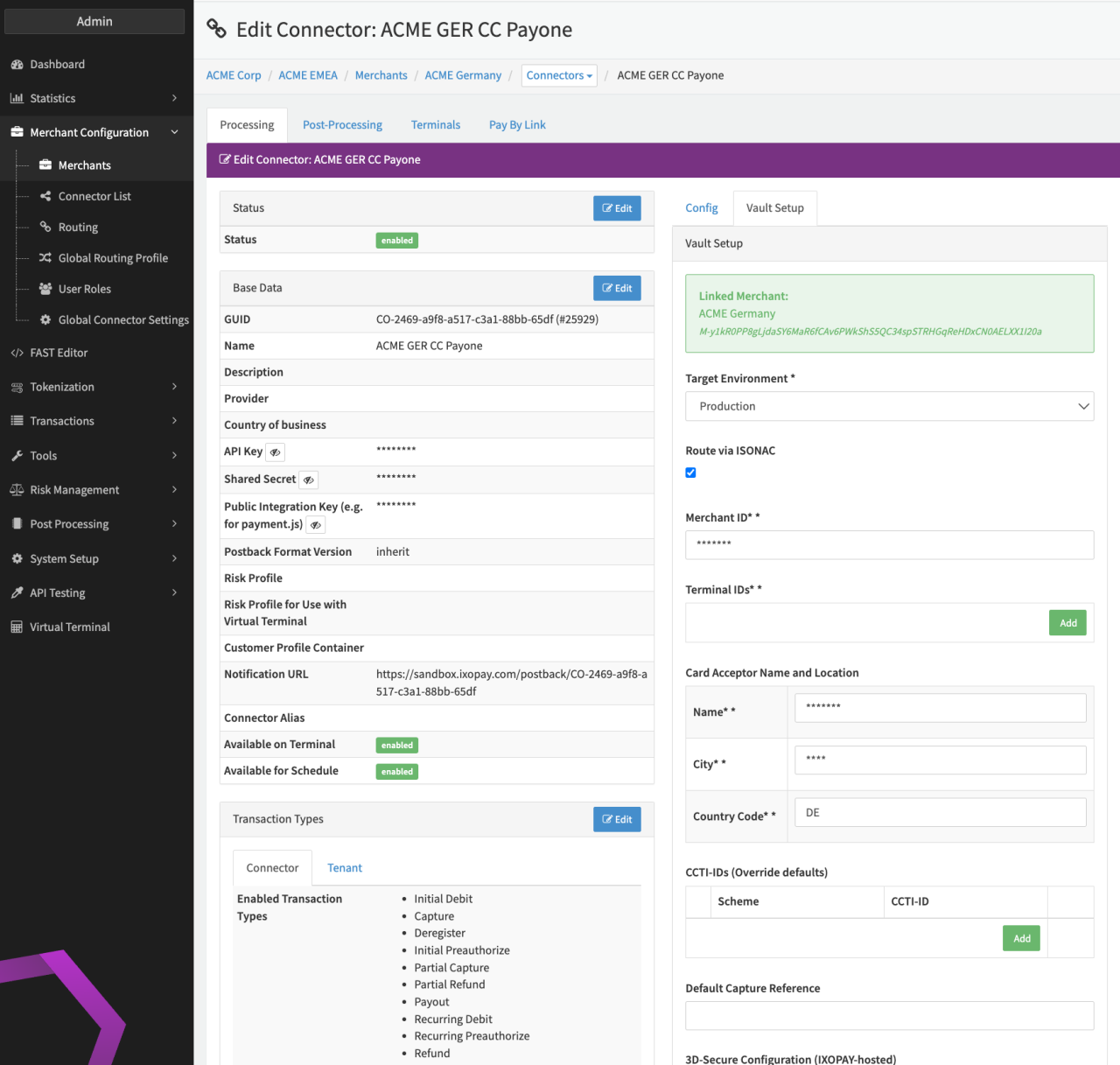
PAYONE Creditcard
Configure the following parameters for the Connector (see Connector Detail Overview - PAYONE Creditcard - Vault Configuration):
- Select the mandatory Target Environment: Dev, Quality, Production
- Select the mandatory option Route via ISONAC
- Fill in the mandatory Merchant ID provided by PAYONE
- Fill in the mandatory Terminal IDs (see also Terminal Setup)
- Fill in the mandatory Card Acceptor Name and Location
- Name
- City
- Country Code (2-character)
- Fill in the optional CCTI-IDs (Override defaults)
- Fill in the optional Default Capture Reference