PPRO
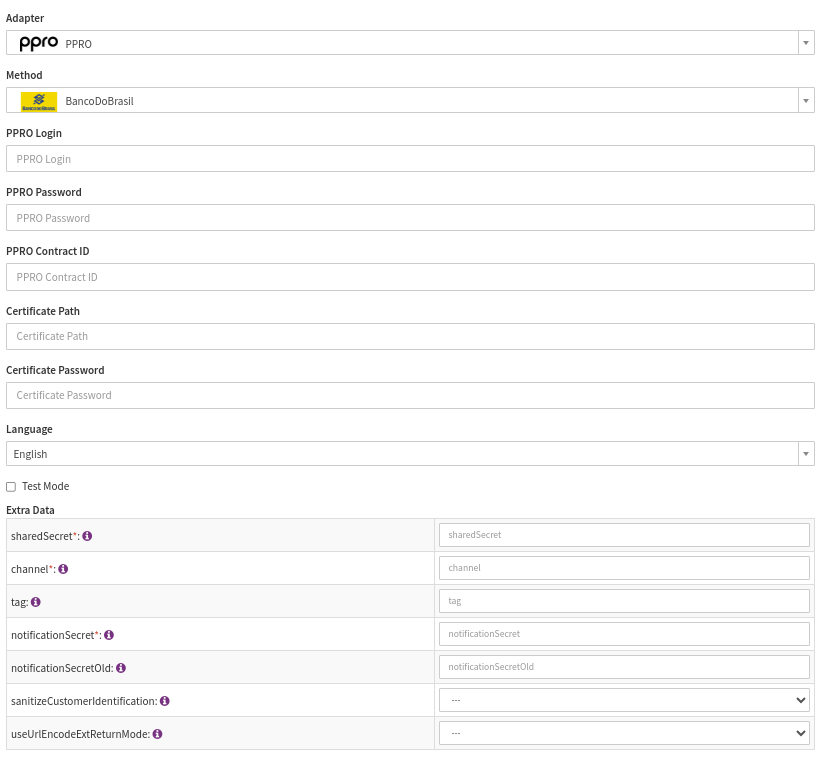
Configure the following parameters for the Connector (see Connector Configuration):
- Fill in the mandatory PPRO Login
- Fill in the mandatory PPRO Password
- Fill in the mandatory PPRO Contract ID — merchant contract identifier
- Fill in the mandatory Certificate Path
- Fill in the mandatory Certificate Password
- Fill in the mandatory Extra Data: sharedSecret
- Fill in the mandatory Extra Data: channel — testchannel for testing and livechannel for production
- Fill in the Extra Data: tag — The tag selects the payment method in the channel that will be used for this transaction. The client will receive a list of valid tags from our boarding team as part of the account credentials.
- Fill in the mandatory Extra Data: notificationSecret
- Fill in the Extra Data: notificationSecretOld
- Select in the Extra Data: sanitizeCustomerIdentification — true, false
- Select in the Extra Data: useUrlEncodeExtReturnMode — true, false
- useUrlEncodeExtReturnMode —
Depending on your configuration with the PSP, this setting may need to be set to true
Set this to true if requests to PPRO return following error "Invalid returnmode, must be urlencodeext"
Data Fetcher Configuration
You have the option to configure Data Fetchers (see section Enable and Set Up Reconciliation on the Provider Level) either on Provider or on Connector Level, depending on which setup works better for your provider (see Edit Provider).
Provider Settlement
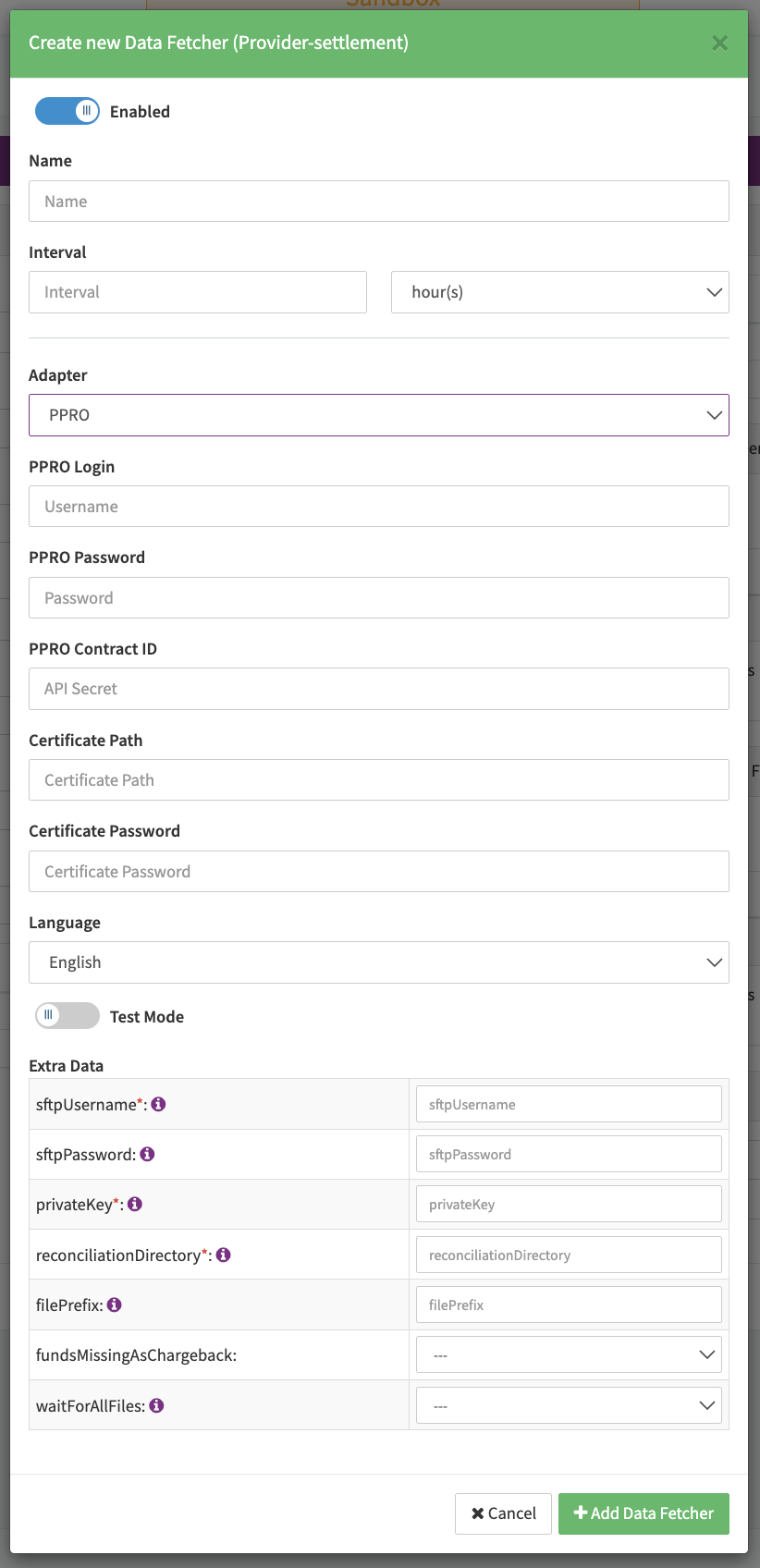
Configure the following Parameters for the Settlements Provider Data Fetcher to fetch Settlement via SFTP:
- Fill in the expected Interval in which the Provider Settlement File should be fetched - days, hours
- Select the Adapter PPRO
- Testmode enabled or disabled fetches Provider Settlements from the PPRO Production (URL sftp.girogate.de) environment
- Fill in the mandatory Extra Data: sftpUser used for authentication
- Fill in the optional Extra Data: sftpPassword used for authentication
- Fill in the mandatory Extra Data: privateKey base64 encoded parameter used for authentication
- Fill in the optional Extra Data: reconciliationDirectory used to specify the directory where the files are deposited
- Fill in the optional Extra Data: filePrefix specify a filename prefix. If a prefix is set, only files containing the prefix will be processed
- Select the optional Extra Data: fundsMissingAsChargeback - true, false
- Select the optional Extra Data: waitForAllFiles — true, false
Reconciliation
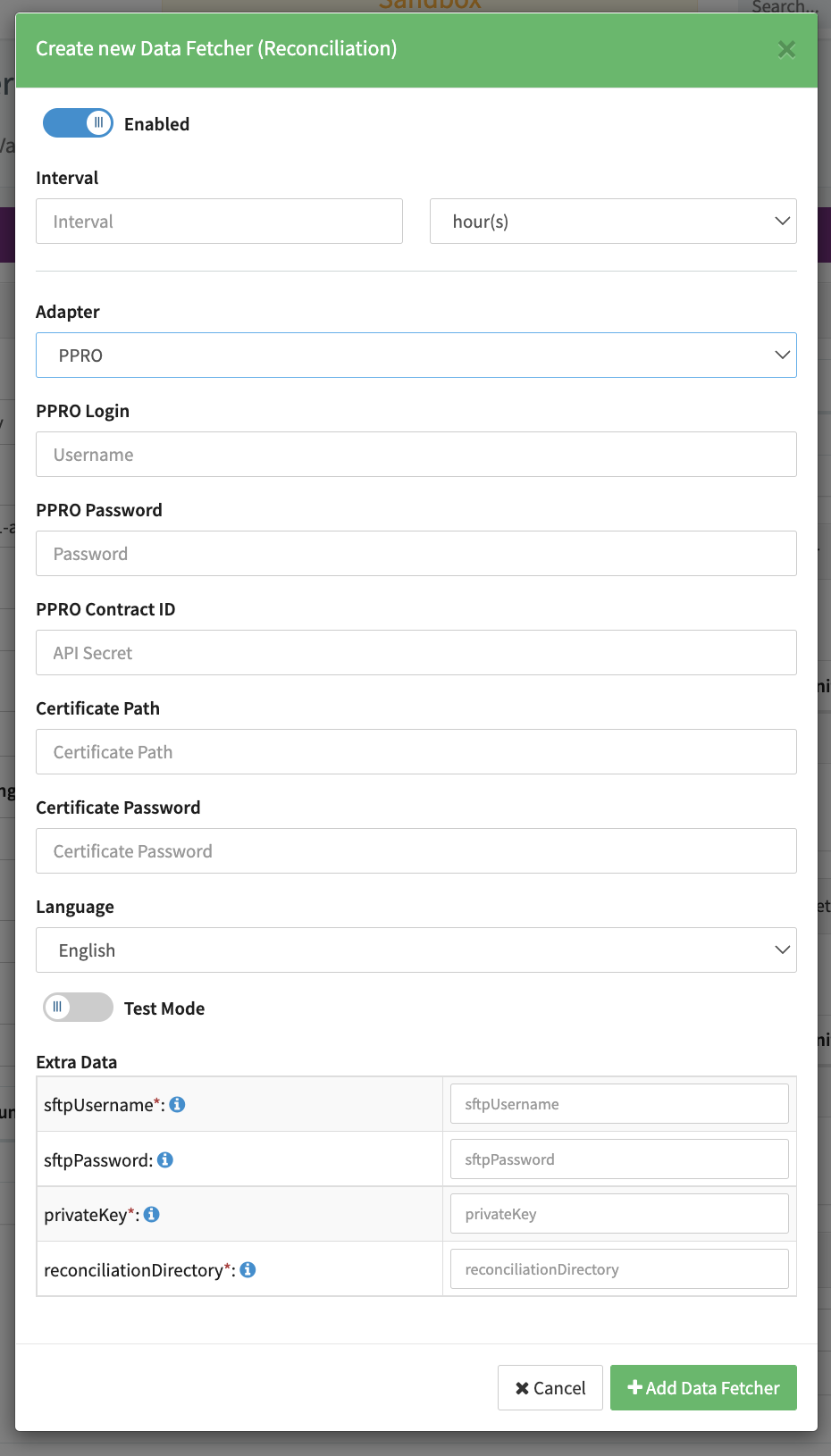
Configure the following Parameters for the Reconciliation Data Fetcher to fetch Reconciliation (csv format) via SFTP (see Reconciliation Data Fetcher Provider Level):
- Fill in the expected Interval in which the Reconciliation File should be fetched - days, hours
- Select the Adapter PPRO
- Testmode enabled or disabled only to fetches Reconciliation files from the PPRO Production (URL sftp.girogate.de) environment
- Fill in the mandatory Extra Data: sftpUsername used for authentication
- Fill in the optional Extra Data: sftpPassword: used for authentication
- Fill in the mandatory Extra Data: privateKey base64 encoded parameter used for authentication
- Fill in the optional Extra Data: reconciliationDirectory used to specify the directory where the files are deposited