Peach Payments
Peach Payments Non-PCI
The Peach Payments Non-PCI connector (adapter Peach) processes redirect-based payments via Peach's hosted Checkout page and real-time EFT payouts via the Peach Payouts API:
- PayShap (ZAR): debits and refunds
- MCB Juice and Blink by Emtel (MUR): debits
- EFT (ZAR): payouts to South African bank accounts
For transaction types, request fields, response data, error codes and examples see the adapter-specific API documentation.
Connector Configuration
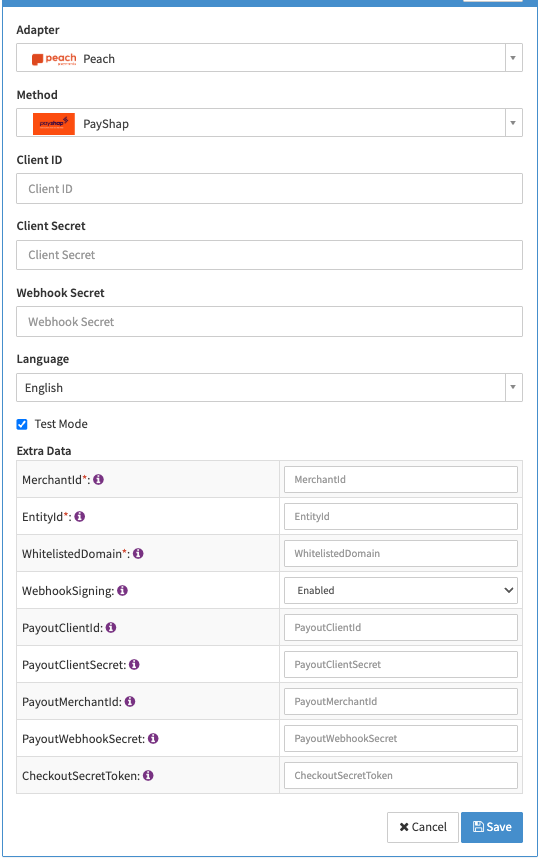
Configure the following parameters for the Connector (see Connector Config - Peach Payments Non-PCI):
- Select the mandatory Method: the payment method processed by this connector (PayShap, MCB Juice, Blink by Emtel or EFT)
- Fill in the mandatory Client ID: the Checkout API Client ID from the Peach Payments Dashboard
- Fill in the mandatory Client Secret: the Checkout API Client Secret
- Fill in the conditional Webhook Secret: mandatory if Extra Data: WebhookSigning is Enabled. It is also needed to receive encrypted webhooks, which are always verified.
- Enable Test Mode to process transactions against the Peach sandbox environment (https://testsecure.peachpayments.com, https://sandbox-dashboard.peachpayments.com, https://testapi.peachpayments.com, https://sandbox-payouts.peachpayments.com). If disabled, the Peach live environment (https://secure.peachpayments.com, https://dashboard.peachpayments.com, https://api.peachpayments.com, https://payouts.peachpayments.com) is used.
- Fill in the mandatory Extra Data: MerchantId: the Peach Merchant ID
- Fill in the mandatory Extra Data: EntityId: the Peach Entity ID (channel)
- Fill in the mandatory Extra Data: WhitelistedDomain: the domain (Origin/Referer) that initiates the checkout. The same domain must also be allowlisted in the Peach Payments Dashboard.
- Select the optional Extra Data: WebhookSigning (Enabled, Disabled): defaults to Enabled. Set it to Disabled only if webhook signing is not enabled in the Peach Payments Dashboard. This setting applies to Checkout webhooks (debits and refunds). For payout webhooks see Payouts Webhook Signing Secret.
- Fill in the optional Extra Data: PayoutClientId, Extra Data: PayoutClientSecret and Extra Data: PayoutMerchantId: see Payout Credentials
- Fill in the conditional Extra Data: PayoutWebhookSecret (
whsec_…, provided by Peach support): mandatory for payouts if Extra Data: WebhookSigning is Enabled, recommended otherwise. See Payouts Webhook Signing Secret - Fill in the conditional Extra Data: CheckoutSecretToken: mandatory for refunds. Copy it from the Peach Payments Dashboard (Checkout → API keys). It is neither the Webhook Secret nor the Client Secret.
Payout Credentials
Peach can issue separate credentials for the Payouts API (Peach Payments Dashboard → Payouts → Settings). Fill in Extra Data: PayoutClientId, Extra Data: PayoutClientSecret and Extra Data: PayoutMerchantId only in that case.
- Each payout credential that is filled in is used for payouts.
- Each payout credential that is left empty falls back to its Checkout value (Client ID, Client Secret, Merchant ID).
Payouts Webhook Signing Secret
Payout webhooks are only applied after their signature has been verified with the Extra Data: PayoutWebhookSecret. Unlike the Checkout credentials, this secret has no fallback. How payouts behave depends on the Extra Data: WebhookSigning setting:
| WebhookSigning | PayoutWebhookSecret | Behavior |
|---|---|---|
| Enabled | Filled in | Payout webhooks are verified and applied. |
| Enabled | Empty | Payouts are rejected with a configuration error before they are sent to Peach. |
| Disabled | Filled in | Payout webhooks are verified and applied. |
| Disabled | Empty | Payout webhooks are ignored. The payout status is only updated by the periodic status inquiry. |
A payout webhook that fails verification is never applied.
If Extra Data: WebhookSigning is Enabled, the Checkout Webhook Secret must also be filled in. Otherwise payouts are rejected with a configuration error before they are sent to Peach, even when the Extra Data: PayoutWebhookSecret is filled in.
Fill in the Extra Data: PayoutWebhookSecret whenever you use payouts, even if Extra Data: WebhookSigning is Disabled. Without it, payout status changes are only picked up by the next status inquiry instead of immediately via webhook.
Webhook Configuration
To receive status notifications, register the connector's Notification URL as a webhook in the Peach Payments Dashboard. The URL can be found in your Connector edit screen. Peach accepts one webhook URL per account. New webhooks are inactive until you activate them.
Example
Notification URL: https://gateway.ixopay.com/postback/CO-XXXX-XXXX-XXXX