Paynetics
If you want to use this adapter, please contact your Customer Success Manager directly, or contact our Support Team in the IXOPAY Customer Experience Portal.
Paynetics Creditcard
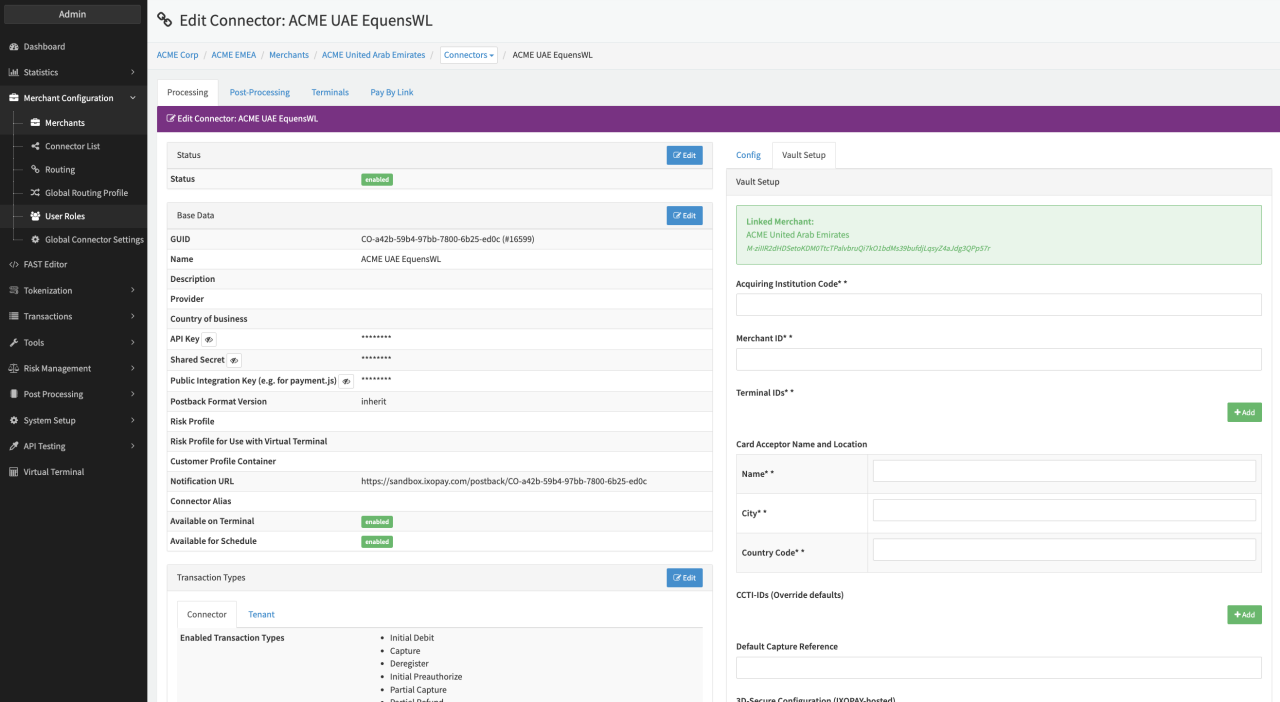
Configure the following parameters for the Connector (see Connector Detail Overview - Paynetics Creditcard - Vault Configuration):
- Fill in the mandatory Acquiring Institution Code
- Fill in the mandatory Merchant ID
- Fill in the mandatory Terminal IDs
- Fill in the mandatory Card Acceptor Name and Location parameters:
- Fill in the mandatory Name
- Fill in the mandatory City
- Fill in the mandatory Country Code
- Fill in the optional CCTI-IDs (Override defaults)
- Fill in the optional Default Capture Reference
Data Fetcher Configuration
You have the option to configure Data Fetchers (see section Enable and Set Up Reconciliation on the Provider Level) either on Provider or on Connector Level, depending on which setup works better for your provider.
Provider Settlement
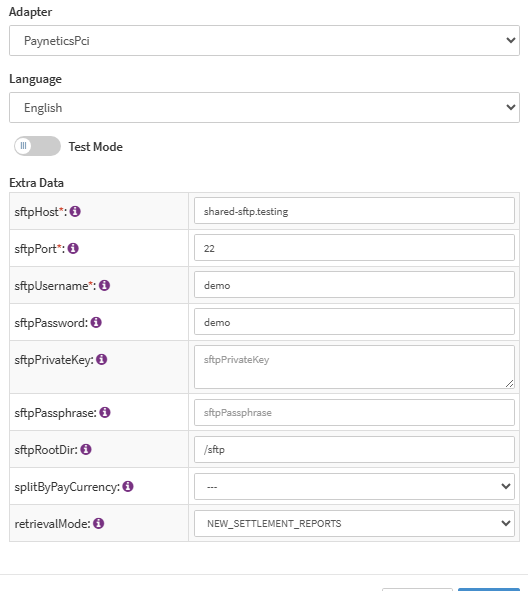
Configure the following Parameters for the Settlements Provider Data Fetcher to fetch Settlements (see: Provider Settlement Data Fetcher Provider Level)
- Fill in the optional Name
- Fill in the expected Interval in which the Provider Settlement File should be fetched - days, hours
- Select the Adapter PayneticsPci
- Fill in the mandatory Extra Data: sftpHost
- Fill in the mandatory Extra Data: sftpPort
- Fill in the mandatory Extra Data: sftpUsername
- Fill in the optional Extra Data: sftpPassword
- Fill in the optional Extra Data: sftpPrivateKey
- Fill in the optional Extra Data: sftpPassphrase
- Fill in the optional Extra Data: sftpRootDir (default:
/) - Select the option Extra Data: splitByPayCurrency - true, false. If set to true the incoming settlement can be split into multiple settlements per incoming pay currency. This setting also alters the settlement batch number. Only applies when retrievalMode is
LEGACY_SETTLEMENT_REPORTS- it has no effect inNEW_SETTLEMENT_REPORTS, see New Settlement Reports Mode below. - Select the optional Extra Data: retrievalMode -
LEGACY_SETTLEMENT_REPORTS(default) orNEW_SETTLEMENT_REPORTS. Controls which settlement file format and parsing logic is used, see Settlement fields (legacy) vs. New Settlement Reports Mode below.
The settlement retrieval fetches the "Posting"-File first before fetching related "Payout" file (same filename except with "Payout" instead of "Posting").
- Regex Posting File:
/.-Posting-.*\.*csv$/
The Provider Settlement retrievalMode documented here (LEGACY_SETTLEMENT_REPORTS / NEW_SETTLEMENT_REPORTS) is a separate setting from the Reconciliation Data Fetcher's own retrievalMode below (LEGACY_POF / NEW_REPORTS). They share a name but control different, unrelated features - one governs settlement file parsing, the other governs reconciliation file parsing.
New Settlement Reports Mode
(retrievalMode = NEW_SETTLEMENT_REPORTS)
When Extra Data: retrievalMode is set to NEW_SETTLEMENT_REPORTS, settlement files are parsed using Paynetics' newer Posting/Payout report format, classifying rows by Transaction Code (TXN-Code) instead of by description text.
File naming and batching
Files must match the pattern:
{MerchantName}_PayoutReport-Posting-{YYYY-MM-DD}.csv
{MerchantName}_PayoutReport-Payout-{YYYY-MM-DD}.csv
For example: ExampleMerchant_PayoutReport-Posting-2022-07-07.csv
The settlement batch number is payout-{MerchantName}-{settlement date}, where {MerchantName} is taken from the file name (not from the MerchantName column inside the CSV), and {settlement date} is formatted as YYYYMMDD without dashes - e.g. for ExampleMerchant_PayoutReport-Posting-2022-07-07.csv the batch number is payout-ExampleMerchant-20220707.
Extra Data: splitByPayCurrency does not apply in this mode. There is always exactly one batch per Posting/Payout file pair, regardless of that setting - batches are never split by currency here. This is not the same thing as the Payout report's per-currency aggregation described below: multiple currencies produce multiple line items within that one batch, not multiple batches.
Posting report
Each row's TXN-Code determines what it becomes. Settlement transactions:
| TXN-Code | Description | Mapped to |
|---|---|---|
| 1200 | Sales Draft | Debit settlement |
| 1410 | Credit Voucher | Refund settlement |
| 1380 | Debit to merchant | Chargeback settlement |
| 1280 | Credit to merchant | Chargeback-reversal settlement |
Fees (created only when the fee amount is non-zero; amount/currency use SettlementAmount/SettlementCurrency, falling back to ProcAmount/ProcCurrency if unset):
| TXN-Code | Description | Fee Category | Amount Sign |
|---|---|---|---|
| 2300 | Merchant Service Charge | Markup Fee | + |
| 2310, 2570 | Transaction Fee | Transaction Fee | + |
| 2330 | Chargeback Fee | Chargeback Fee | + |
| 2450 | Refund Fee | Transaction Fee | + |
| 2700 | MIF++ Fee, Credit | Interchange Fee | + |
| 2900 | MIF Fee, Debit | Interchange Fee | − |
| 2930 | Approval Authentication Fee | Transaction Fee | + |
| 2940 | Decline Authentication Fee | Rejected-Transaction Fee | + |
| 2950 | Monthly Fee | Service Fee | + |
| 2960 | Retrieval Request Fee | Provider Fee | + |
| 2970 | Account Setup Fee | Service Fee | + |
| 2980 | Fraud Handling Fee | Provider Fee | + |
| 2360 | Other Fee (catch-all) | Unknown | + |
| 2480 | Other VISA Fees | Card Scheme Fee | + |
| 5820 | Wire Fee | Wire Transfer Fee | + |
| 5620 | Wire Fee Reversal | Wire Transfer Fee | − |
| 13 | Currency Exchange Loss | FX Gain/Loss | + |
| 2730, 2740, 2750, 2760, 2770, 2780 | Reversals of 2930/2940/2950/2960/2970/2980 respectively | Same category as fee reversed | − |
Each fee line item carries a descriptive title (the TXN-Code description) so multiple fees mapped to the same category can be told apart.
Rows ignored on purpose:
| TXN-Code | Description | Reason |
|---|---|---|
| 9000 | Balance before payments | Informational only, no money movement |
| 9010 | Balance after payments | Informational only, no money movement |
| 9020 | Rolling Reserve Payout | Already covered by the Payout report |
| 6100, 6110, 6200, 6300, 6310, 6400 | Internal transfer-balance codes | Business handling not yet confirmed with Paynetics |
Unsupported TXN-Codes are recorded as unprocessable settlement items with code, description, amount, and currency information for manual review.
Payout report
The Payout report is aggregated per currency using the Pay Currency column.
Amounts from different currencies are never merged.
| Column | Mapped to |
|---|---|
| Net Amount | Actual Net Settlement Amount (one line item per currency) |
| Rolling Reserve Amount | Rolling Reserve - Deducted (summed per currency) |
| Rolling Release Amount | Rolling Reserve - Released/Payout (summed per currency) |
| Custom Fee Amount | Unknown Fee, titled "Custom Fee" (summed per currency) |
| Actual Pay Amount | Not used - always empty/zero in production files |
If a given amount sums to zero for a currency, no line item is created for it.
Data quality
If a file is missing a required column, or a data row has a malformed amount, currency, or date, that row (or, for a missing/incorrect header, the whole file) is recorded as an unprocessable settlement item with a specific reason (e.g. "Missing PayDate", "Invalid SettlementAmount", "Unsupported TXN-Code 1340") rather than causing the whole import to fail silently. These appear in the Provider Settlement admin view for manual review.
Reconciliation
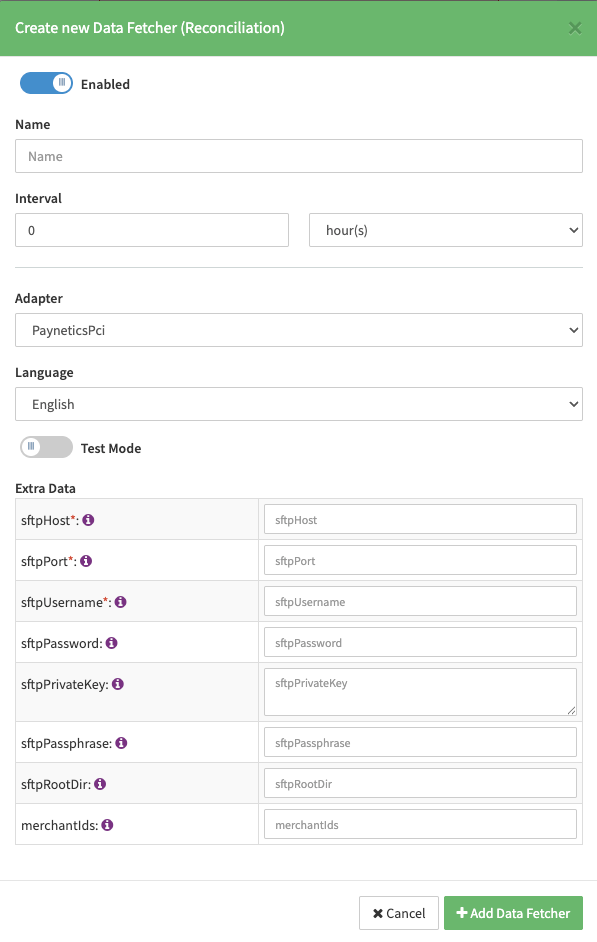
Configure the following Parameters for the Reconciliation Data Fetcher to fetch Reconciliations
(see: Reconciliation Data Fetcher Provider Level)
- Fill in the optional Name
- Fill in the expected Interval in which the Reconciliation File should be fetched - days, hours
- Select the Adapter PayneticsPci
- Fill in the mandatory Extra Data: sftpHost
- Fill in the mandatory Extra Data: sftpPort
- Fill in the mandatory Extra Data: sftpUsername
- Fill in the optional Extra Data: sftpPassword
- Fill in the optional Extra Data: sftpPrivateKey
- Fill in the optional Extra Data: sftpPassphrase
- Fill in the optional Extra Data: sftpRootDir (default:
/) - Fill in the optional Extra Data: merchantIds - Comma-separated list of merchant IDs to include. Detail records with any other merchant ID (3rd column) are excluded.
The filename must contain 1602_PAYNETICS_POF. to be retrieved.
Settlement fields
Applies when Extra Data: retrievalMode is left at the default LEGACY_SETTLEMENT_REPORTS. For NEW_SETTLEMENT_REPORTS, see New Settlement Reports Mode above.
Batch Number
The batch number "MerchantName"-"SettlementDate" or "MerchantName"-"PayCurrency"-"SettlementDate"
Mapped Fields
We are mapping the following fields from the settlement reports (Provider → IXOPAY platform):
| Provider | IXOPAY platform | default (if not set by Provider) |
|---|---|---|
| MerchantTransactionRef | Transaction UUID | None |
| SettlementAmount | Settlement Amount | None |
| SettlementCurrency | Settlement Currency | None |
| Merchant Service Charge (MSC) Debit | markup fee | None |
Settlement
| Provider | IXOPAY platform | default (if not set by Provider) |
|---|---|---|
| RollingReserveAmount | Amount | None |
| RollingReleaseAmount | Amount for extra RR | None |
| PayCurrency | Currency | None |
Payout (Rolling Reserve)
CardData as CreditCardData (Reconciliation)
| Provider | IXOPAY platform | default (if not set by Provider) |
|---|---|---|
| cardNumber | FirstSixDigits | |
| cardNumber | LastFourDigits | |
| expirationDate | ExpiryYear | |
| expirationDate | ExpiryMonth | |
| cardTypeGroup | Type | |
| cardHolderCountryCode | Country |
ICFee - interchangeAmount as TransactionFeeData (Reconciliation)
| Provider | IXOPAY platform | default (if not set by Provider) |
|---|---|---|
| calculated with interchangeAmount, interchangeAmountSign, interchangeAmountExponent | FeeAmount | |
| interchangeAmountCurrCode | FeeCurrency |
Transaction: transactionClass "P" as ReconciliationTransaction (Reconciliation)
| Provider | IXOPAY platform | default (if not set by Provider) |
|---|---|---|
| additionalMerchantData | TransactionId | |
| calculated with amount, amountSign, amountExponent | Amount | |
| currencyCode | Currency | |
| transactionDateTime | TransactionDate | |
| arn | Arn | |
| rrn | Rrn | |
| approvalCode | AuthCode | |
| transactionCategory ‘SALES’ | Type TYPE_CAPTURE | |
| transactionCategory ‘CREDIT_VOUCHER’ | Type TYPE_REFUND |
transactionClass "C" or "B" as ChargebackReversal (reversalFlag "Y") or Chargeback (Reconciliation)
| Provider | IXOPAY platform | default (if not set by Provider) |
|---|---|---|
| internalEWLReferenceNumber (ChargebackReversal) | ReferenceId | |
| caseID (ChargebackReversal) | ExtraData[caseId] | |
| transactionDateTime (ChargebackReversal) | ReversalDateTime | |
| reasonCode (mapped) (ChargebackReversal) | ReversalReason | |
| additionalMerchantData (ChargebackReversal) | OriginalTransactionId | |
| cardSchemeCBReference (Chargeback) | ReferenceId | |
| approvalCode (Chargeback) | AuthCode |