Kalixa/PXP
Creditcard
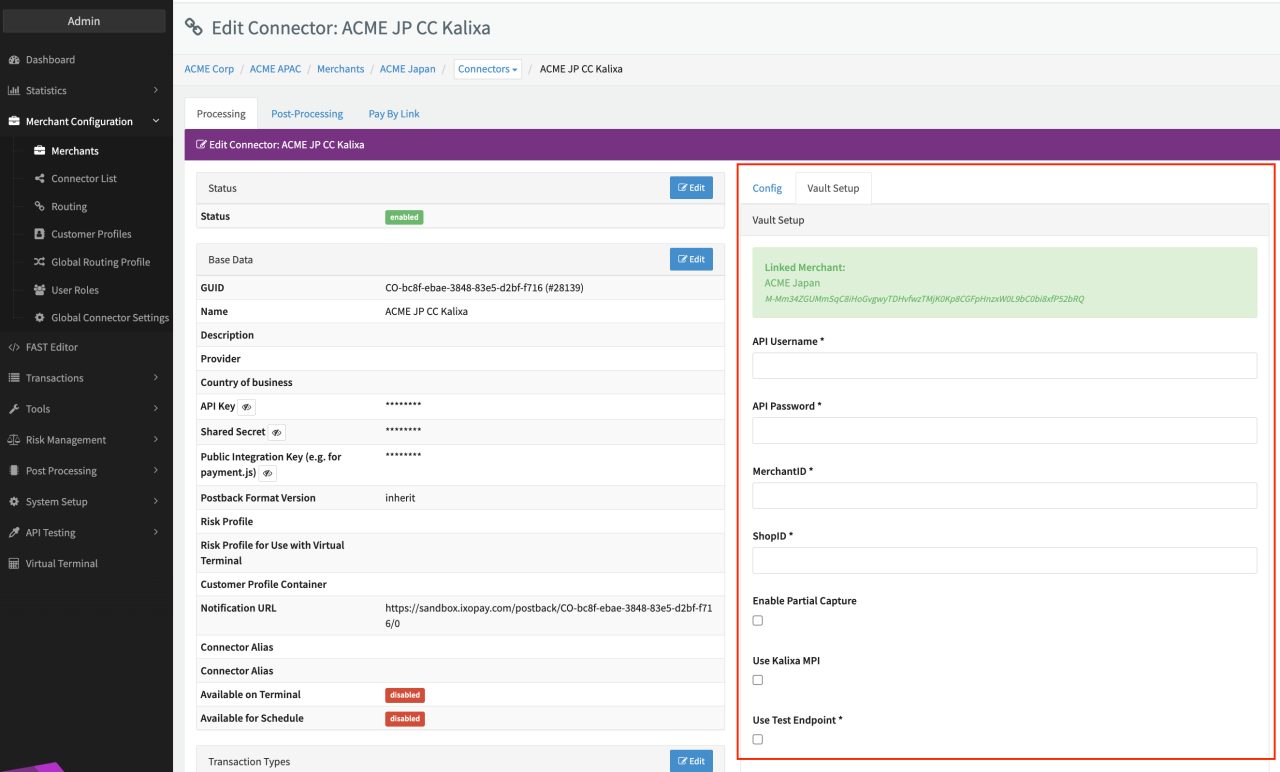
Configure the following parameters for the Connector (see Connector Detail Overview - Kalixa Creditcard - Vault Configuration):
- Fill in the mandatory API Username
- Fill in the mandatory API Password
- Fill in the mandatory MerchantID
- Fill in the mandatory ShopID
- Enable Partial Capture to enable partial capture transaction types
- Use Test Endpoint
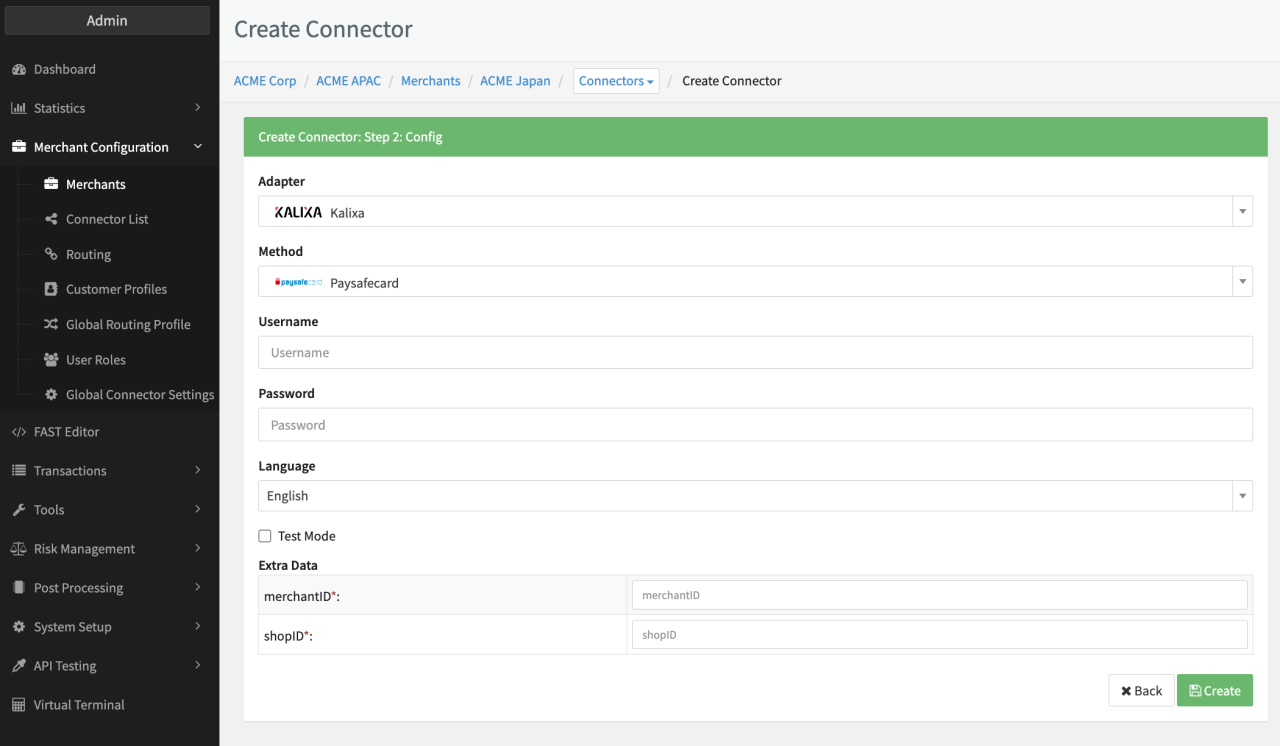
Configure the following parameters for the Connector (see Connector Config - Kalixa):
- Fill in the mandatory Username Merchant’s account name.
- Fill in the mandatory Password Merchant’s account password.
- Fill in the mandatory Extra Data: merchantID Unique ID to identify the Merchants. Generated and provided by PSP.
- Fill in the mandatory Extra Data: shopID The ID of the shop.
Data Fetcher Configuration
You have the option to configure Data Fetchers (see section Enable and Set Up Reconciliation on the Provider Level) either on Provider or on Connector Level, depending on which setup works better for your provider (see Edit Provider).
Provider Settlement
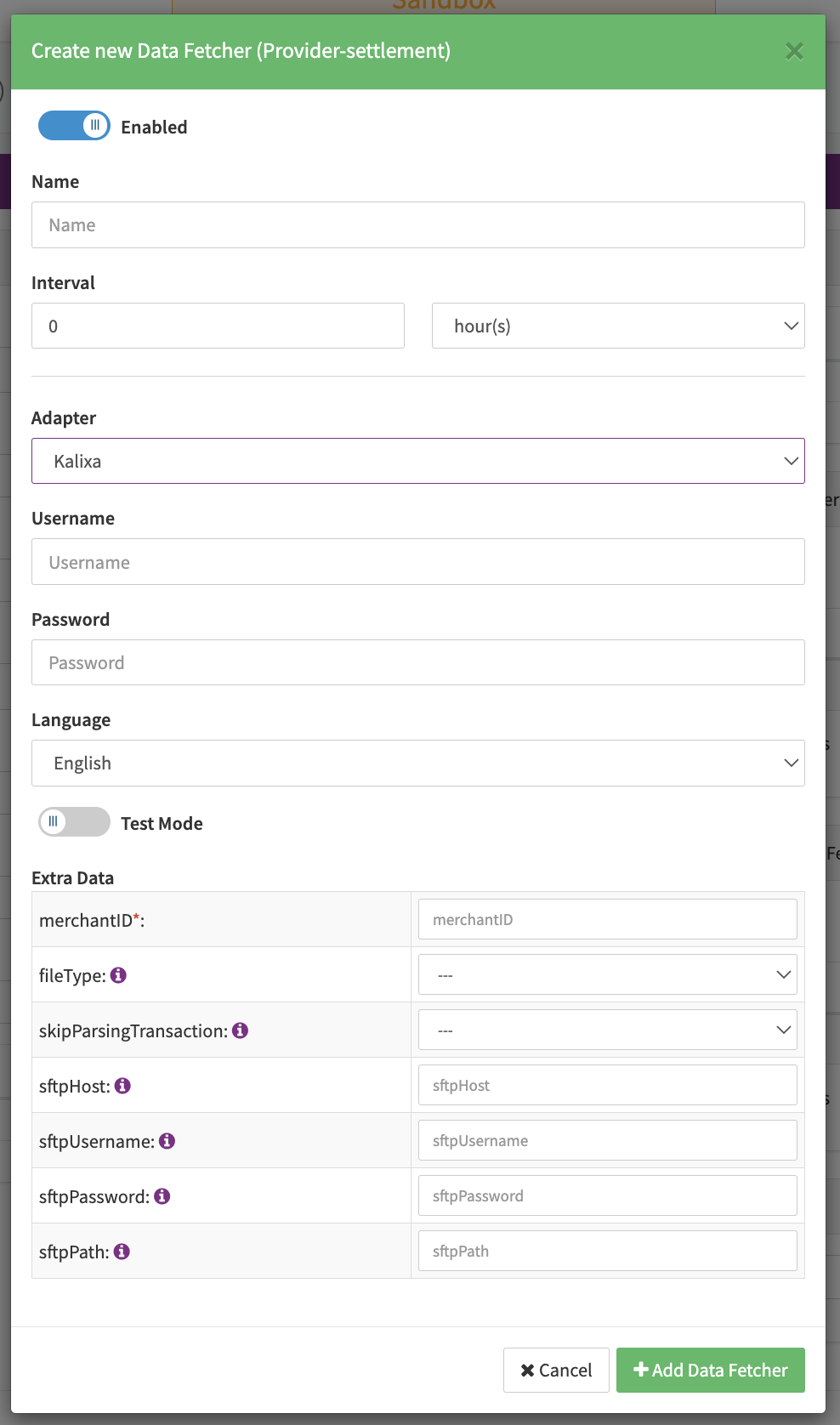
Configure the following Parameters for the Settlements Provider Data Fetcher to fetch Settlement (csv format) via an SFTP (see Edit Provider Settlement Data Fetcher Provider Level):
- Fill in the optional Name
- Fill in the expected Interval in which the Provider Settlement File should be fetched - days, hours
- Select the Adapter Kalixa
- Enable Testmode - irrelevant for this adapter
- Fill in the mandatory Extra Data: merchantID
- Select the Extra Data: fileType — Settlement Report, Clearing Payout Report
- Select the Extra Data: skipParsingTransaction — true, false; Default value is false
- Fill in the Extra Data: sftpHost - Hostname/IP-Address where to connect to (default to sft1.servebase.net)
- Fill in the Extra Data: sftpUsername — Username for authentication on SFTP host
- Fill in the Extra Data: sftpPassword — Password for authentication on SFTP host
- Fill in the Extra Data: sftpPath - Path where the files are stored
Settlement fields
Batch Number
If there is a column BatchID present that value is used as batch number.
If there is no BatchID and there is a column ClearingPayoutID this value is used instead.
Payment Reference
There is no payment reference saved
Mapped Fields
We are mapping the following fields from the provider settlement reports:
| Provider | IXOPAY platform | default (if not set by Provider) |
|---|---|---|
SettlementDate / CreatedOn | Settlement Date | None |
UniqueID | Settlement Reference ID | None |
PaymentID | Settlement Transaction ID | None |
PaymentSettlementAmount | Settlement Amount | None |
PaymentSettlementCurrency | Settlement Currency | None |
BatchID / ClearingPayoutID | Settlement Batch Number | None |
PaymentStateDefID | Transaction Type | None |
SettlementDate | Settlement Date - When there is a column SettlementDate with a value in format m/d/Y H:i:s or m/d/Y the value of the field is used | |
CreatedOn | Settlement Date - When there is no column SettlementDate but a CreatedOn with a value in format m/d/Y H:i:s or m/d/Y H:i than the value of that is used instead |
Fee mapping
| Provider | IXOPAY platform | default (if not set by Provider) |
|---|---|---|
PaymentSettlementCurrency | Markup / Interchange / Scheme / Fee Currency | None |
MarkupFeeInSettlementCurrency | Markup Fee Amount | None |
InterchangeFeeInSettlementCurrency | Interchange Fee Amount | None |
SchemeFeeInSettlementCurrency | Scheme Fee Amount | None |
FeeAmount | Normal Fee Amount | None |
FeeCurrency | Normal Fee Currency | None |