GoCardless
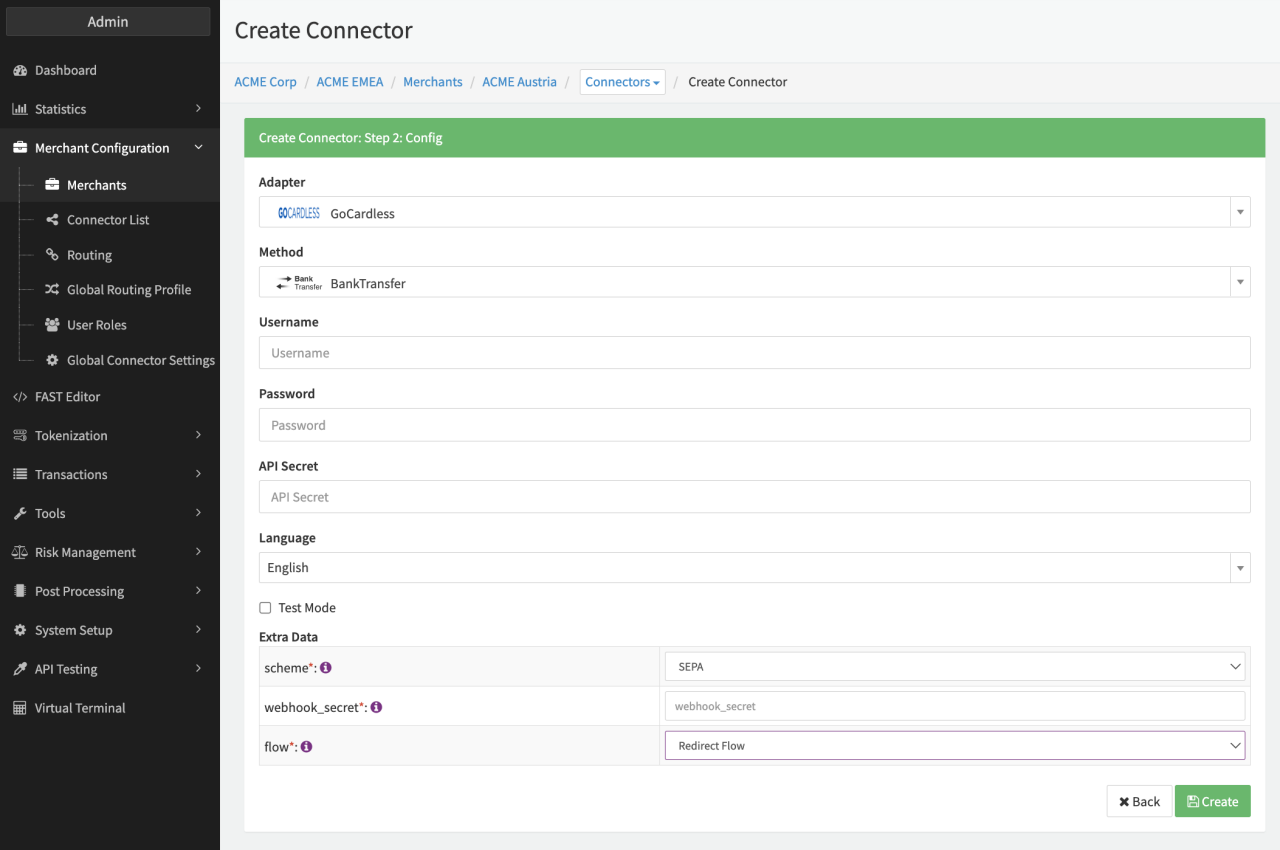
Configure the following parameters for the Connector (see Connector Config - GoCardless):
- Fill in the mandatory Username Merchant-Account Username
- Fill in the mandatory Password Merchant-Account Password
- Fill in the mandatory API Secret Generated and provided by PSP.
- Select the mandatory Extra Data: scheme SEPA, BetalingsService, BACS, ACH, BECS, BECS NZ, PAD, SEPA Instant Credit Transfer, SEPA Credit Transfer
- Fill in the mandatory Extra Data: webhook_secret see Webhooks
- Select in the mandatory Extra Data: flow — Redirect Flow, Server-to-Server
- Select in the optional Extra Data: enable_status_sync - true/false, When enabled, the system actively polls the GoCardless API for transaction status updates instead of relying solely on webhook notifications.
Webhooks
To receive real-time notifications from GoCardless, you’ll need to add a webhook endpoint from your Dashboard https://manage-sandbox.gocardless.com/developers/webhook-endpoints/create.
Simply enter the connectors Notification URL, give your endpoint a name, and then click "Create webhook endpoint". Next, click on your new endpoint in the list and copy the secret to your clipboard to be configured in your connector configuration.
Data Fetcher Configuration
You have the option to configure Data Fetchers (see section Enable and Set Up Reconciliation on the Provider Level) either on Provider or on Connector Level, depending on which setup works better for your provider.
Provider Settlement
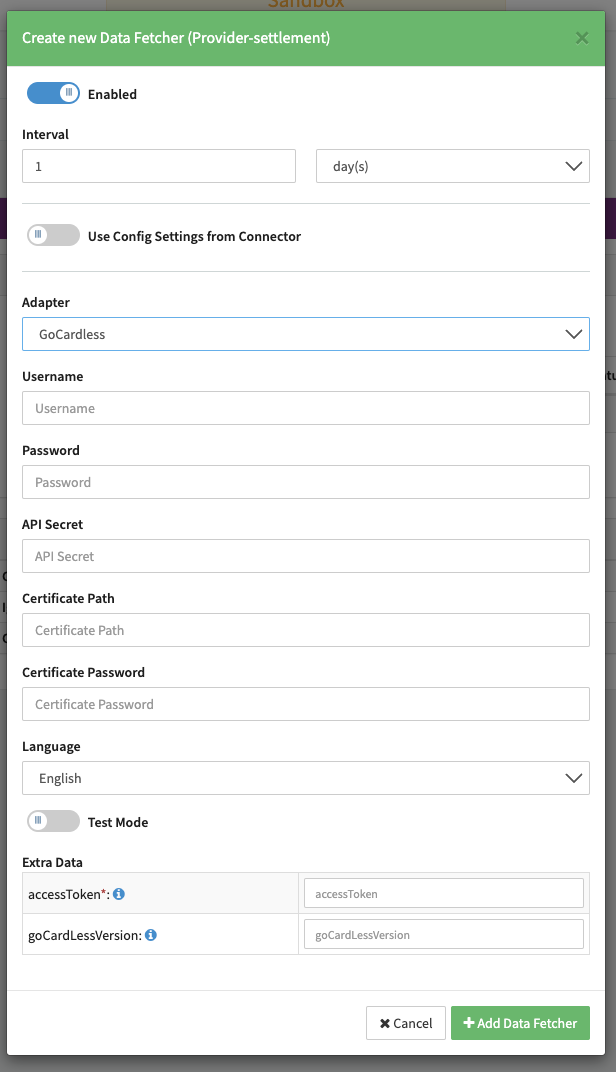
Configure the following Parameters for the Settlements Provider Data Fetcher to fetch Settlement (json format) via an API (see Edit Provider Settlement Data Fetcher Provider Level):
- Fill in the expected Interval in which the Provider Settlement File should be fetched - days, hours
- Select the Adapter GoCardless
- Enable Testmode to test fetching of Provider Settlements from the GoCardless Sandbox (URL used https://api-sandbox.gocardless.com/), disabled the GoCardless Production (URL https://api.gocardless.com/) environment is used
- Fill in the mandatory Extra Data: accessToken (string): used for the Authorization Request Header and can be found in the GoCardless dashboard
- Fill in the optional Extra Data: goCardLessVersion (boolean): Used for the GoCardless-Version Request Header to specify the version of the released API. Version "2015-07-06" will be used by default if no version was provided.
Settlement fields
Batch number
The batch number is taken from the report notification itself and contains the batchId found under "id"
Payment reference
The payment reference is taken from the report notification itself and contains the paymentReference found under "reference"
| GoCardless | IXOPAY platform | Default (if not set by GoCardless) |
|---|---|---|
| created_at | Transaction settlement date | None |
| currency | Transaction settlement currency | None |
| amount | Transaction settlement amount | None |
| payment | refund | Transaction settlement reference id | None |
| payment_paid_out | Transaction type: debit | None |
| payment_refunded | Transaction type: refund | None |
| payment_charged_back | Transaction type: chargeback | None |
Mapped Fees
| GoCardless | IXOPAY platform | Default (if not set by GoCardless) |
|---|---|---|
| gocardless_fee | Markup | None |
| surcharge_fee | Markup | None |
| amount | Normal | None |
| currency | Transaction fee currency | None |