Finrax
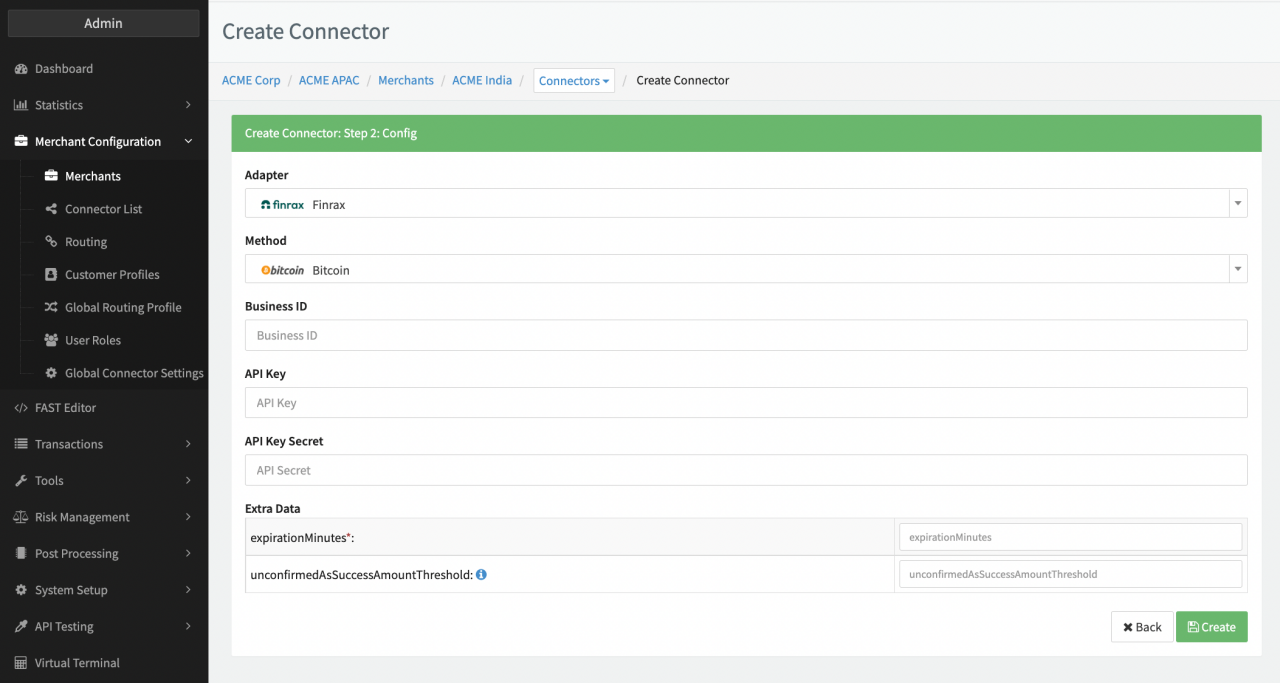
Configure the following parameters for the Connector (see Connector Config - Finrax):
- Fill in the mandatory Business ID — Identifies the business with your finrax organisation unit. You can create/find businesses in the dashboard.
- Fill in the mandatory API Key
- Fill in the mandatory API Key Secret
- Fill in the mandatory Extra Data: expirationMinutes — for the timeframe for a transaction to expire
- Fill in the mandatory Extra Data: unconfirmedAsSuccessAmountThreshold —
For fast transaction processing you may want to treat the UNCONFIRMED status notification as success.
Define the amount of transactions for which you will treat UNCONFIRMED as success.
(Default: 0.00 means: wait for
CONFIRMEDand ignoreUNCONFIRMED).
Finrax API credentials can be managed directly from the Finrax Dashboard by users with the Manager or Admin or custom roles with the relevant permission. Go to "Settings -> API keys" and click on the "New Key" to create new API credentials. Provide a name (alias) for the key/secret pair and select the permissions that are relevant to your use-case. Your 2FA code will also be required as a step of the key creation process.
Upon successful API credentials creation, you will be provided with the values for the API key and API secret. At this stage, you must store the API secret securely, e.g. by writing it down or copying it in a trusted store as this is the only time the API secret will be displayed.
Webhooks
Withdrawal broadcast notification
Currently, Finrax supports 20+ cryptocurrencies as a payout option. Once you initiate a withdrawal Finrax needs to take care of a couple of things before they successfully broadcast it to the network. Withdrawals take on average 10 minutes to be broadcast on the designated blockchain network. Upon completion, you'll receive a callback notification. This callback notification is sent on your withdrawalCallbackUrl endpoint (Notification URL of your connector).