dLocal
Creditcard
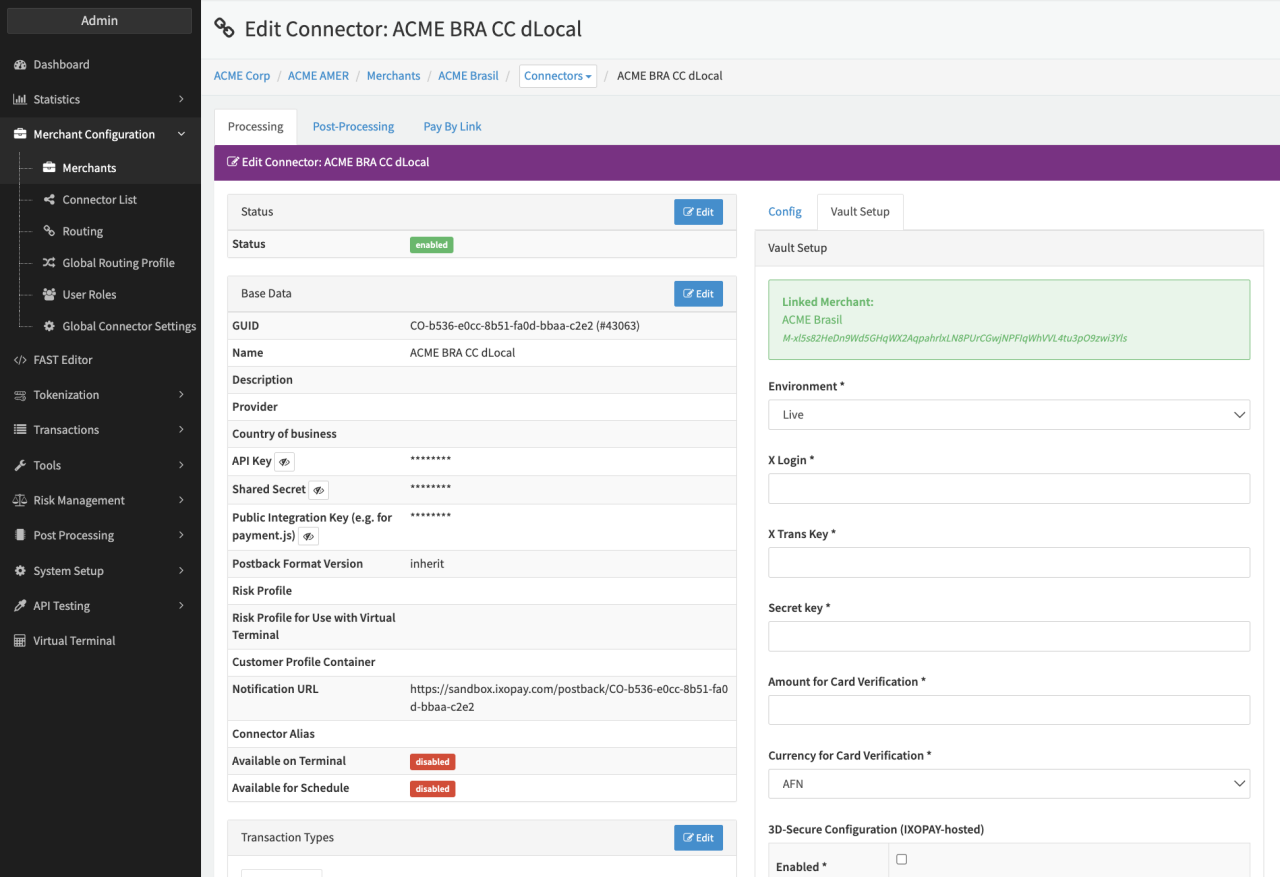
Configure the following parameters for the Connector (see Connector Detail Overview - dLocal - Vault Configuration):
- Select the mandatory Environment: Live, Test
- Fill in the mandatory X Login
- Fill in the mandatory X Trans Key
- Fill in the mandatory Secret key
- Fill in the mandatory Amount for Card Verification
- Select the mandatory Currency for Card Verification from the selection
APM / Bank Transfer
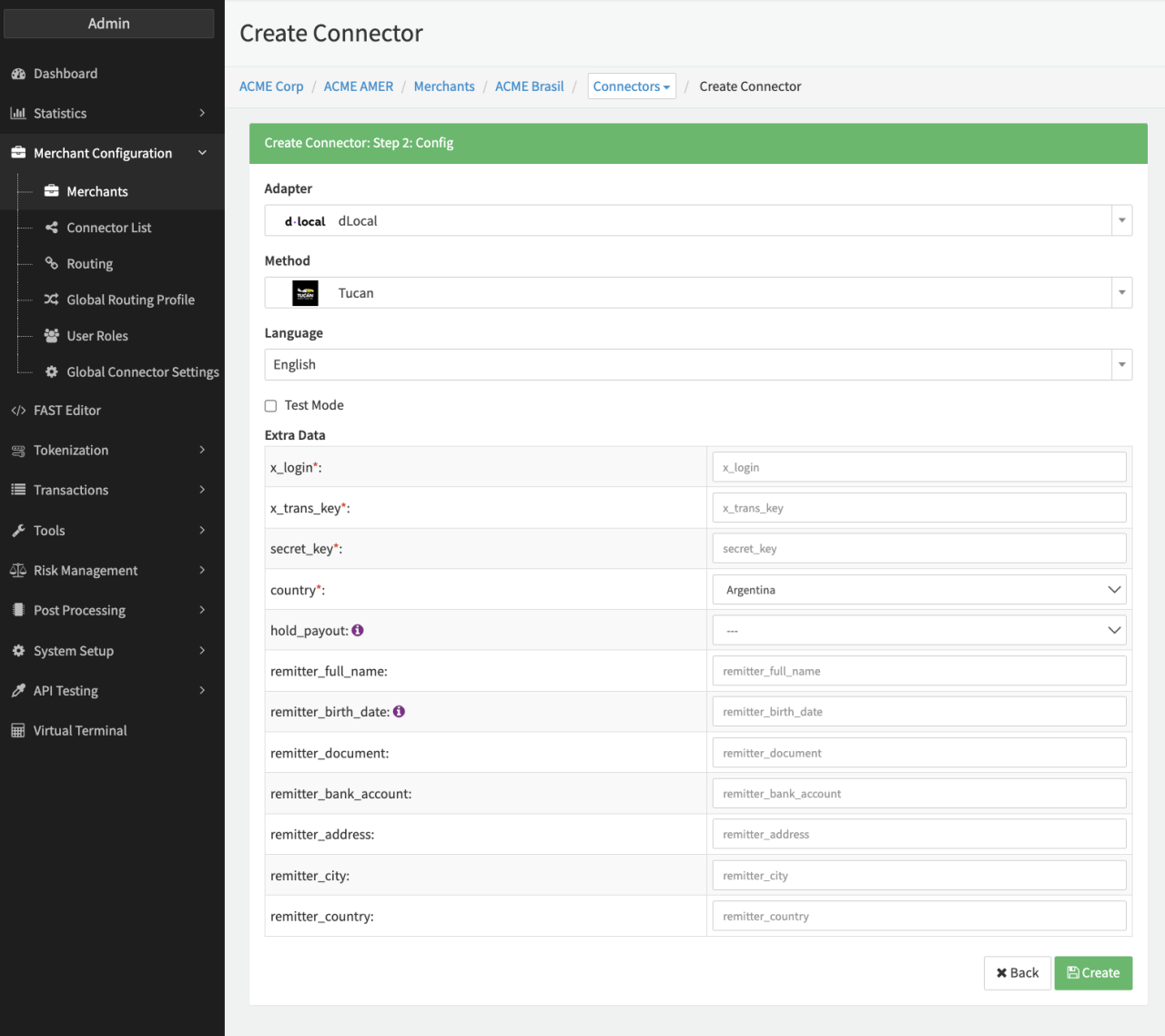
Depending on the chosen method the a subset of the following parameters for the Connector need to be configured (see Connector Config - dLocal):
- Fill in the mandatory Extra Data: x_login
- Fill in the mandatory Extra Data: x_trans_key
- Fill in the mandatory Extra Data: x_secret_key
- Select the mandatory Extra Data: country from the selection
- Select the Extra Data: hold_payout — true, false. The On-hold payouts section displays all the payouts that have been uploaded with the on-hold status (either through the API or the dashboard) and need to be confirmed in order to be processed.
- Fill in the Extra Data: remitter_full_name — max. 200 characters
- Fill in the Extra Data: remitter_birth_date — "YYYYMMDD"
- Fill in the Extra Data: remitter_document — max. 45 characters
- Fill in the Extra Data: remitter_bank_account
- Fill in the Extra Data: remitter_address
- Fill in the Extra Data: remitter_city
- Fill in the Extra Data: remitter_country — ISO 2-letter code
IP Whitelist
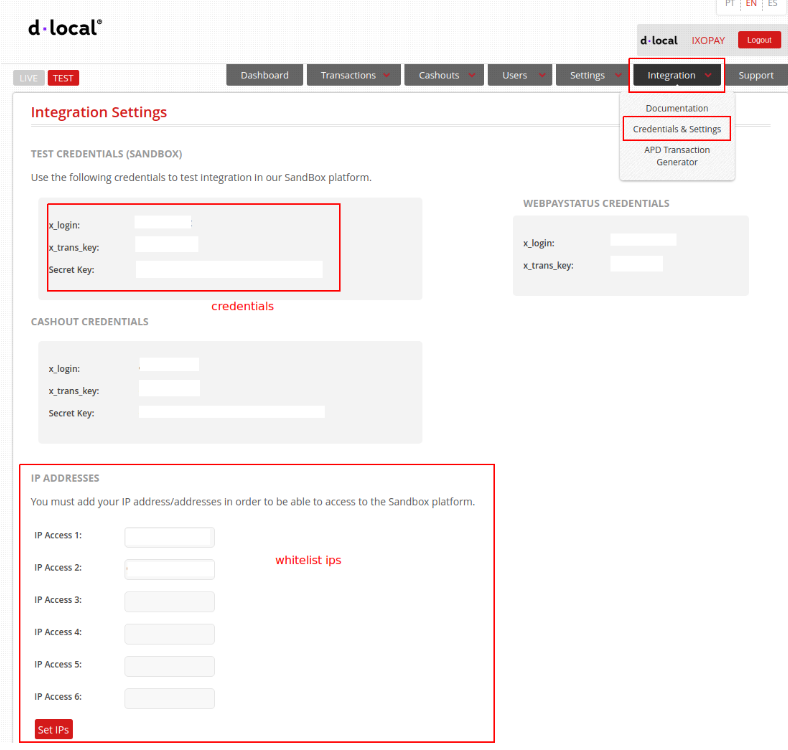
For credentials, please visit the dLocal Dashboard. You will find the credentials under "Integration → Credentials & Settings".
dLocal also requires whitelisting of the IXOPAY platform's IP addresses per Account. Please contact the Customer Success team for obtaining the IXOPAY platform's public IP addresses.
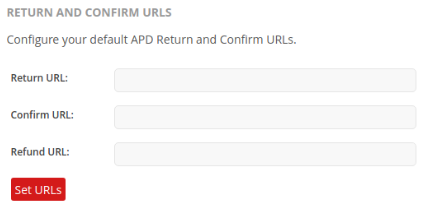
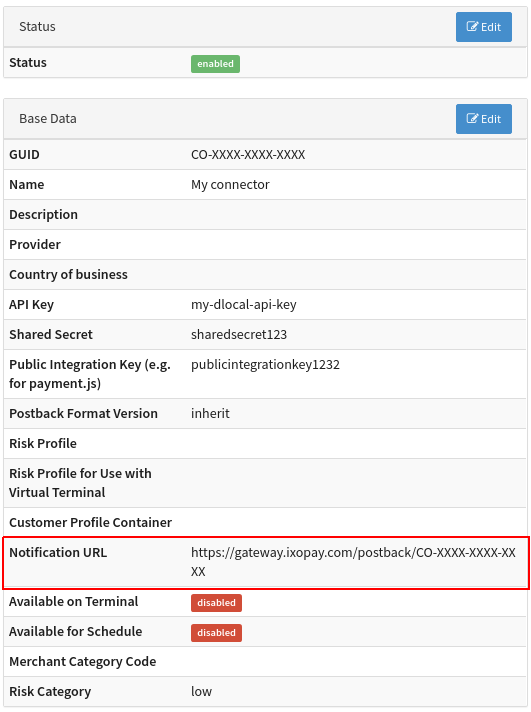
In order to receive proper notifications, please ensure to setup the Refund URL which is used for Refund and Chargeback notifications. The URL which should be used can be found in your Connector edit screen.
Note: Return URL and Confirm URL can be left empty
Example
Refund URL: https://gateway.ixopay.com/postback/CO-XXXX-XXXX-XXXX?refundcb=true
Data Fetcher Configuration
You have the option to configure Data Fetchers (see section Enable and Set Up Reconciliation on the Provider Level) either on Provider or on Connector Level, depending on which setup works better for your provider.
Provider Settlement
Configure the following Parameters for the Settlements Provider Data Fetcher to fetch Settlement
(CSV format, default /^.\*\_Settlement_Report+\_(\\d{8})\_(.+).\*\\.csv$/) via SFTP (see Edit Provider Settlement Data Fetcher Provider Level):
- Fill in an option Name
- Fill in the expected Interval in which the Provider Settlement File should be fetched - days, hours
- Select the Adapter dLocal
- Enable Testmode - irrelevant for this adapter
- Fill in the mandatory Extra Data: sftpHost
- Fill in the mandatory Extra Data: sftpPort
- Fill in the mandatory Extra Data: sftpUsername
- Fill in the mandatory Extra Data: sftpPassword
- Fill in the optional Extra Data: private Key used for authentication
- Fill in the optional Extra Data: Passphrase
- Fill in the optional Extra Data: RootDirectory — default is
/ - Fill in the mandatory Extra Data: FileRegex used to specify file pattern, default
/^.\*\_Settlement_Report+\_(\\d{8})\_(.+).\*\\.csv$/
Settlement fields
Batch Number
The batch number is taken from the Tranfer id from the header of the file.
Payment Reference
No payment reference
Mapped Fields
We are mapping the following fields from the dLocal settlement reports (dLocal → IXOPAY platform):
| dLocal | IXOPAY platform | default (if not set by dLocal) |
|---|---|---|
| TRANSACTION_ID | transaction id | n/a |
| DLOCAL_TRANSACTION_ID | reference id | none |
| GROSS_LOCAL_AMOUNT | settlement amount | n/a |
| LOCAL_CURRENCY | settlement currency | n/a |
| TRANSFER_DATE | settlement date | n/a |
| ROW_TYPE | settlement type | n/a |
| FEE_LOCAL_AMOUNT | Settlement Fee SCHEME | n/a |
| TAX_LOCAL_AMOUNT | Settlement Fee SCHEME | n/a |