Cybersource
This adapter requires an additional setup
If you want to use this adapter, please contact your Customer Success Manager directly, or contact our Support Team in the IXOPAY Customer Experience Portal.
Creditcard
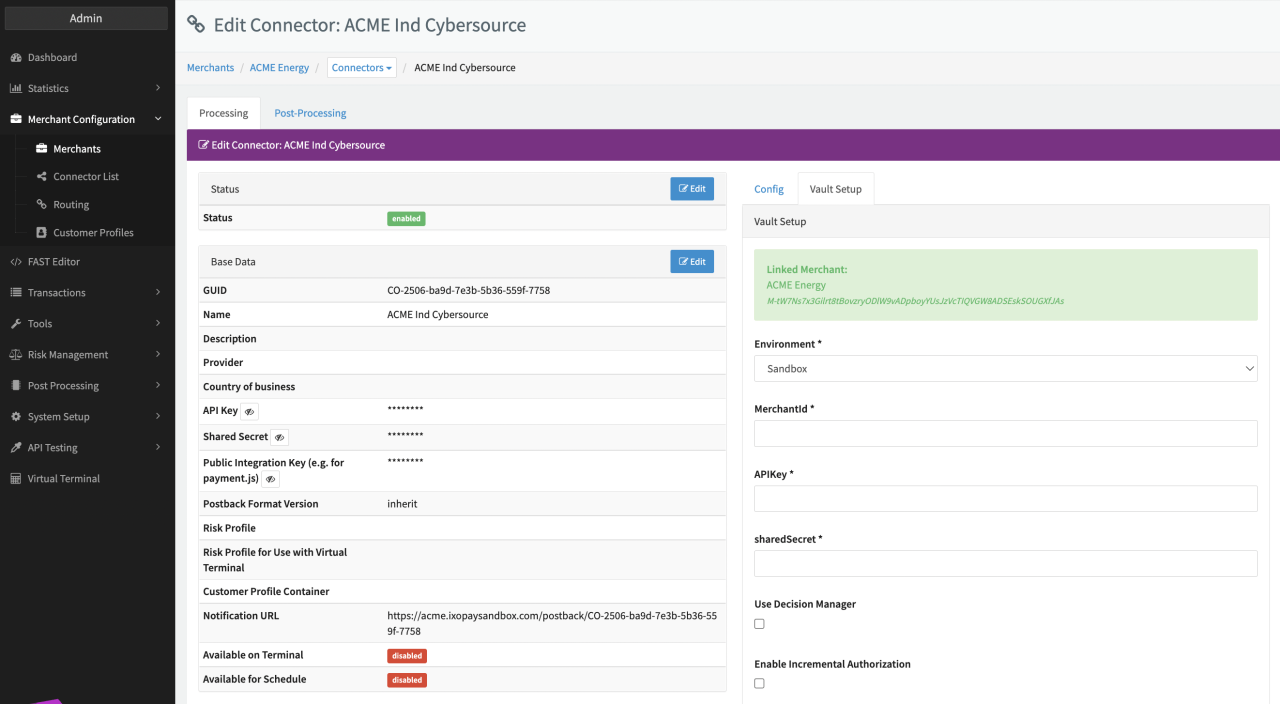
Configure the following parameters for the Connector
- Select the Environment: Live, Sandbox
- Fill in the mandatory Merchant ID
- Fill in the mandatory API Key
- Fill in the mandatory sharedSecret
- Use Decision Manager
Mark this checkbox to include risk information data in the payload of requests to PSP. - Enable Incremental Authorization
Mark this checkbox to enable processing of incremental authorization requests. - Treat PENDING status as SUCCESS for refunds
Mark this checkbox to set status to SUCCESS for refund transactions that receive status PENDING. - Treat PENDING status as SUCCESS for captures
Mark this checkbox to set status to SUCCESS for capture transactions that receive status PENDING. - Treat PENDING status as SUCCESS for voids
Mark this checkbox to set status to SUCCESS for void transactions that receive status PENDING. - Treat CONTACT_PROCESSOR status reason as ERROR
Mark this checkbox to set status to ERROR for transactions that receive status reason "CONTACT_PROCESSOR" from PSP.