Braintree
Braintree Creditcard
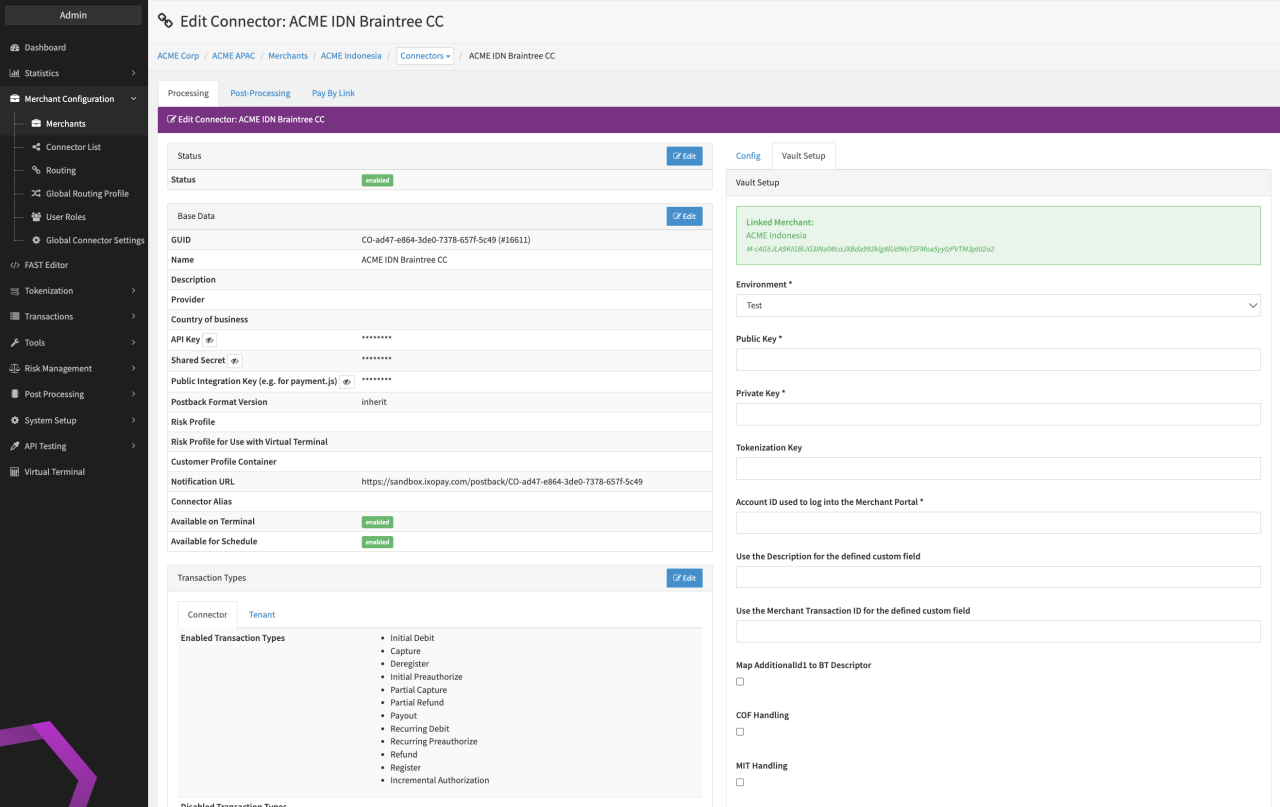
Configure the following parameters for the Connector (see Connector Detail Overview - Braintree - Vault Configuration):
- Select the mandatory Environment: Live, Test
- Fill in the mandatory Public Key
- Fill in the mandatory Private Key
- Fill in the mandatory Tokenization Key
- Fill in the mandatory Account ID used to log into the Merchant Portal
- Fill in the mandatory Use the Description for the defined custom field
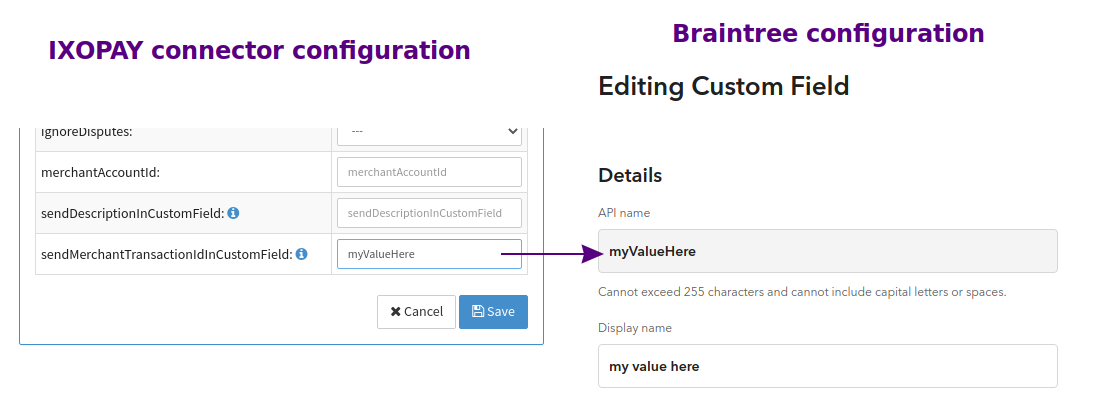
- Fill in the mandatory Use the Merchant Transaction ID for the defined custom field — API name of Custom field (see Braintree Custom fields)
- Enable the optional Map AdditionalId1 to BT Descriptor — to map by default the AdditionalId1 to the Descriptor shown on customers bank statement
- Enable the option COF Handling
- Enable the option MIT Handling
- Enable the option 3DS Handling — to forward all available 3DS related data to Braintree in payment request when available (please activate this configuration for new connectors, should be disabled only for old connectors that have requirements for legacy payload)
For the Braintree-specifc Parameters see also https://developer.paypal.com/braintree/articles/control-panel/important-gateway-credentials#environment.
Braintree Paypal
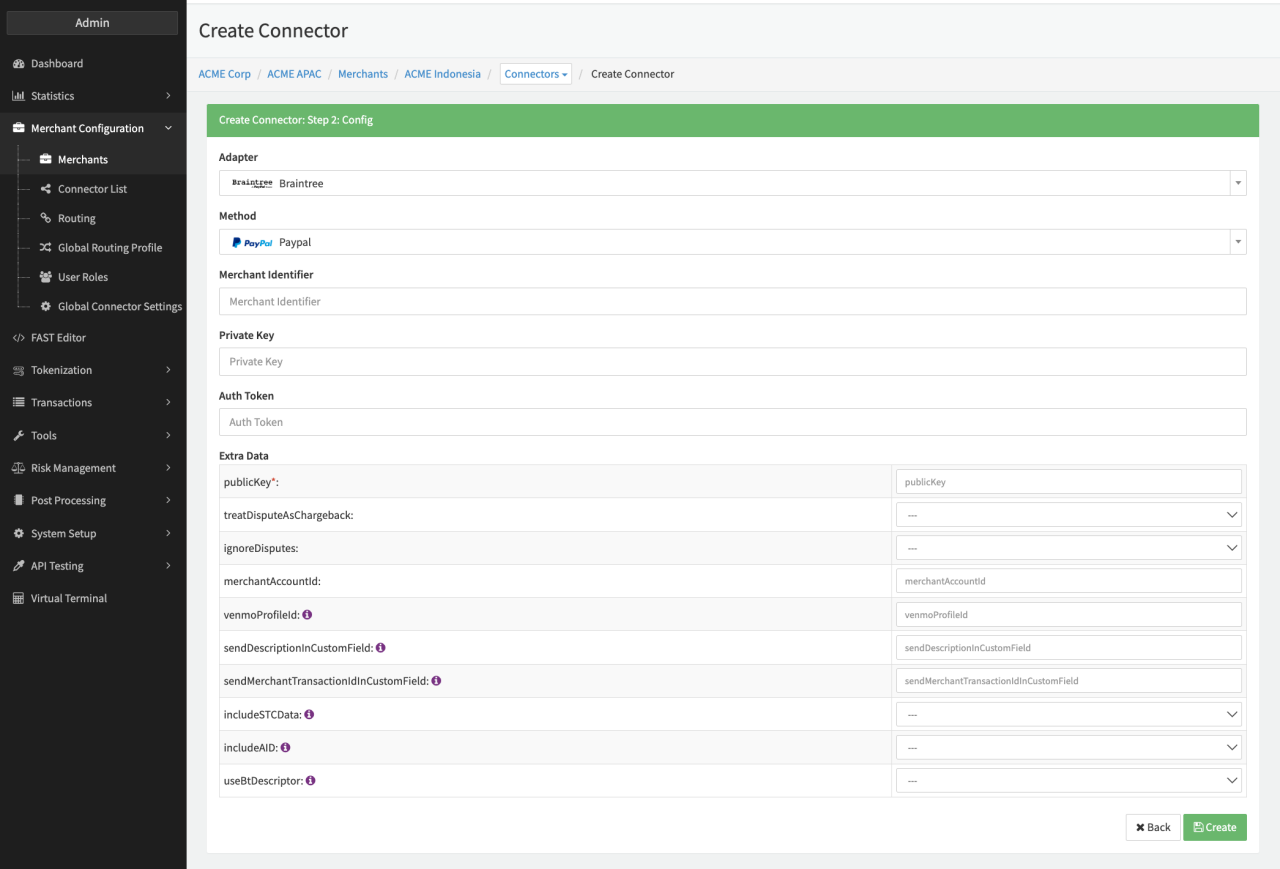
Configure the following parameters for the Connector (see Connector Config):
- Fill in the mandatory Merchant Identifier
- Fill in the mandatory Private Key
- Fill in the mandatory Auth Token (API Secret)
- Fill in the mandatory Extra Data: publicKey
- Fill in the optional Extra Data: treatDisputeAsChargeback
- Fill in the optional Extra Data: IgnoreDisputes
- Fill in the optional Extra Data: merchantAccountId
- Fill in the optional Extra Data: venmoProfilId
- Fill in the optional Extra Data: sendDescriptionInCustomField — API name of Custom field (see Braintree Custom fields)
- Fill in the optional Extra Data: sendMerchantTransactionIdInCustomField — API name of Custom field (see Braintree Custom fields)
- Fill in the optional Extra Data: includeSTCData — if set to true, the IXOPAY platform will loop in the ExtraData fields to search and include the Set Transaction Context Data as described in the adapter-specific API documentation
- Fill in the optional Extra Data: includeAID — if set to true, the IXOPAY platform will loop in the ExtraData fields to search and include the AIR Itinerary Data as described in the adapter-specific API documentation
- Fill in the optional Extra Data: useBtDescriptor — if set to true and the payload will contain the parameter additionalId1, the value of additionalId1 will be mapped to Braintree's descriptor parameter. Refer to https://developer.paypal.com/braintree/docs/reference/request/transaction/sale/php#descriptor for more information about descriptor
For the Braintree-specific Parameters see also https://developer.paypal.com/braintree/articles/control-panel/important-gateway-credentials#environment.
Clients which received an identifier/PartnerCode (aka BNCode) from Braintree or Paypal and want this identifier included in their transactions, please contact your Customer Success Manager or our Support Team in the IXOPAY Customer Experience Portal.
Payment method Blik is integrated, but has not been actively used for an extended period, or its individual capabilities could not undergo thorough testing. Since using this payment method might require further development, we encourage you to reach out directly to your Customer Success Manager or contact our Support Team in the IXOPAY Customer Experience Portal if you're interested in implementing this payment method.
Braintree Custom fields
Find more information about setting up custom fields here: https://developer.paypal.com/braintree/articles/control-panel/custom-fields#creating-a-custom-field
- Log into the Control Panel
- Click on the gear icon in the top right corner
- Click Processing from the drop-down menu
- Scroll to the Transactions section
- Next to Custom Fields, click the Options link
- Click the Add link located on the right side of the page
- Enter a custom field API name to pass with your code — This value must be less than or equal to 255 characters and can't contain any spaces or capital letters
- Enter a display name
- Under the Options section, select either Store and Pass Back
- Click the Add Custom Field button
When using Braintree as a meta connector, the template needs to be adopted specifically. Please contact our Customer Success Manager or our Support Team in the IXOPAY Customer Experience Portal.
Data Fetcher Configuration
You have the option to configure Data Fetchers (see section Enable and Set Up Reconciliation on the Provider Level) either on Provider or on Connector Level, depending on which setup works better for your provider.
Provider Settlement
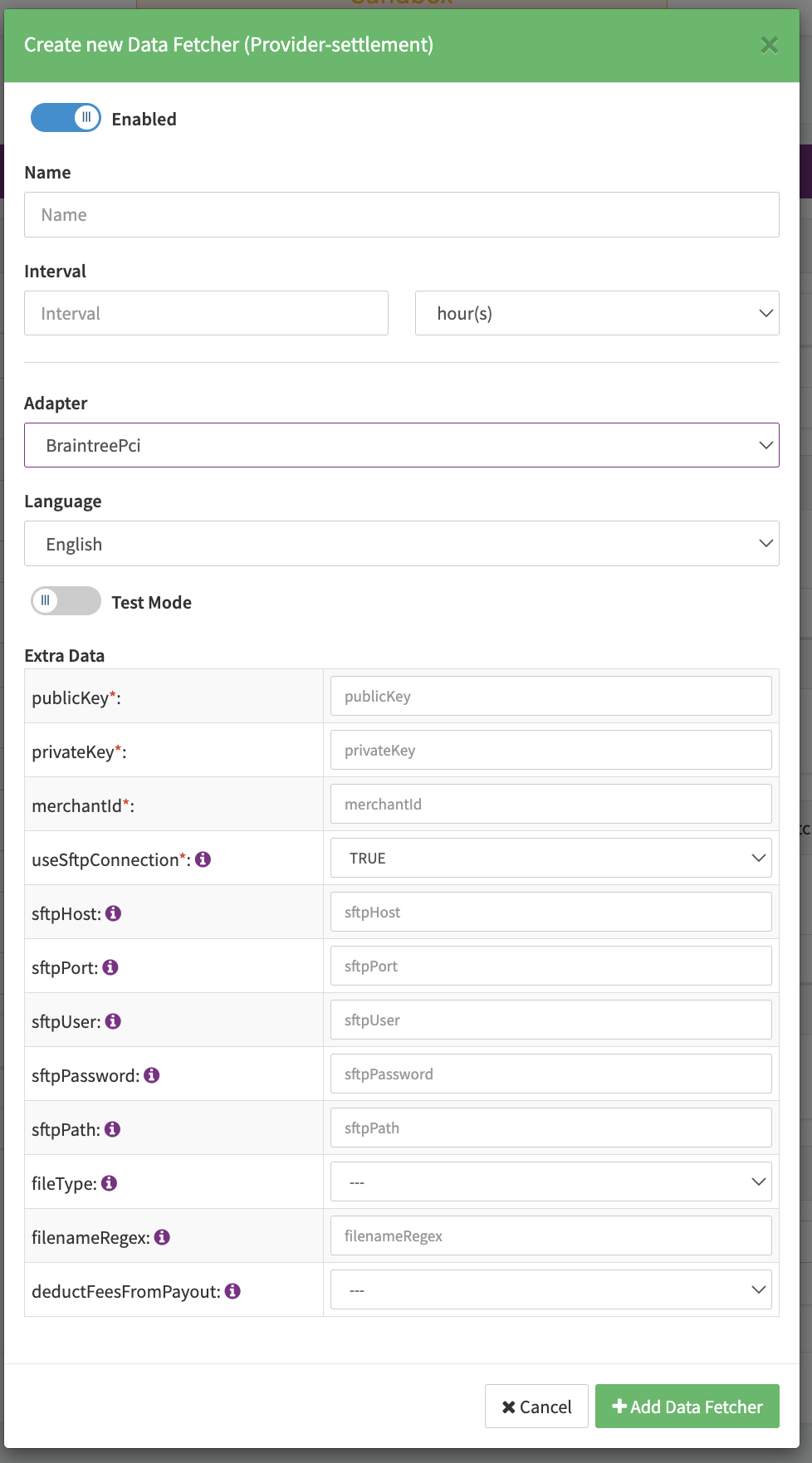
Configure the following Parameters for the Settlements Provider Data Fetcher to fetch Settlement (filename matching regex: /.\*\[0-9\]\{14}\\.csv$/ )
via SFTP or API (see Edit Provider Settlement Data Fetcher Provider Level):
- Fill in the an optional Name
- Fill in the expected Interval in which the Provider Settlement File should be fetched - days, hours
- Select the Adapter BraintreePci
- Enable Testmode to test fetching of Provider Settlements from the Braintree Sandbox, disabled the Braintree Production environment is used
- Fill in the mandatory Extra Data: publicKey used for authentication
- Fill in the mandatory Extra Data: privateKey used for authentication
- Fill in the mandatory Extra Data: merchantId used for authentication
- Select the optional Extra Data: useSftpConnection true, false. If set to true, files will be fetched via SFTP
- Fill in the optional Extra Data: sftpHost hostname / IP address where to connect to
- Fill in the optional Extra Data: sftpPort port where to connect to (defaults to 22)
- Fill in the optional Extra Data: sftpUser used for authentication on SFTP host
- Fill in the optional Extra Data: sftpPassword used for authentication on SFTP host
- Fill in the optional Extra Data: sftpPath Path, where the files are stored (defaults to "/")
- Select the optional Extra Data: fileType — AIB transaction fee detailed report (default), Disbursements and fees report, Disputes US report, AIB transaction fee detail US report, Settlement MY report, Disbursement and fees for IC plus report. To determine which file type should be fetched.
- Fill in the optional Extra Data: filenameRegex Custom filename regex to fetch only matching files from the SFTP
- Select the optional Extra Data: deductFeesFromPayout Deducts settlement transaction fees from the payout (default false)
The datafetcher is looking for files matching the selected Extra Data: fileType,
e.g. in case the selected type is Disbursement and fees for IC plus report it looks for '/.\*DisburmentIcPLusSettlement.\*\\.csv$/',
in case the selected type Settlement My report it looks for '/.\*transaction_detail_report.\*\\.csv$/' (Myanmar country report)
for which the mapping for chargebacks and chargeback reversals comes from different rows
Settlement fields
Batch Number
In case of fetching via API the batch number is taken from the value settlementBatchId.
In case of fetching via SFTP the batch number is taken from the filename (4 digits)
Payment Reference
In case of fetching via API the payment reference is taken from the field name retrievalReferenceNumber
Mapped Fields
We are mapping the following fields from the Provider settlement reports (Provider → IXOPAY platform):
SFTP Mapping
| Provider | IXOPAY platform | default (if not set by Provider) |
|---|---|---|
| Settlement Date | settlement date | fileType Disbursements and fees report or Disbursement and fees for IC plus report: If Settlement Date is empty, the Created At is used. |
| Order ID | settlement transaction Id | none |
| Settlement Amount | settlement amount | none |
| Settlement Currency | settlement currency | none |
| fileType Settlement My report: Transaction Currency | settlement currency | none |
| fileType: Disputes US report | Currency ISO Code | none |
SFTP Mapping - Chargebacks (DisbursementAndFees)
| Provider | IXOPAY platform | default (if not set by Provider) |
|---|---|---|
| Chargeback Amount | Settlement amount | None |
| Chargeback Currency | Settlement currency | None |
API Mapping
| Provider | IXOPAY platform | default (if not set by Provider) |
|---|---|---|
| createdAt | settlement date | none |
| orderId | settlement transaction Id | none |
| amount | settlement amount | none |
| currencyIsoCode | settlement currency | none |
| settlementBatchId | settlement batch number | none |
| retrievelReferenceNumber | payment reference | none |
| acquiererReferenceNumber | ARN | none |
| globalId | reference Id | none |