American Express
AMEX Creditcard
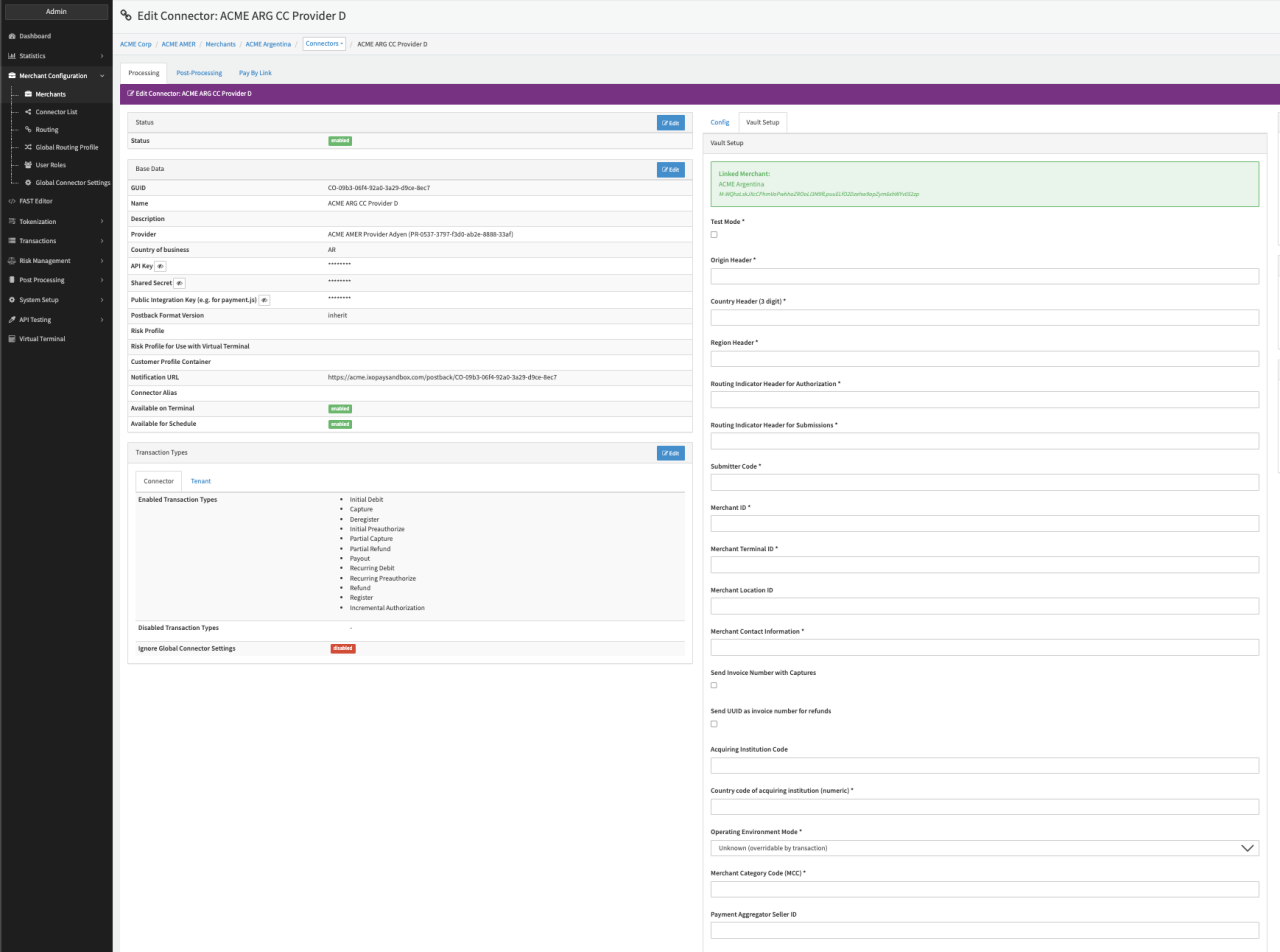
Configure the following parameters for the Connector (see Connector Detail Overview - AmericanExpress Creditcard - Vault Configuration I & II):
- Enable the option Test Mode
- Fill in the mandatory Origin Header — provided by acquirer enrolling the MID
- Fill in the mandatory Country Header — provided by acquirer enrolling the MID
- Fill in the mandatory Region Header — provided by acquirer enrolling the MID
- Fill in the mandatory Routing Indicator Header for Authorization — provided by acquirer enrolling the MID
- Fill in the mandatory Routing Indicator Header for Submissions — provided by acquirer enrolling the MID
- Fill in the mandatory Submitter Code — provided by acquirer enrolling the MID
- Fill in the mandatory Merchant ID — provided by acquirer enrolling the MID
- Fill in the mandatory Merchant Terminal ID
- Fill in the mandatory Merchant Location ID
- Fill in the mandatory Merchant Contact Information
- Enable the option to Send Invoice Number with Captures
- Enable the option to Send UUID as invoice number for refunds
- Fill in the Acquiring Institution Code
- Fill in the Country code of acquiring institution (numeric) *
- Select the mandatory Operating Environment Mode * — Unknown (overridable by transaction), Electronic delivery (digital goods), Physical delivery
- Fill in the mandatory Merchant Category Code (MCC)
- Fill in the Payment Aggregator Seller ID
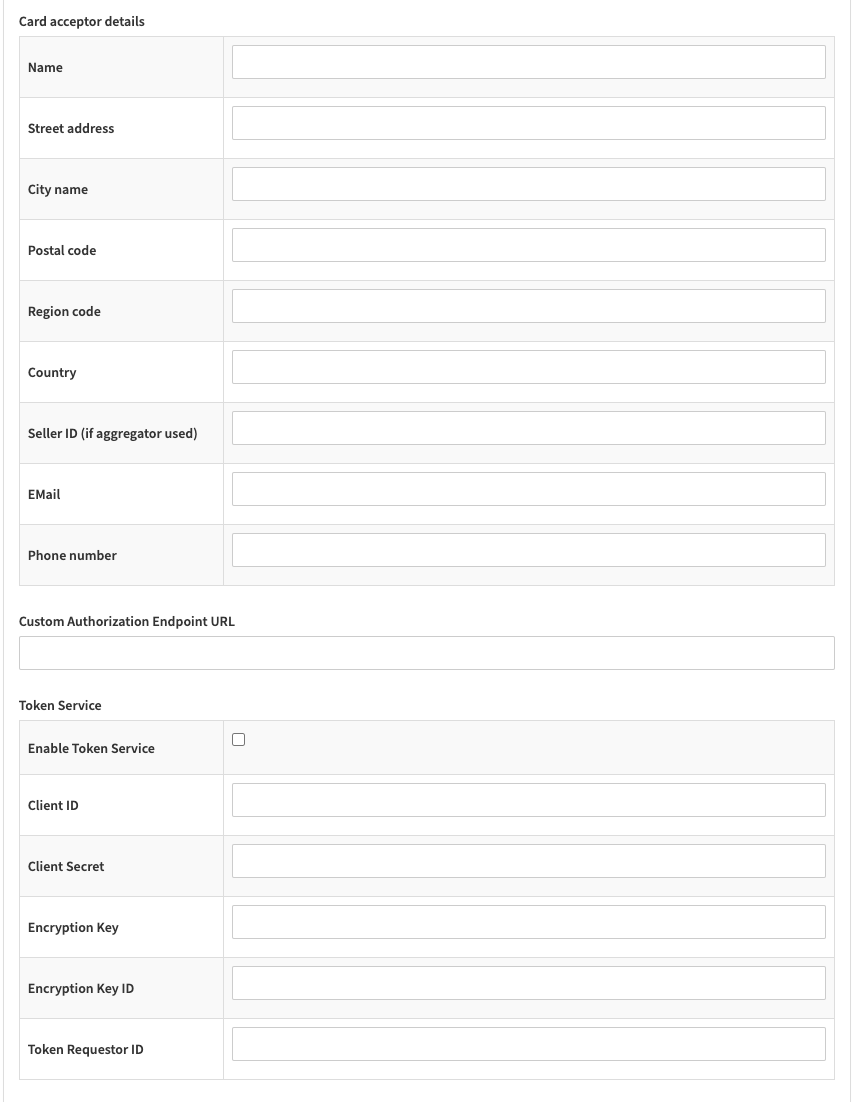
- Fill in the Card acceptor details:
- Fill in the Name
- Fill in the Street address
- Fill in the City name
- Fill in the Postal code
- Fill in the Region code
- Fill in the Country
- Fill in the Seller ID (if aggregator is used)
- Fill in the EMail
- Fill in the Phone number
- Fill in the Custom Authorization Endpoint URL
- Fill in the Token Service parameters
- Select the option to Enable Token Service
- Fill in the Client ID
- Fill in the Client Secret
- Fill in the Encryption Key
- Fill in the Encryption Key ID
- Fill in the Token Requestor ID
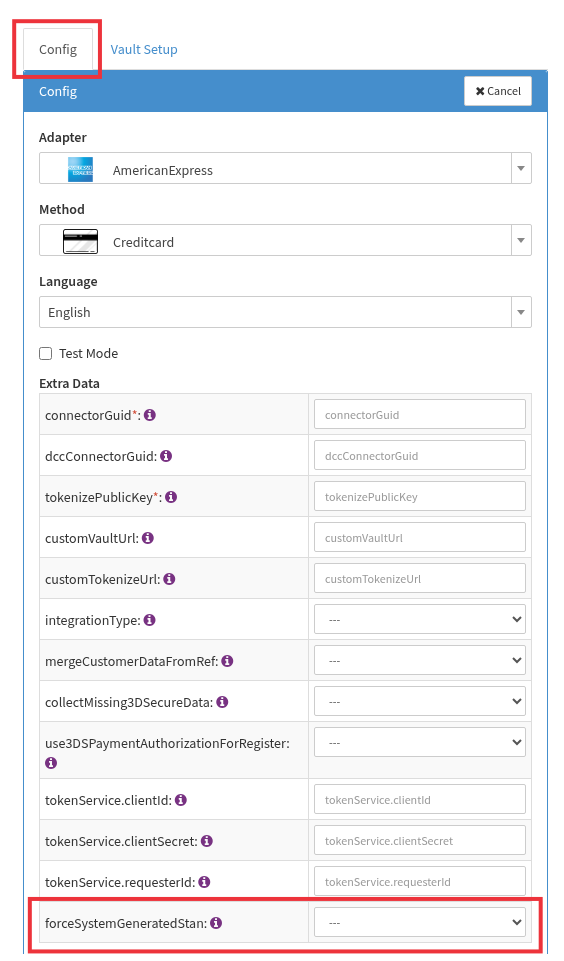
Force System Generated STAN
This setting is found in the Config tab (see screenshot).
Following 2 options are available:
- Yes - Uppercase characters only
- Yes - Upper- and lowercase characters
American Express expects a System Trace Audit Number (STAN) which must be a unique 6 character alpha numeric string used for transaction processing. Depending on the Amex account configuration the requirement may be limited to upper case characters only. In that case, the setting Yes - Uppercase characters only should be selected.
The STAN may also be provided manually in the request via the additionalId1 parameter. If done that way, the aforementioned requirements must be considered!
This setting is specifically recommended for scenarios where an additionalId1 is being sent in the request but a system generated STAN should be used for the actual transaction process. I.e. by enabling one of the two options the system will generate a STAN which will be used for the transaction process while retaining the additionalId1 for other uses.
Note: If you currently have live traffic it is highly recommended to not change this setting without testing it carefully beforehand.
Data Fetcher Configuration
You have the option to configure Data Fetchers (see section Enable and Set Up Reconciliation on the Provider Level) either on Provider or on Connector Level, depending on which setup works better for your provider
Provider Settlement
Configure the following Parameters for the Settlements Provider Data Fetcher to fetch Settlement files (txt with filename containing "GRRCN" if not overwritten with filenameRegex configuration) via an SFTP (fsgateway.americanexpress.com) (see Edit Provider Settlement Data Fetcher Provider Level):
- Fill in the optional Name
- Fill in the expected Interval in which the Provider Settlement File should be fetched - days, hours
- Select the Adapter AmericanExpressPci
- Enable Testmode - is irrelevant for this adapter
- Fill in the mandatory Extra Data: sftpUsername used for authentication
- Fill in the mandatory Extra Data: sftpPassword used for authentication
- Fill in the optional Extra Data: filenameRegex
- Fill in the optional Extra Data: grossSettlementHandling - true, false; Enables Gross Settlement handling (ignoring fees)
- Fill in the optional Extra Data: paymentNumberAsBatchNumber - true, false; Enables to save the payment number as batch number instead of the default value.
Reconciliation
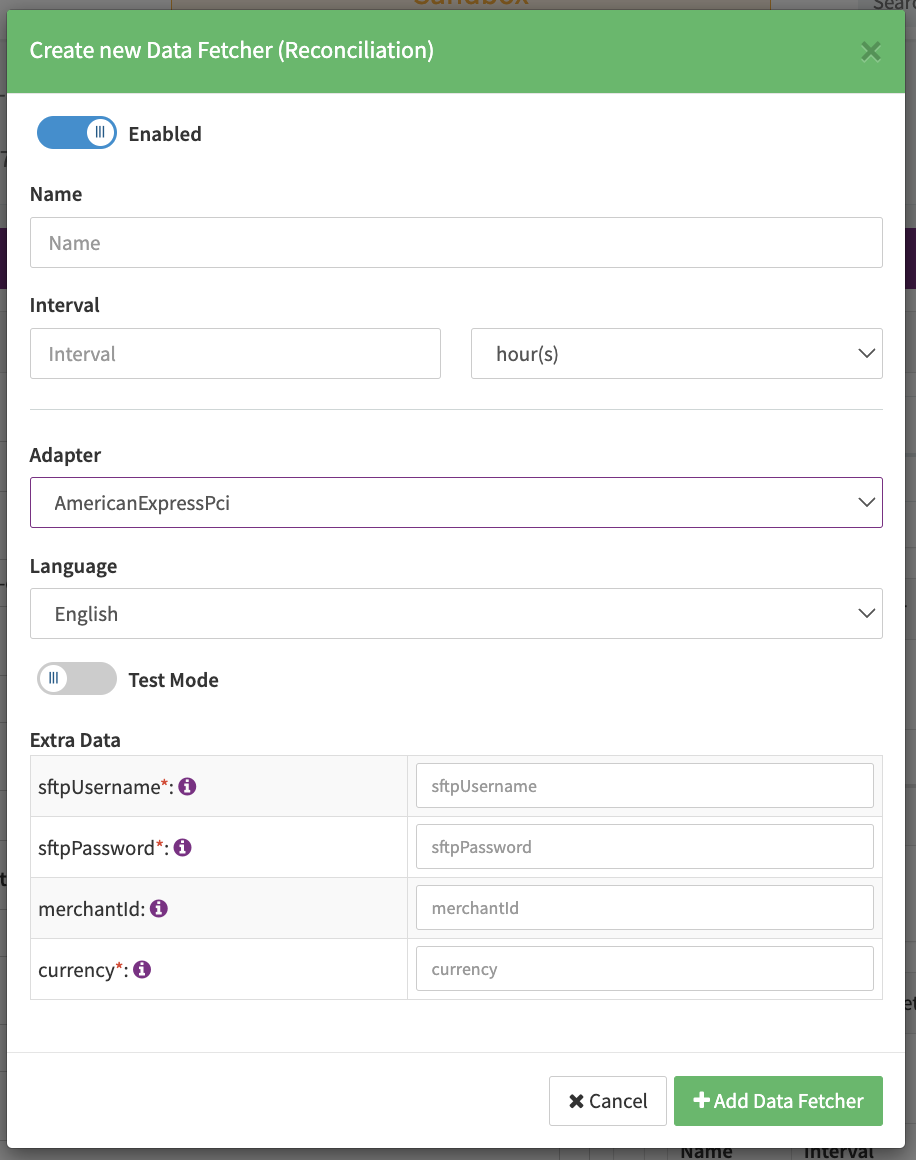
Configure the following Parameters for the Reconciliation Data Fetcher to fetch Reconciliation files (txt with filename contains EPPRC) via SFTP (fsgateway.aexp.com) (see Reconciliation Data Fetcher Provider Level):
- Fill in the optional Name
- Fill in the expected Interval in which the Reconciliation File should be fetched - days, hours
- Select the Adapter AmericanExpressPci
- Enable Testmode — is irrelevant for this adapter
- Fill in the mandatory Extra Data: sftpUsername used for authentication
- Fill in the mandatory Extra Data: sftpPassword used for authentication
- Fill in the optional Extra Data: merchantId — in order to limit fetching to Merchant IDs (comma-separated)
- Fill in the mandatory Extra Data: currency — Currency Code (e.g. USD or EUR)
Settlement fields
Batch Number
The batch number by default is the fileDate_fileTime, it can be modified for Settlements by the configuration setting called Payment Number as Batch Number setting it to TRUE.
Payment Reference
The payment reference is mapped to amexPaymentNumber.
Mapped Fields
We are mapping the following fields from the settlement reports (AMEX →IXOPAY platform):
| AMEX | IXOPAY platform | default (if not set by Provider) |
|---|---|---|
amount | Transaction amount | None |
currency | Transaction currency | None |
arn | Transaction arn, Settlement Reconciliation arn | None |
referenceNumber | Transaction Id, Chargeback Original Tx Id | None |
fileDate-fileTime | Transaction date | None |
Date or amexPaymentNumber | Settlement Batch Number | None |
cbReasonCode:cbReasonDate | Chargeback reversal reason | None |
cbNumber | Chargeback reference id | None |
approvalCode | Settlement Reconciliation auth code | None |
feeAmount/discountAmount | Transaction fee amount | None |
paymentCurrency | Transaction fee currency | None |
Reconciliation fields
| AMEX | IXOPAY platform | default (if not set by Provider) |
|---|---|---|
SE_REF_POA | Reconciliation transaction Id | None |
ROC_AMOUNT | Reconciliation amount | None |
TRANSACTION_TIME | Reconciliation transaction time | None |
TRANS_DATE | Reconciliation transaction date | None |
TERMINAL_ID | extraData terminalId | None |
APPROVAL_CODE | extraData approvalCode | None |