Adyen
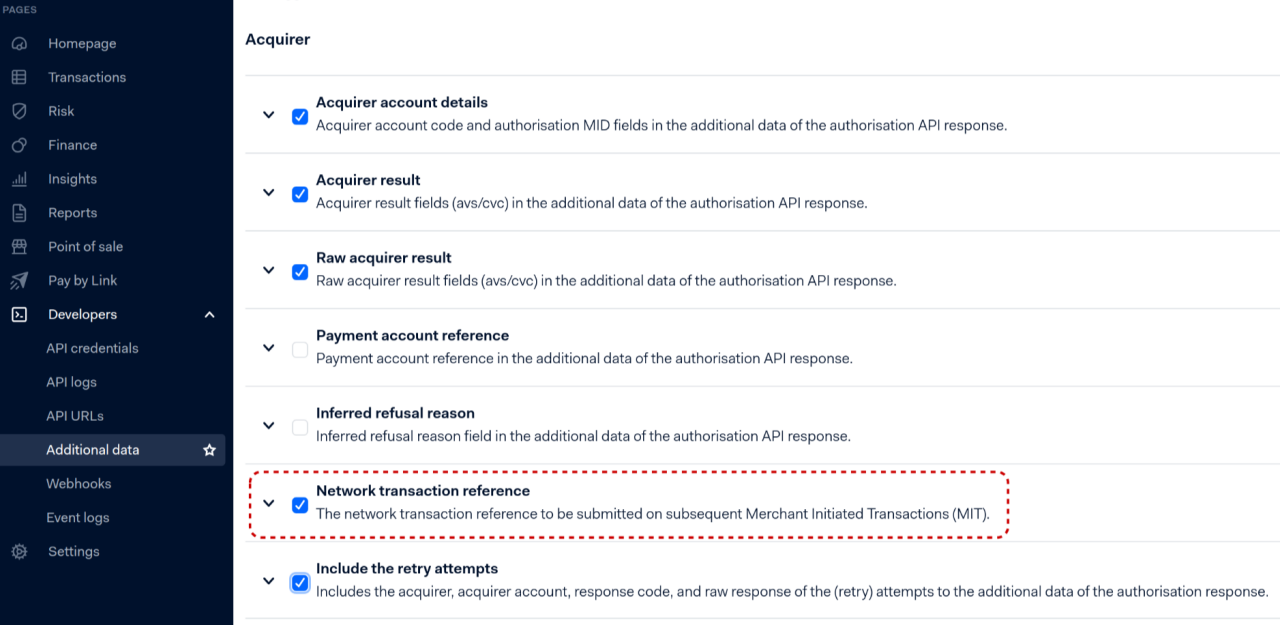
In case you are planning to process Merchant-Initiated transactions (MIT) with transation indicators
such as RECURRING or CARDONFILE-MERCHANT-INITIATED, please ensure your Adyen account (Developers > Additional Data > Acquirer)
is configured to include "Network Transaction Reference" in the responses/webhooks to the IXOPAY platform,
otherwise the Transactions will fail.
Adyen Checkout PCI Credit Card
Configure the following parameters for the Connector (see Connector Detail Overview - Adyen Checkout - Vault Configuration Part I):
- Select the mandatory Environment: Production, Test
- Fill in the mandatory API Key
- If the environment is production, fill in the live URL prefix
- Fill in the mandatory Merchant Account Identifier
- If you want to use the IXOPAY-hosted 3-D Secure 2 function, check the box Include 3DS2 Acquirer Data to Adyen
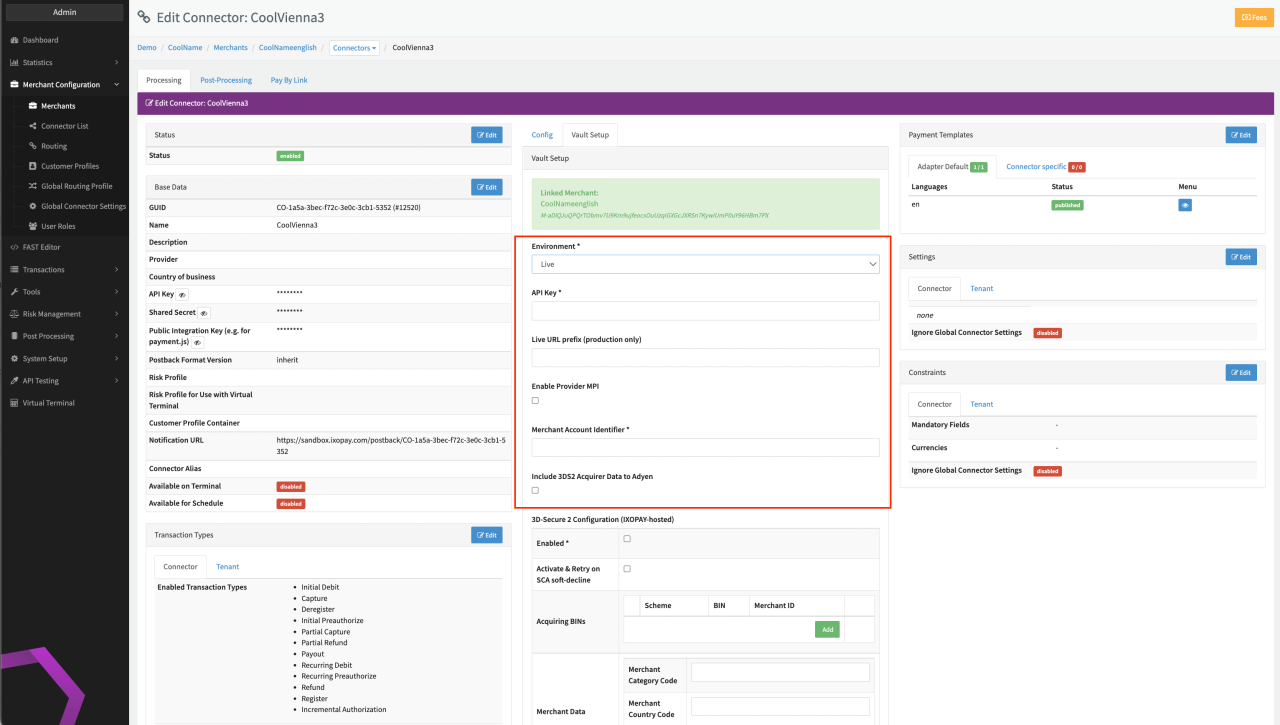
IXOPAY-hosted 3D Secure 1 is not supported with Adyen Checkout PCI Credit Card. Keep in mind to disable the Adyen Automatic capture to use IXOPAY-hosted 3D-Secure 2 (for more information https://docs.adyen.com/online-payments/capture).
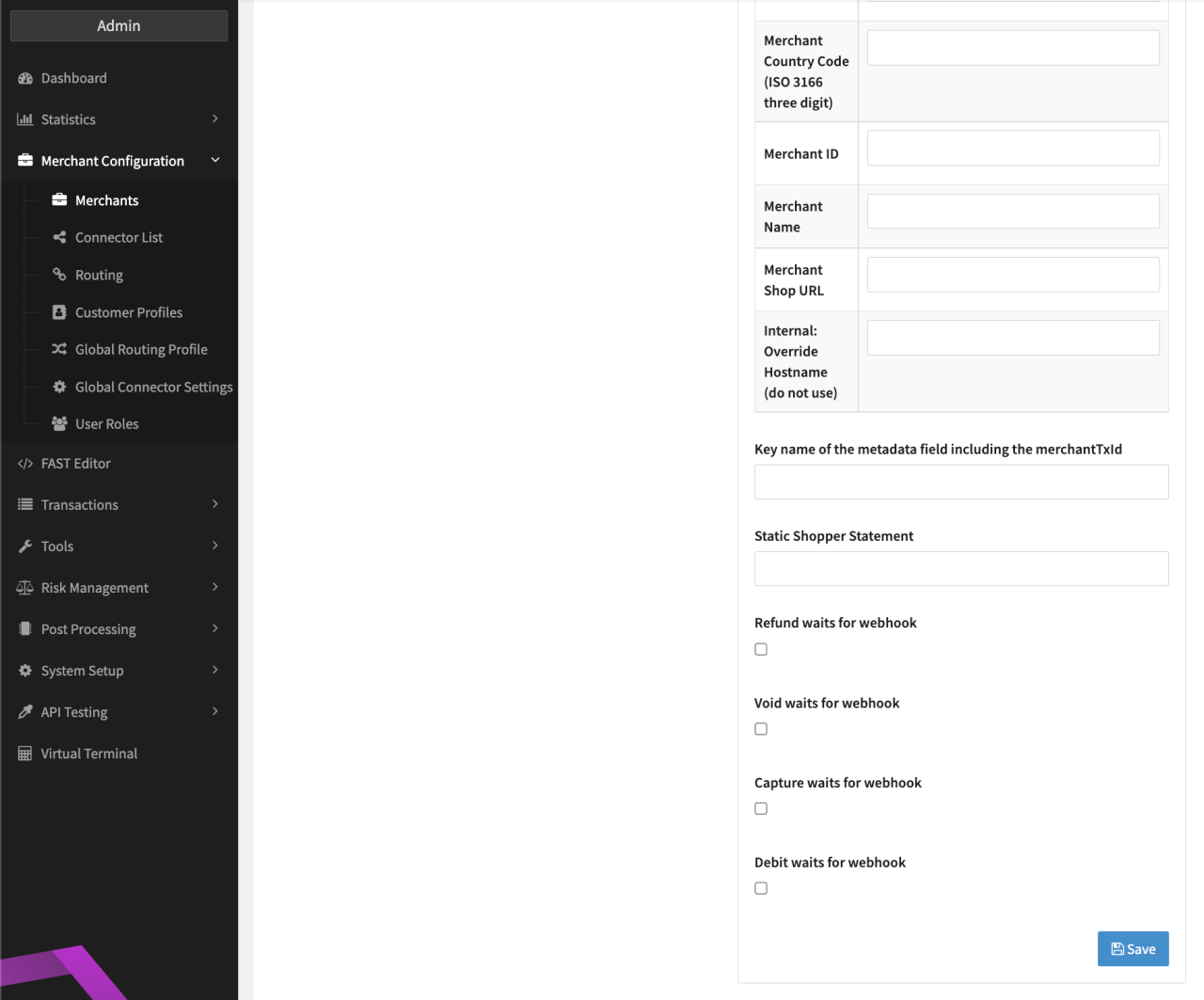
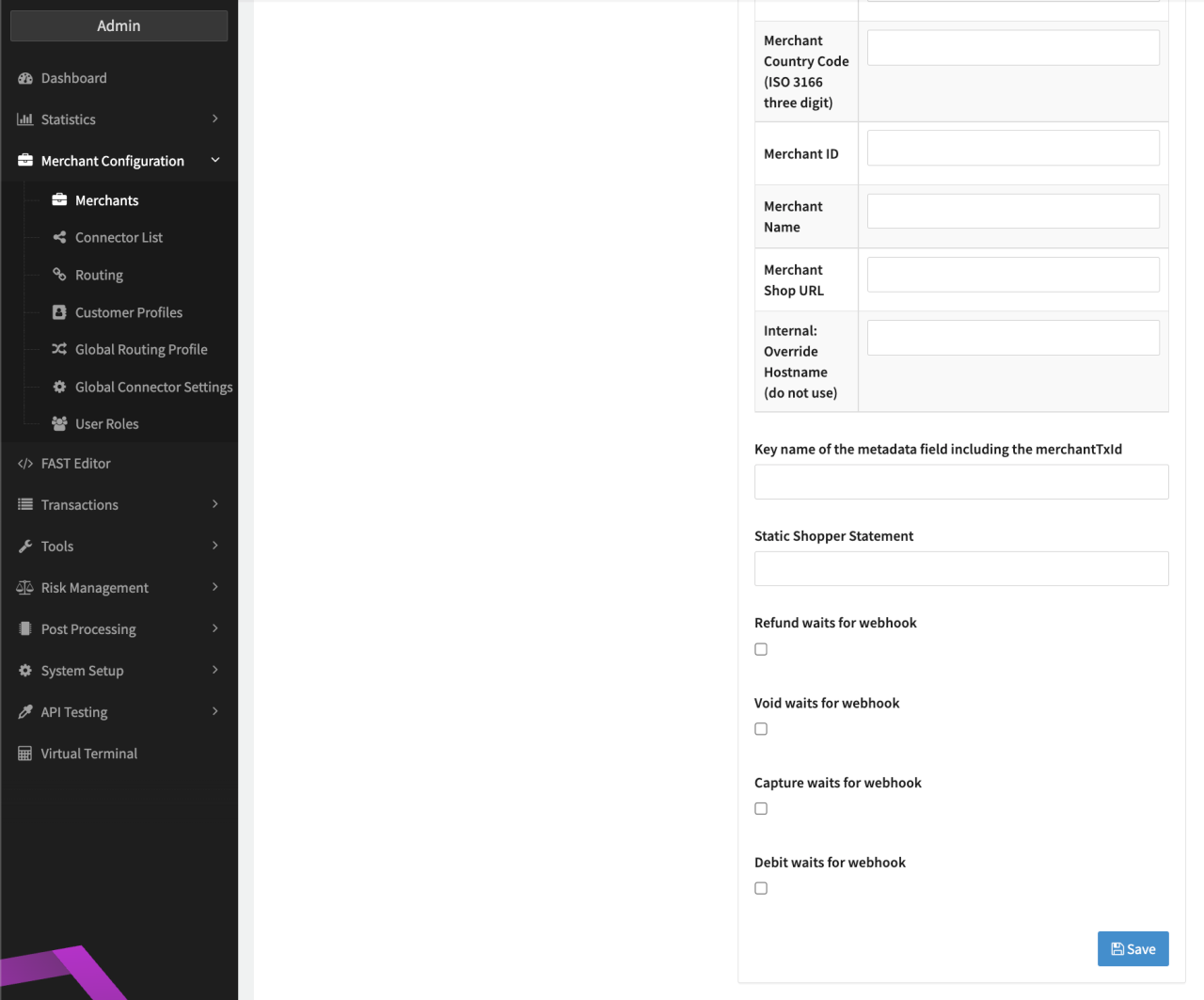
Additionally the following optional parameters can be configured (Connector Detail Overview - Adyen Checkout - Vault Configuration Part II)
- Key name of metadata field including the merchantTxId: (see also https://docs.adyen.com/api-explorer/#/CheckoutService/v69/post/payments__reqParam_metadata)
- Static Shopper Statement: Field to overwrite the Merchant Account Name, if left empty the Transaction Description field is used.
- Check the following options to set Transactions to pending instead of success:
- Refund waits for webhook
- Void waits for webhook
- Capture waits for webhook
- Debit waits for webhooks
- Check the option Use Adyen tokenization (use shopperReference and storedPaymentMethodId)
- Check the option Include billingAddress inIXOPAY platform 3DS Flow
Adyen PCI Credit Card
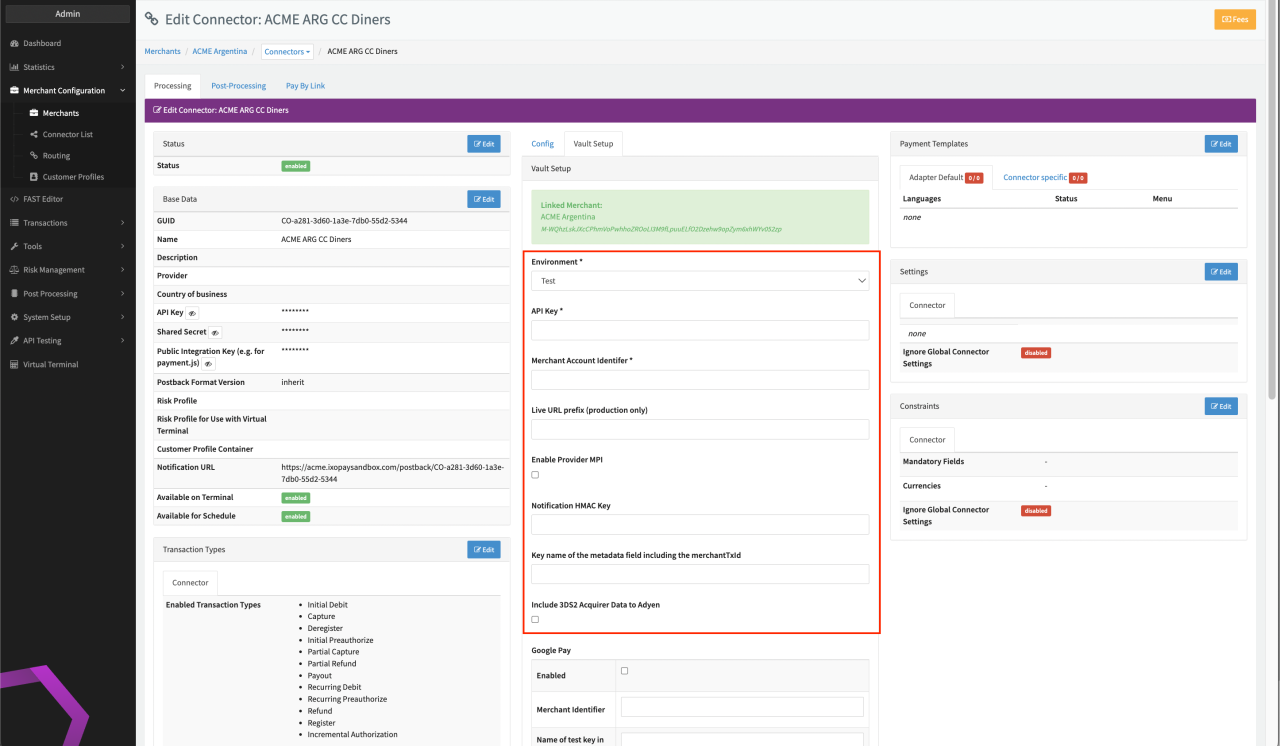
Configure the following parameters for the Connector (see Connector Detail Overview - Adyen - Vault Configuration I & II):
- Select the mandatory Environment: Production, Test
- Fill in the mandatory API Key
- If the environment is production, fill in the live URL prefix
- Fill in the mandatory Merchant Account Identifier
- Fill in the optional Notification HMAC Key
- Fill in the optional Key name of metadata field including the merchantTxId: (see also https://docs.adyen.com/api-explorer/#/CheckoutService/v69/post/payments\_\_reqParam\_metadata)
- If you want to use the IXOPAY platform-hosted 3-D Secure 2 function, check the box Include 3DS2 Acquirer Data to Adyen
- Check the following options to set Transactions to pending instead to success:
- Refund waits for webhook
- Void waits for webhook
- Capture waits for webhook
- Debit waits for webhooks
IXOPAY-hosted 3D Secure 1 is not supported with Adyen PCI Credit Card. Keep in mind to disable the Adyen Automatic capture to use IXOPAY-hosted 3D-Secure 2 (for more information https://docs.adyen.com/online-payments/capture).
Adyen POS
Adyen POS is an adapter for handling requests to Adyen's Terminal API. It also integrates with Adyen's eCommerce API to capture or cancel pre-authorizations made via a terminal, and to perform merchant-initiated transactions (MIT) using credit card tokens collected from an initial point-of-sale (POS) transaction.
Tokens generated by this adapter can only be used for Merchant Initiated Transactions (MITs). This is because passing a CVC, which is required for Customer Initiated Transactions (CITs), isn't currently supported.
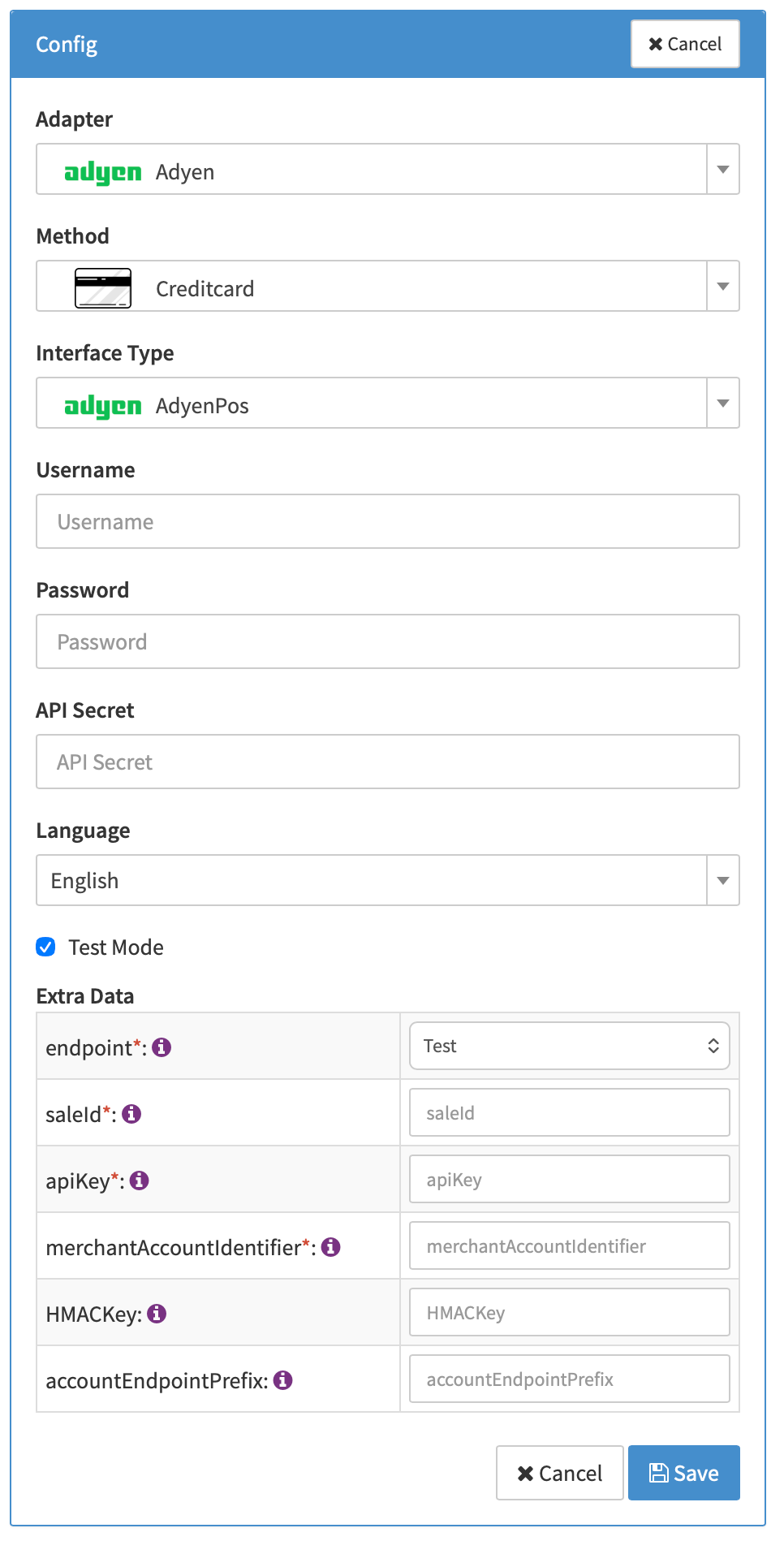
Configure the following parameters for the Connector (see Connector Detail Overview - AdyenPos - Config):
- Endpoint: Select the mandatory Environment from the dropdown list:
- Test
- Live - Australia
- Live - East Asia
- Live - Europe
- Live - US
- Sale ID: Enter the mandatory
saleId, which is an identifier for the system you're using to initiate your requests. - API Key: Provide the mandatory
apiKeyfor authentication. - Merchant Account Identifier: Input your mandatory
merchantAccountIdentifier. - HMAC Key: (Optional) If applicable, enter the Notification HMAC Key for webhook verification.
- Account Endpoint Prefix: If you are using a production environment (any "Live" option for Endpoint), fill in the live URL prefix provided by Adyen.
Adyen
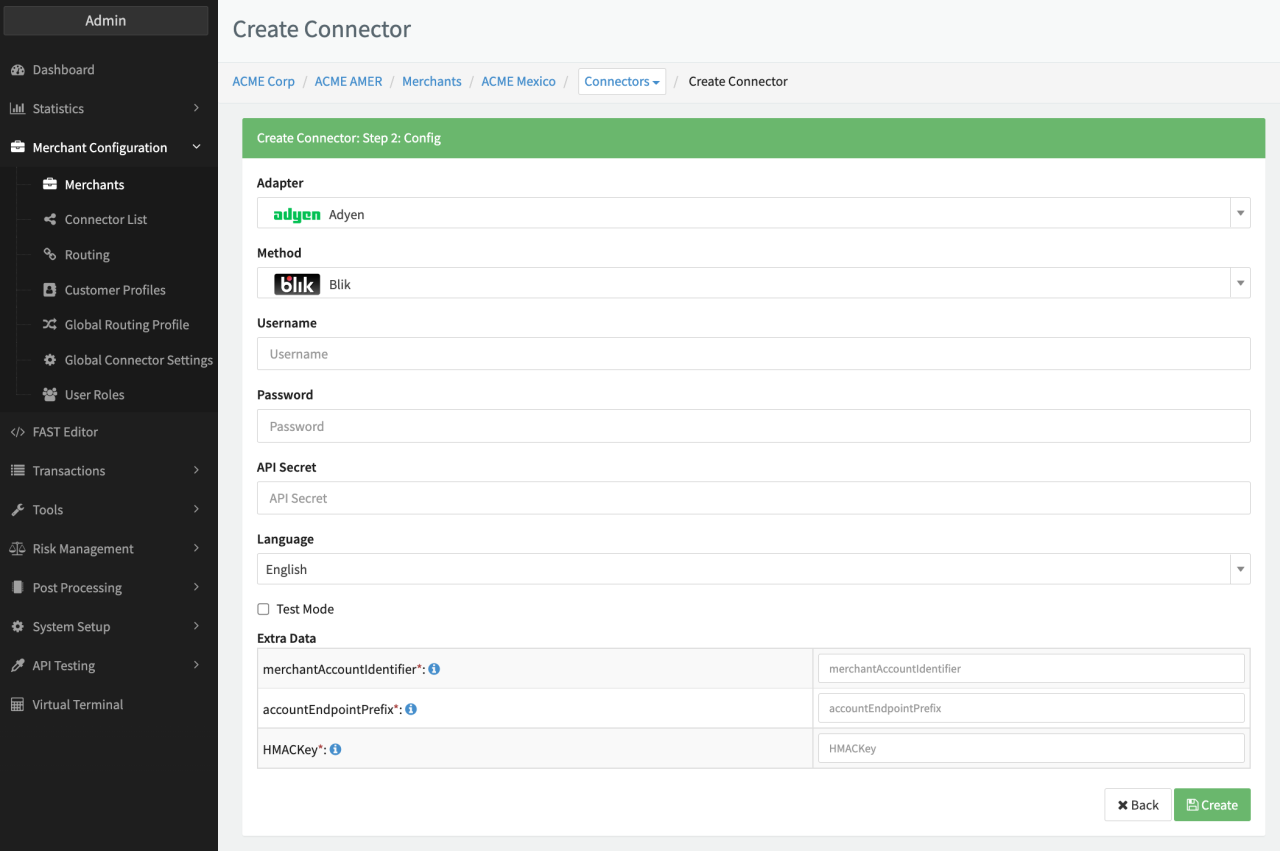
Depending on the chosen method the a subset of the following parameters for the Connector need to be configured (see Connector Config Adyen):
- Fill in the Username
- Fill in the Password
- Fill in the API Secret
- Fill in the mandatory Extra Data: merchantAccountIdentifier
- Fill in the mandatory Extra Data: accountEndpointPrefix
- Fill in the mandatory Extra Data: HMACKey
For iDeal connectors we recommend to configure the Connector Setting Handle unknown transactions postbacks using strategy Acknowledgement to ensure correct transaction in case of customer edge case behaviour.
For some payment methods the configuration of Webhooks on Adyen side is essential to get an accurate status for your Transactions. Please make sure that "Standard Webhooks" are enabled for your Account including at least the following Event types:
AUTHORISATIONAUTHORISATUON_ADJUSTMENTAUTORESCUECANCEL_AUTORESCUECANCEL_OR_REFUNDCANCELLATIONCAPTURECAPTURE_FAILEDCHARGEBACKCHARGEBACK_REVERSEDHANDLED_EXTERNALLYMANUAL_REVIEW_ACCEPTMANUAL_REVIEW_REJECTNOTIFICATION_OF_CHARGEBACKNOTIFICATION_OF_FRAUDORDER_CLOSEDORDER_OPENEDPAIDOUT_REVERSEDPAYOUT_DECLINEPAYOUT_EXPIREPAYOUT_THIRDPARTYPENDINGPOSTPONED_REFUNDPREARBITRATION_LOSTPREARBITRATION_WONRECURRING_CONTRACTREFUNDREFUND_FAILEDREFUND_WITH_DATAREFUNDED_REVERSEDREPORT_AVAILABLEREQUEST_FOR_INFORMATIONSECOND_CHARGEBACKTECHNICAL_CANCELVOID_PENDING_REFUND
Data Fetcher Configuration
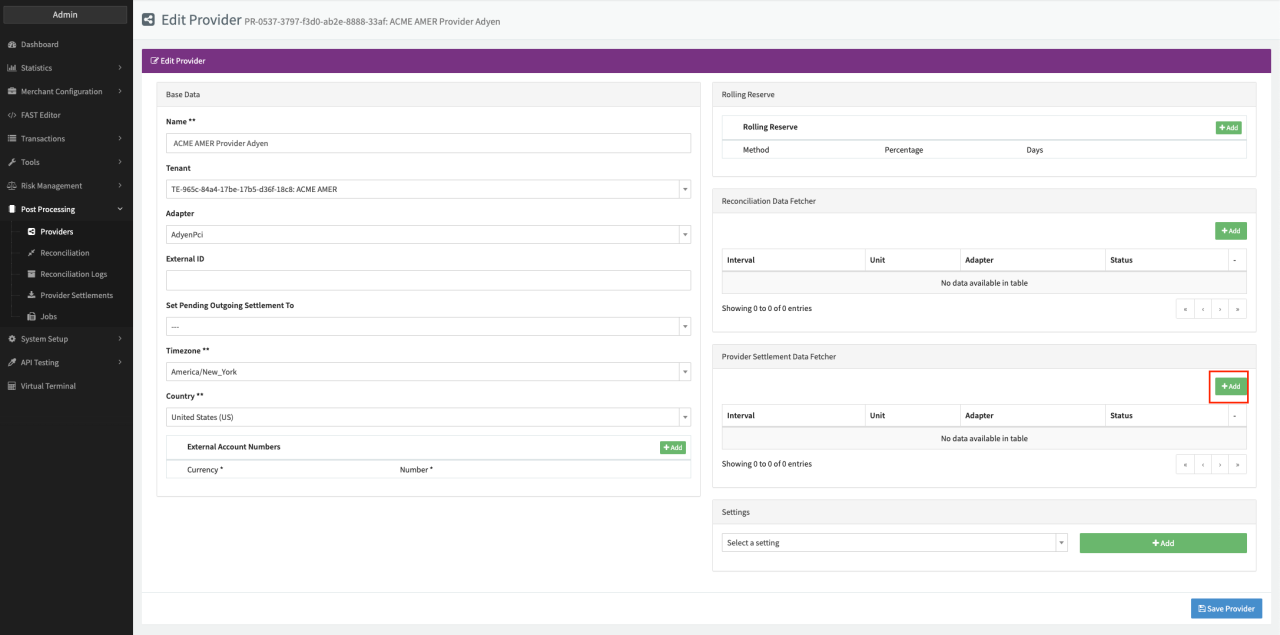
You have the option to configure Data Fetchers (see section Enable and Set Up Reconciliation on the Provider Level) either on Provider or on Connector Level, depending on which setup works better for your provider (see Edit Provider).
Reconciliation & Provider Settlement
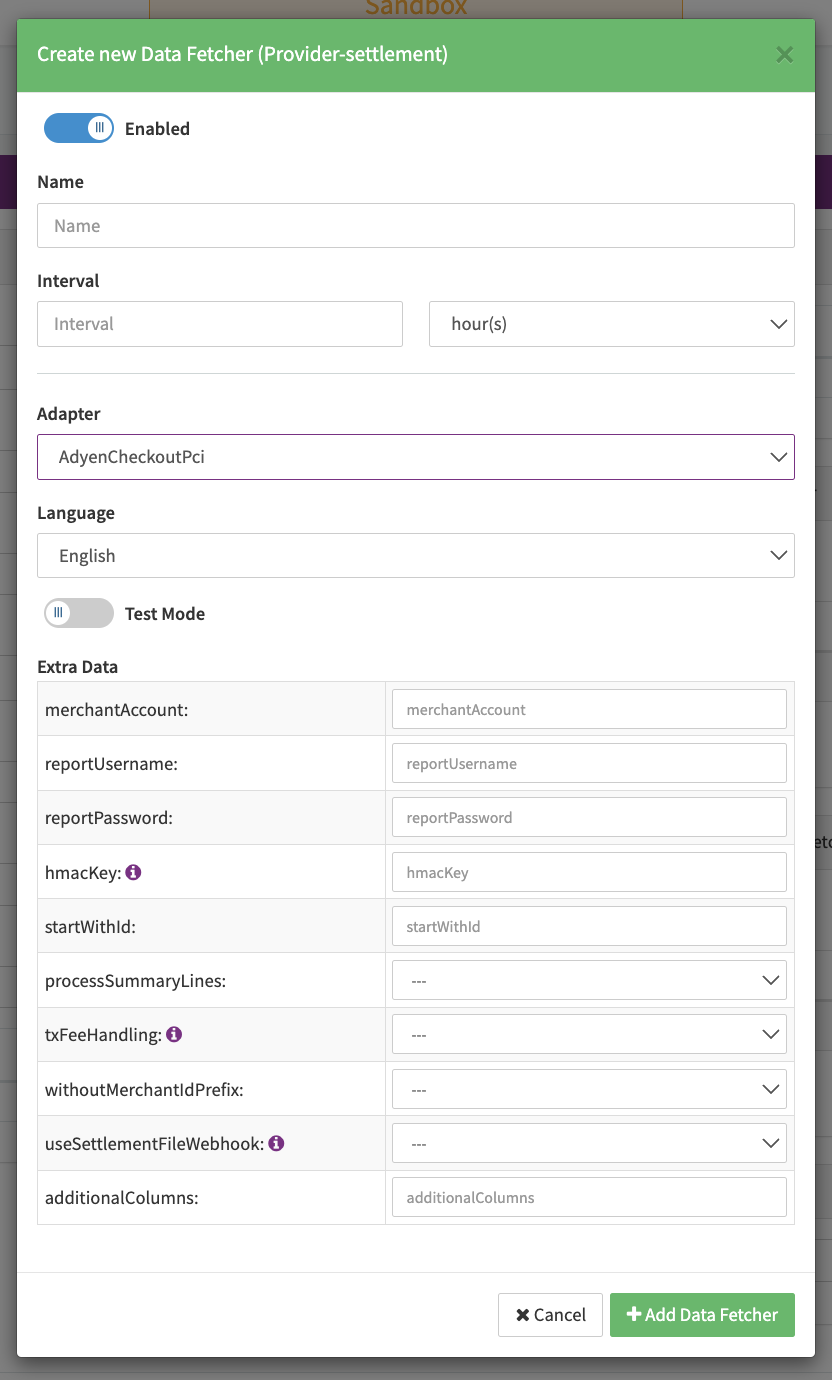
Configure the following Parameters for the Reconciliation or Settlements Provider Data Fetcher to
fetch Reconciliation or Settlements (csv format settlement_detail_report_batch_<lastId>.csv - <lastId> defined via the startWithId field)
via an API (URL host: https://ca-test.adyen.com/reports/download/MerchantAccount, URL path: /<merchantAccount>/<fileName>) or
Webhook (URL host: https://ca-test.adyen.com/reports/download/MerchantAccount, URL path: /<merchantAccount>/<pspReference>)
(see Edit Provider Settlement Data Fetcher Provider Level):
- Fill in the expected Interval in which the Provider Settlement File should be fetched - days, hours
- Select the Adapter AdyenCheckoutPci, AdyenPci, AdyenCheckout (only Provider Settlements)
- Enable Testmode to test fetching of Provider Settlements from the Adyen Checkout PCI Sandbox
(https://ca-test.adyen.com/reports/download/MerchantAccount/), disabled the Adyen Checkout PCI Production
(URL https://ca-test.adyen.com/reports/download/MerchantAccount, URL path:
/<merchantAccount>/<fileName>) environment is used - Fill in the mandatory Extra Data: merchantAccount - used as a URL Parameter to identify the report service user
- Fill in the mandatory Extra Data: reportUsername used for authentication
- Fill in the mandatory Extra Data: reportPassword used for authentication
- Fill in the optional Extra Data: hmacKey HMAC signatures (required when using webhooks)
- Fill in the optional Extra Data: startWithId used to specify the last fetched ID (only to be used when no previous files where fetched); default value "1".
- Fill in the optional Extra Data: processSummaryLines used to add Process Summary Lines (e.g. MerchantPayout and Fee) "transaction-fee" with an amount corresponding to the "netCredit" value (or zero if netCredit is undefined) minus the "nedDebit" value (or zero if nedDebit is undefined).
- Select the mandatory Extra Data: txFeeHandling — separated by type (default), Sum all TX fees into provider fees; used to specify whether to take the summary of fees or each of the fee types.
- Select the optional Extra Data: withoutMerchantIdPrefix — true, false; enable to remove the merchant account of the settlement number
- Select the optional Extra Data: UseSettlementFileWebhook - true, false; enable to use settlement webhooks.
- Fill in the optional Extra Data: additionalColumns used to specify additional columns that should be processed
warning
wrong actions could lead to block processing the settlement!
Configure only one Data Fetcher on Provider level for all Adyen Adapters and assign the Connectors before retrieving settlements, otherwise settlements will be conflicted.
Iyzico post processing capabilities can be used with Adyen. Have a look at the Iyzico adapter documentation
The AdyenPci reconciliation data fetcher does not need any additional parameters to be configured.
Settlement CSV Column Order
The settlement CSV file must contain the following columns in this exact order:
companyAccount, merchantAccount, pspReference, merchantReference, paymentMethod, creationDate, timeZone, type, modificationReference, grossCurrency, grossDebit, grossCredit, exchangeRate, netCurrency, netDebit, netCredit, commission, markup, schemeFees, interchange, paymentMethodVariant, modificationMerchantReference, batchNumber, dccMarkup, reserved5, reserved6, reserved7, reserved8, reserved9, reserved10
To adjust which columns Adyen includes in the report, see Configure report columns in the Adyen documentation.
Any columns configured in additionalColumns on the data fetcher must also be added to the Adyen report and will be expected at the end of the column order above.
Settlement fields
Batch Number
If withoutMerchantIdPrefix is not set, the batch number will be set to the "merchantAccount" value from the settlement file, followed by an underscore and the batch number pulled from the filename. If the withoutMerchantIdPrefix value is set, the value will just be the batch number pulled from the filename.
Payment Reference
The payment reference is pulled from the row in the settlement file that contains the flag value "MerchantPayout", the relevant column in the csv is assumed to always contain the value for the payment reference, followed by a space and then other data that will be ignored.
Mapped Fields
We are mapping the following fields from the Adyen settlement reports (Provider → IXOPAY platform):
| Provider | IXOPAY platform | default (if not set by Adyen) |
|---|---|---|
pspReference | Reference ID | none - required |
netCurrency | Settlement currency and transaction fee currencies | none - required |
modificationMerchantReference | Transaction ID if present (overrides merchantReference) | none - optional |
merchantReference | Transaction ID if modificationMerchantReference is not present | none |
| SettlementDate | none - optional | |
| SettlementAmount | The values for grossCredit and/or grossDebit will be assumed to be zero if not present | |
acquirer | settlementAcquirer | none |
bookingDate | settlementBookingDate | none |
exchangeRate | Exchange rate if set csv row and the netCurrency does not equal the grossCurrency | none |
markup | "markup" transactionFeeData value if txFeeHandling mode is not set to "sum" | none |
schemeFees | "scheme" transactionFeeData value if txFeeHandling mode is not set to "sum" | none |
interchange | "interchange" transactionFeeData value if txFeeHandling mode is not set to "sum" | none |
commission | "commission" transactionFeeData value if txFeeHandling mode is not set to "sum" | none |
| "transaction-fee" if processSummaryLines boolean config value is set | Will be 0.0 minus 0.0 if both values are unset. Will be a corresponding variation of that calculation if one value is set and the other is not. | |
MerchantPayout | "actual-net-settlement-amount" gets set to row’s "netDebit" value | 0.0 |
RefundedReversed | Ignored | |
MerchantPayinReversed | Ignored | |
MerchantPayin | Ignored | |
EpaPaid | Ignored | |
ReserveAdjustment | RollingReserve type "payout" or type "adjusted," depending on amount. Value will always be an absolute value of the difference between netCredit (or zero) and netDebit (or zero). | Will be 0.0 minus 0.0 if both values are unset. Will be a corresponding variation of that calculation if one value is set and the other is not. |
DepositCorrection, MatchedStatement, ManualCorrected, BankInstructionReturned, Balancetransfer | OtherLineItem objects with type "adjustment." Value will always be the difference between netCredit (or zero) and netDebit (or zero). | Will be 0.0 minus 0.0 if both values are unset. Will be a corresponding variation of that calculation if one value is set and the other is not. |
MiscCosts, InvoiceDeduction, PaymentCost | OtherLineItem "service-fee" | |
| Payment reference | null |